Login
You're viewing the aleph.land public feed.
  • Sep 2, 2026, 1:44 PM

    My favorite CarPlay feature is when it's reading a text message to me and I go to tap the "Done" button and it suddenly turns into a "Call” button underneath my finger and I have to wait for all of the animations to finish before I can actually end the call and then I wonder (a) did the person notice that I called them for a few seconds and (b) do I need to explain that now and (c) are they going to call me back now and (d) HOW DID THIS INTERFACE EVER SHIP oh my god


    💬 23🔄 0⭐ 0

Replies

  • Sep 2, 2026, 1:46 PM

    see also the button in the corner of WhatsApp that INSTANTLY starts a video call without any confirmation or way to disable it

    💬 4🔄 0⭐ 0
  • Sep 2, 2026, 1:55 PM

    @marcoarment See also also about how Apple's own HIG note that apps should not place actionable items in places that may be difficult to click on or tap.. And then puts all sorts of actionable items in the top right corner right where notifications pop in...

    I can't tell you how many times I've gone to click in the X on my MacBook to close the incoming call I don't want, but then it opens up Screen Mirroring and answers the call. I don't believe they use this internally, really.

    💬 0🔄 0⭐ 0
  • Sep 2, 2026, 3:37 PM

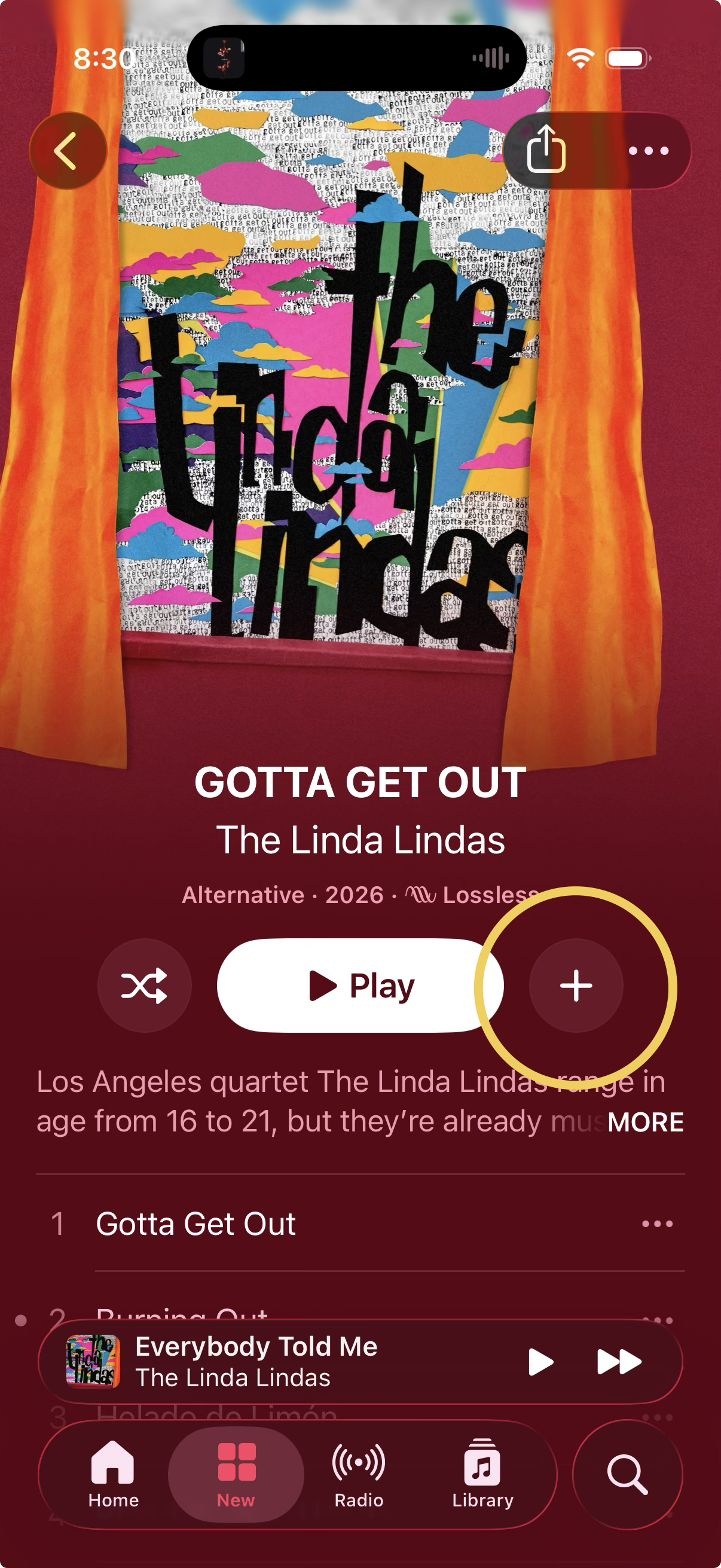
    @marcoarment For me it’s this button in Music. Right where my thumb goes to scroll the view to see tracks on the album. I’ve added hundreds of albums unintentionally.

    Screenshot of Music app with add to library button highlighted.
    💬 3🔄 0⭐ 0
  • Sep 2, 2026, 3:45 PM

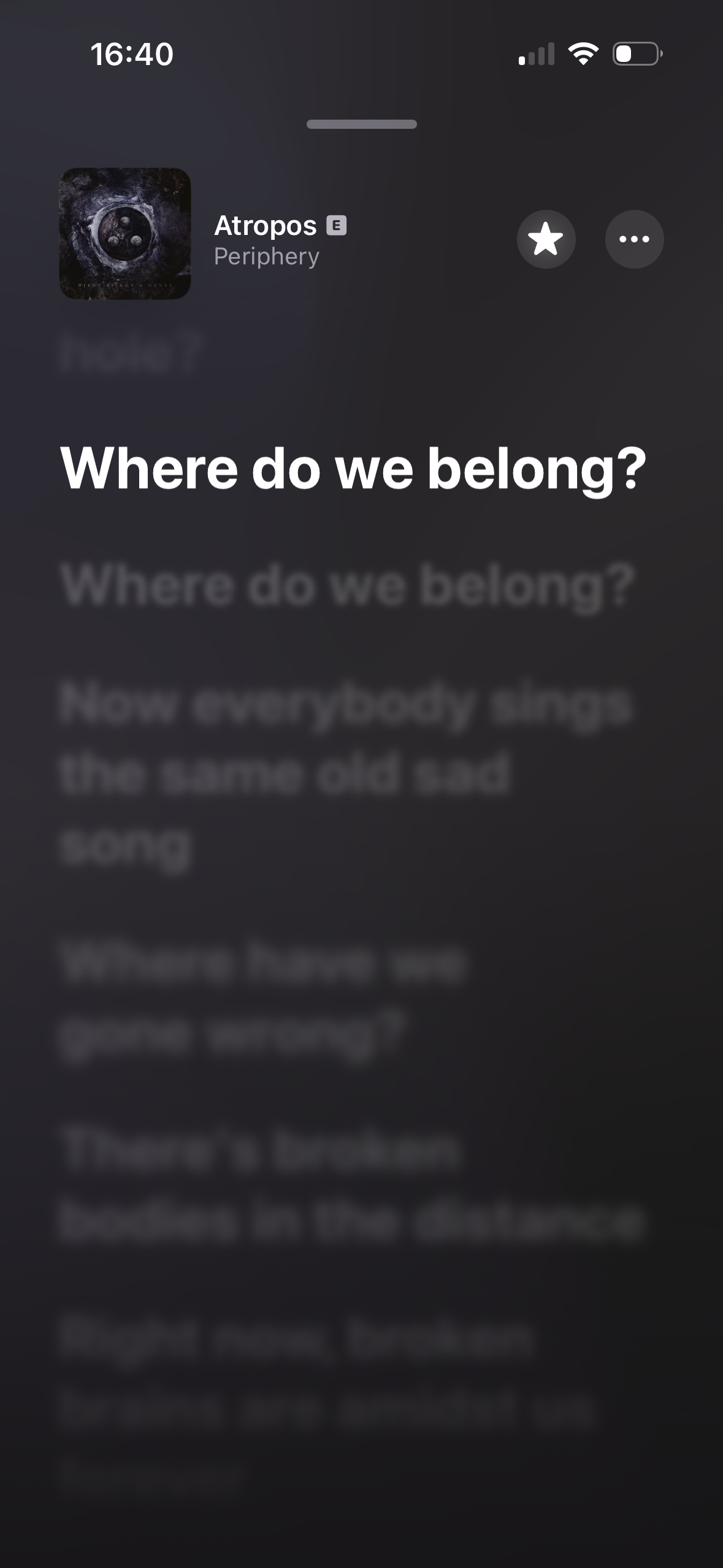
    @chockenberry @marcoarment Apple Music lyrics view. I would love to see the code to decipher which areas are “bring up controls” and which areas are “jump to the timestamp for this lyric”, cause I cannot fathom it at all. Experiments feel like tapping below the half-way mark always brings up controls, but experience tells me that is extremely fickle and completely wrong. I’ve jumped to blurry unreadable lyrics more times than I can count.

    Apple Music’s lyrics view. Most of the time tapping in the lower half jumps to blurry unreadable lyrics. Sometimes it brings up the controls. When and why? WHO KNOWS?!
    💬 0🔄 0⭐ 0
  • 💬 0🔄 0⭐ 0
  • Sep 2, 2026, 10:24 PM

    @chockenberry @marcoarment My problem is when I add an album to my library. It then becomes a “download this album to the device” that sometimes works and sometimes doesn’t automatically. So I click download because that’s what I usually want but it doesn’t look like anything is downloading. That cancels the downloads that are working without any user notification and cancels the downloads and sometimes reverts back to the plus sign button. Then I wonder if the album is added to my library..

    💬 0🔄 0⭐ 0
  • Sep 2, 2026, 3:53 PM

    @marcoarment personally I like when I hit the share button to share something with my group text, which is the furthest left, and right as I tap, someone’s airdrop shows up in the same location and airdrop doesn’t even have a confirmation step. Apologies to all who have received my daily Wordle score as an airdrop.

    💬 0🔄 0⭐ 0
  • Sep 2, 2026, 4:02 PM

    @marcoarment Also when you tap on a Facebook post to save it and the menu repopulates and shifts while you’re tapping so you hit “hide and report” instead. Good times!

    💬 0🔄 0⭐ 0
  • 💬 0🔄 0⭐ 0
  • Sep 2, 2026, 2:05 PM

    @marcoarment I call it a dickunder iOS Search does it too when the algorithm chooses a better top result and you launch the wrong app. Infuriating.

    💬 0🔄 0⭐ 0
  • Sep 2, 2026, 2:28 PM

    @marcoarment prior to ios 26, before apple added the unified view to the phone app, whenever i wanted to end a call but the other person ended it a millisecond earlier, i'd accidentally tap a random recent caller. even if i immediately cancelled the call, that person would always get a notification.

    💬 0🔄 0⭐ 0
  • Sep 2, 2026, 2:29 PM

    @marcoarment absolutely infuriating, of all the improvements in CarPlay, and they drop this land mine right in the hot path 🤬

    💬 0🔄 0⭐ 0
  • 💬 0🔄 0⭐ 0
  • Sep 2, 2026, 3:02 PM

    @marcoarment I really like it when I select a destination (say, “home”) and then it pops up with a dialog with a time and duration, with a big “Go” at the bottom.

    It starts out with a green “Go” button for a millisecond, then it instantly turns grey, almost as if it were disabled (but it isn’t).

    Sometimes after a few seconds, it turns green again.

    No idea why.

    💬 0🔄 0⭐ 0
  • Sep 2, 2026, 3:04 PM

    @marcoarment It shipped because the engineer responsible for the build had a button that originally said “Deploy to TestFlight” but the button switched at the last second to “Publish to Prod” and it was pushed out.

    💬 0🔄 0⭐ 1
  • Sep 2, 2026, 3:25 PM

    @marcoarment I HATE phone designs. I look at a number that called me and before I know it I have now rung that number. No idea what I did but it was not what I wanted.

    💬 0🔄 0⭐ 0
  • Sep 2, 2026, 3:40 PM

    @marcoarment happens to me all the time unfortunately and can confirm at least on my end that the call always goes through because I’ve always gotten a call back from the person.

    💬 0🔄 0⭐ 0
  • Sep 2, 2026, 3:56 PM

    @marcoarment In the Facebook app, when I try to say Not Interested, I click on the ... and go to tap on Not Interested. By the time I tap an AI summary has appeared and shifted the buttons down and I wind up tapping Interested.

    💬 0🔄 0⭐ 0
  • Sep 2, 2026, 4:07 PM

    @marcoarment This is the absolute worst feature of touchscreens that something presented on the screen can change to something else (you do not want!) while you're in motion to touch it.

    💬 0🔄 0⭐ 0
  • Sep 2, 2026, 4:23 PM

    @marcoarment Google Maps in car play when you tell it a destination and it pops up the dialog with the ETA and the start button. I try to hit the button but Google is pulling in more info and updates the dialog adding a bunch of stuff between the destination at the top and start button at the bottom that pushes down the button. Sometimes it moves multiple times before I can hit it. Drives me insane. Why are we always "preparing"? Just go! (That’s a reference)

    💬 0🔄 0⭐ 0
  • 💬 0🔄 0⭐ 0
  • Sep 2, 2026, 5:39 PM

    @marcoarment dear god, I was just about to rant about this "feature" today as well, after it bit me twice yesterday.

    💬 0🔄 0⭐ 0
  • 💬 0🔄 0⭐ 0
  • 💬 0🔄 0⭐ 0
  • Sep 3, 2026, 6:06 PM

    @marcoarment I feel like this is everywhere on Apple platforms, surprise ways to initiate calls without confirmation

    💬 0🔄 0⭐ 0
  • Sep 4, 2026, 3:52 PM

    @marcoarment @jack_daniel I personally love how, on any Apple device, you’re typing along and see the word you want in autocomplete, but by the time you notice you’ve typed another character, and then the word changes as your finger is confirming the autocomplete. 🤦‍♂️

    💬 0🔄 1⭐ 3
  • 💬 0🔄 0⭐ 0
  • Sep 4, 2026, 4:20 PM

    @marcoarment sent my new crush a photo and when I hit the 'x' button in the corner to leave after looking at it the button was replaced with a VIDEO CALL button which of course I accidentally pressed at 10pm before I went to bed

    💬 0🔄 0⭐ 0
  • Sep 5, 2026, 10:16 PM

    @marcoarment If someone calls me and then disconnects after a few seconds and doesn't call again, I assume it was a mistake.

    But yeah, UI elements that change what they do or that move on you just as you're about to tap them are a pain in the ass. There's one app I use occasionally that I've learned to just sit & wait about 5 seconds for the start button to stop moving around so I can click it, otherwise I'm just chasing it across the screen.

    💬 0🔄 0⭐ 0
  • Sep 7, 2026, 5:05 AM

    @marcoarment You know what, Apple has this “change the touch target randomly 1/2 second after displaying it so you do something unintended” problem ALL OVER in iOS. It’s exceedingly annoying.

    💬 0🔄 0⭐ 0
  • Sep 7, 2026, 10:18 AM

    @marcoarment Also when accidentally calling the number in a contacts sheet because the scrolling registered as a tap…

    💬 0🔄 0⭐ 0