Login
You're viewing the mstdn.social public feed.
  • Jun 28, 2026, 12:42 AM

    I do not understand .desktop files. The last time I used desktop Linux was so long ago I wasn't even using Linux I was using Solaris. Then I went headless only for Linux for awhile, and when I came back we were all expected to understand what a .desktop file is. But I do not. I do not understand what I am supposed to do with one. I do not understand how to create one. I tried creating one and it did not work. Can .desktop files use relative relative paths for Exec, Icon, and working dir? Why not
    💬 7🔄 4⭐ 20

Replies

  • Jun 28, 2026, 1:06 AM

    RE: mastodon.social/@mcc/116825004

    From talking to people in replies, conclusions I am coming to. If you distribute a program as an executable in a directory:

    - You cannot create a .desktop file because .desktop files must contain absolute paths, so you must know a priori where it is installed.

    - Your entry point MUST be an ELF executable; in GNOME, a shell script will not be executed. A .desktop file doesn't help with this.

    - Additionally, you cannot have an icon?

    - And a .desktop file overall doesn't do anything useful?

    💬 7🔄 1⭐ 11
  • Jun 28, 2026, 1:07 AM

    Is the state of Linux GUI… *worse* than it was in 2004? WindowMaker did not give me nearly this much trouble 🤔

    💬 6🔄 2⭐ 15
  • Jun 28, 2026, 4:15 AM

    UPDATE: This works, and presumably works regardless of DE, but it feels ridiculous enough that I may wind up making a flatpak exclusively to get rid of the bad taste

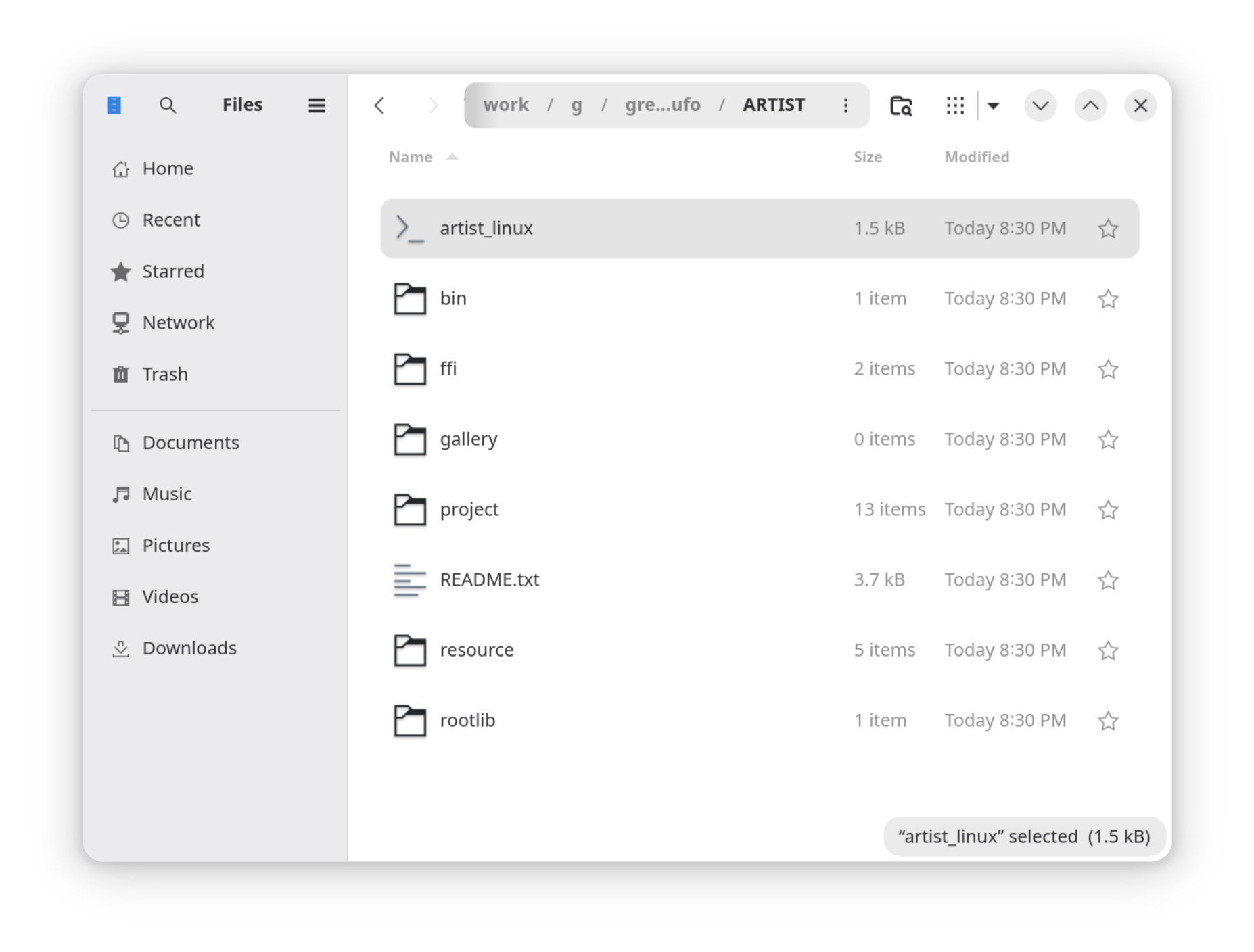
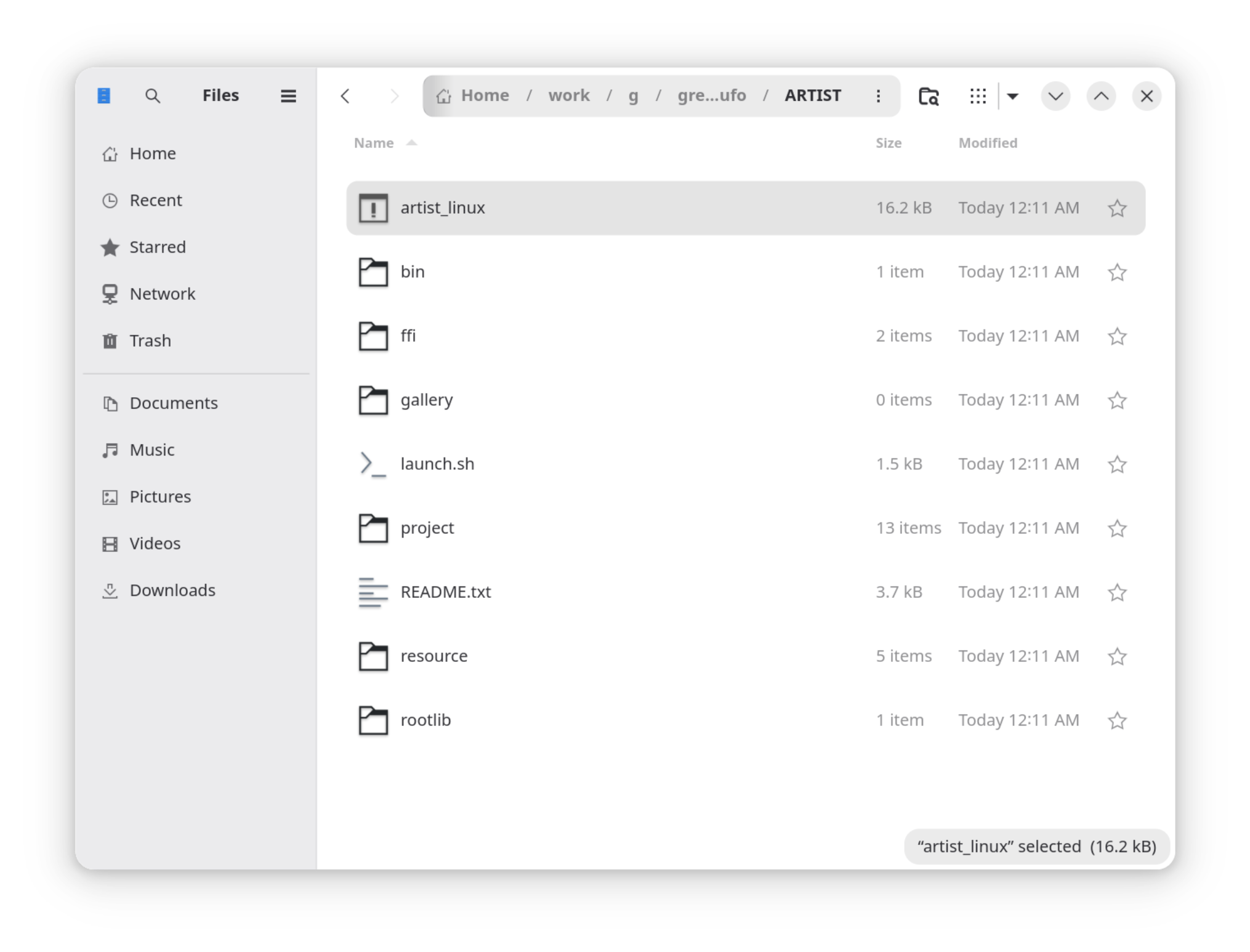
    Screenshot of a Nautilus window. It shows an executable named artist_linux, a shell script named launch.sh, a README, and some folders.
    #include <unistd.h>
#include <limits.h>
#include <stdlib.h>
#include <stdio.h>

int main() {
	// Launch shell script with pwd = directory of this executable
	char self[PATH_MAX+1];
	ssize_t len = readlink("/proc/self/exe", self, PATH_MAX);
	ssize_t len2 = len;
	for(; len2 > 0 && self[len2] != '/'; len2--)
		self[len2] = '\0';
	if (len2>0)
		chdir(self);
	else
		fprintf(stderr, "Warning: Could not find the directory to run from.\n"
			            "If this does not work, cd to the ARTIST directory\n"
			            "and run ./launch.sh");
	return system("./launch.sh");
}
    💬 2🔄 3⭐ 6
  • Jun 28, 2026, 4:17 AM

    Note: There may have been a simpler way to do this involving argv[0], but I didn't want to think about whether that works in all situations. I just wanted to move on to making the mac release. I thought the mac release was going to be the hard one. I want to go to bed.

    💬 1🔄 1⭐ 8
  • 💬 1🔄 0⭐ 1
  • Jun 28, 2026, 12:45 AM

    @mcc but there's a %k substitution which is the location of the desktop file itself

    so maybe Exec=%k/../app could work? I've never seen it

    💬 1🔄 0⭐ 2
  • Jun 28, 2026, 12:49 AM

    @whitequark Thank you.

    The %k/.. doesn't appear to work on my system, though maybe that is because I do not actually understand what I'm supposed to do with a desktop file once I have it.

    If it cannot be relative, does that imply that if an application is downloaded into a user's Download directory, it is impossible to do any of the "desktop file"-y things with it because it has no canonical path?

    💬 1🔄 0⭐ 0
  • Jun 28, 2026, 12:51 AM

    @mcc i think you can wire up your application to create a desktop file pointing to its own executable, wherever that is

    most 'portable' applications i've seen do this or just not bother at all with desktop files

    💬 1🔄 0⭐ 2
  • Jun 28, 2026, 12:55 AM

    @whitequark Imagine I have a Linux application in a directory. The entry point is a shell script named "artist_linux". If you run this from a command line, it runs the application. If you double click this in GNOME, it opens in gedit.

    Is there any way at all for me to helpfully engage with the Linux GUI (gnome, qt) short of changing my packaging strategy (eg, creating a Flatpak or Appimage)?

    Screenshot of a directory
    💬 4🔄 0⭐ 2
  • Jun 28, 2026, 12:56 AM

    @mcc assuming you're distributing this as a tar file and file mode gets preserved: if you replace the shell script with an executable int main() { system("./bin/artist_linux"); } it will definitely not get opened in gedit heh

    💬 1🔄 0⭐ 0
  • 💬 1🔄 0⭐ 1
  • 💬 1🔄 0⭐ 0
  • Jun 28, 2026, 1:02 AM

    @whitequark but it presents as an executable, right? so if double clicked it would presumably run (no idea if it would have, for example, an icon)

    💬 1🔄 0⭐ 0
  • 💬 1🔄 0⭐ 1
  • 💬 1🔄 0⭐ 1
  • 💬 1🔄 1⭐ 6
  • 💬 0🔄 0⭐ 0
  • 💬 2🔄 0⭐ 0
  • 💬 1🔄 0⭐ 0
  • 💬 0🔄 0⭐ 0
  • Jun 28, 2026, 12:59 AM

    @dotstdy @whitequark if the user cannot figure out how to launch the application, then writing a desktop file on first launch will not be helpful.

    additionally, it is unclear to me what a .desktop file would do if i had one. when i tried creating a .desktop file, I could not figure out how to interact with it. would you expect double clicking a .desktop file to open the application? For me it opened in a program named "Main Menu" created by a group named LibreMenuEditor.

    💬 3🔄 1⭐ 2
  • Jun 28, 2026, 1:01 AM

    @dotstdy @whitequark (Another oddity I'm just noticing; if you are looking at an application in the GNOME "Software" application, such as "Main Menu", there does not appear to be a way to share a link to that pane in GNOME software, such as would allow me to say, in a mastodon post, "this" and link to the "Main Menu" application to distinguish it from the other program in GNOME software named "Main Menu".)

    💬 0🔄 1⭐ 1
  • Jun 28, 2026, 1:01 AM

    @mcc @whitequark desktop file just adds an entry in the start menu, you still need to have some way to create it in the first place anyway, which means clicking on something executable.

    💬 1🔄 0⭐ 0
  • Jun 28, 2026, 1:02 AM

    @dotstdy it appears to mean "clicking on an ELF executable", since double clicking on a +x shell script does nothing

    💬 1🔄 0⭐ 0
  • Jun 28, 2026, 1:05 AM

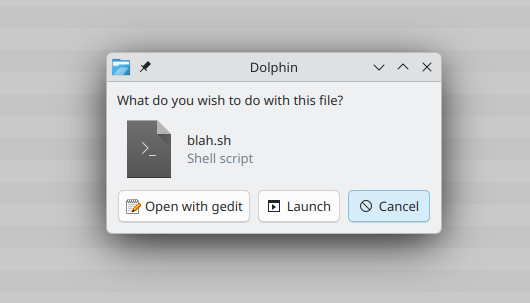
    @mcc that depends on your desktop environment. (so yes, a regular elf binary is a good way to make it more likely to work without complexity)

    kde prompt for executable shell file
    💬 1🔄 1⭐ 1
  • Jun 28, 2026, 2:33 AM

    @dotstdy @mcc Yes this is a Nautilus problem. They're trying to be more secure by banning direct shell script execution, but in practice this is inconvenient for some use cases, especially if you're used to a Windows style way of distributing programs.

    Dolphin and some other file managers don't have this problem.

    Probably best to do an ELF executable. It is an oversight that ELF defines no embedded icon though.

    💬 0🔄 0⭐ 2
  • 💬 0🔄 1⭐ 2
  • Jun 28, 2026, 2:51 AM
    @mcc I understand that this is frustrating for you and it is needlessly hard. But I feel that on a system scale it is a net benefit that "if you grab a random package from the web it's kinda annoying to use". It encourage things to go through the proper channels and prevent the system from devolving into a mess over time with every program writing stuff into random places.

    In fact this can be seen with system managed config/state files vs home config/state files. home is a wild west and it's pretty much impossible to reliably cleanup or backup.
    💬 1🔄 0⭐ 0
  • Jun 28, 2026, 3:33 AM

    @shironeko but there are no proper channels. Or at least none that are consistent cross distribution. Unless I (1) make a container and (2) assume Ubuntu users will know what to do with a flatpak

    💬 1🔄 0⭐ 1
  • Jun 28, 2026, 11:03 AM
    @mcc cross distribution distribution channel is an oxymoron, although it would make for a good T-shirt. You are basically asking there to be only one distro.
    💬 1🔄 0⭐ 0
  • Jun 28, 2026, 3:15 PM

    @shironeko I don't need there to be only one distro; I just need there to be one fewer (Ubuntu).

    💬 0🔄 0⭐ 0
  • Jun 28, 2026, 8:33 PM

    @mcc @whitequark add installation instructions to the top of the script file so if someone opens it in gedit they will know what to do?

    #!/usr/bin/env bash
    echo "xfce: right click, open with, open with other application, use a custom command, browse, bash, open, open"

    Doesn't seem sketchy at all.

    💬 1🔄 0⭐ 0
  • 💬 0🔄 0⭐ 0
  • Jun 28, 2026, 1:13 AM

    @mcc At least the state of Linux GUI is not where it needs to be. Its only 40 years behind Windows and Apple and those are not great either.

    💬 0🔄 0⭐ 0
  • Jun 28, 2026, 1:16 AM

    @mcc the analogy i would make is that we used to have mediocre bus service that was slow but had good coverage throughout the city, and a somewhat unpleasant but cheap taxi service.

    now we have much worse bus service, a high speed rail that only goes a couple of places, a gutted taxi service that only serves the airport, and a bunch of fairly expensive ride share services that won't do pick ups in some neighborhoods.

    💬 1🔄 2⭐ 0
  • 💬 0🔄 0⭐ 1
  • Jun 28, 2026, 1:24 AM

    @mcc .desktop files are usually placed in menus and autostart directories separate from the thing they're running: You don't normally see them in the directory with an application, because they don't work very well with relative paths. I think that's deliberate for security. :-\ You're usually better just using a shell script. But you can be hacky and do:

    Exec=sh -c "exec $(dirname %k)/script.sh"

    To run script.sh relatively from a .desktop file... Looks a bit ropey though.

    💬 1🔄 0⭐ 0
  • Jun 28, 2026, 1:29 AM

    @kbm0 My application is already a shell script; that's the problem. GNOME Nautilus won't run shell scripts

    💬 1🔄 0⭐ 1
  • Jun 28, 2026, 1:33 AM

    @mcc They seem to have been deliberately removing the ability to "accidentally" run things from Linux file managers for a while now. Xfce's Thunar still lets you run shell scripts.

    The concept of bundling an application as a folder with some sort of launcher in it doesn't seem to have ever become a thing in Linux. They seem to want you to install things on the path. And as for icons...

    💬 1🔄 0⭐ 0
  • Jun 28, 2026, 1:55 AM

    @kbm0 but how do I install without running a script :( I'm gonna make an elf launcher for one sh file

    💬 1🔄 0⭐ 1
  • Jun 28, 2026, 2:24 AM

    @mcc Urgh. Apparently there is a preference in Nautilus to configure whether it should run scripts or not. I have never used Gnome myself.

    💬 0🔄 0⭐ 0
  • Jun 28, 2026, 4:55 AM

    @mcc Linux is always difficult because you can certainly do it, but only if you discover the incantation. Mac is the easy one, because the answer is "no".

    💬 2🔄 9⭐ 42
  • Jun 28, 2026, 6:36 AM

    @TomF @mcc I want to say that container things like Flatpak are probably crucial for apps that use a bunch of system libraries that haven’t been particularly passionate about compatibility. But most games might use a few libraries that care deeply about compatibility and can generally avoid these containers.

    But also, it’s very easy to make big and non-obvious mistakes setting up anything, and I hate that.

    💬 1🔄 0⭐ 4
  • 💬 1🔄 0⭐ 4
  • Jun 28, 2026, 6:41 AM

    @icculus @TomF because the Linux gui thinks this is better than right clicking and saying "attach to dock" somehow

    💬 0🔄 0⭐ 2
  • 💬 0🔄 0⭐ 0
  • Jun 28, 2026, 5:38 AM

    @mcc yuuck!

    I'm not in front of my computer right now, but I know I can launch shell scripts from the application menu (start menu).

    In my experience, clicking on an executable file as a way of launching it, is not really a thing in Linux. Those files should be buried in some bin/ directory so they are on the $PATH.

    💬 0🔄 0⭐ 0
  • Jun 28, 2026, 5:08 AM

    @mcc the GNOME developers feel that desktop shortcuts would hurt the workflow & aesthetic they’re trying to cultivate, so as far as the DE does read desktop shortcuts it treats them as app shortcuts in the launcher. 🙄

    KDE Plasma takes a more rational approach, but not everything puts a shortcut in the right place. Eg. To make my Steam games appear in the launcher & desktop I had to write a custom systemd unit that ran in the background to sync .desktop files between folders & fix the broken relative links. 🤦🏻‍♂️

    💬 0🔄 0⭐ 1
  • Jun 28, 2026, 5:10 AM

    @trechnex the GNOME developers clearly do not want me to be using GNOME. For whatever reason, I continue to fight back on them on this

    💬 0🔄 0⭐ 5
  • 💬 0🔄 0⭐ 1
  • 💬 1🔄 0⭐ 0
  • 💬 1🔄 0⭐ 0
  • Jun 28, 2026, 1:09 AM

    @mcc the desktop file has to go in the special directory anyway, so you need to write it there somehow.

    💬 1🔄 0⭐ 0
  • 💬 0🔄 0⭐ 0
  • 💬 2🔄 0⭐ 0
  • 💬 0🔄 0⭐ 0
  • 💬 2🔄 0⭐ 1
  • Jun 28, 2026, 1:35 AM

    @mcc ah, do you need it to launch on double click *without* it being in the special desktop file locations then I'm assuming? Afaik typically . desktop files are specified to be in a specific directory, I've never seen one used for an entirely local purpose like that before

    💬 2🔄 0⭐ 0
  • 💬 0🔄 0⭐ 0
  • 💬 0🔄 0⭐ 0