Login
You're viewing the discuss.systems public feed.
  • Oct 22, 2026, 11:37 AM

    Video player question for anyone who wants to weigh in:

    From my personal perspective, I've never understood "Theater mode" as it exists in YouTube and PeerTube.

    In the screenshots (showing PeerTube) you can see the regular player (first image) with the theater mode button [1]. In the second screenshot you see theater mode enabled, with a somewhat larger player area [2].

    What I do understand about this is that it makes sense to have something between "normal player" and "full screen", i.e. a third mode that gives maximum viewing area *without* hiding your browser, window, OS interface, etc. (e.g. maybe you have another window next to it that should stay visible, or you want to see the time in your OS task bar, etc.).

    But here's what puzzles me: Why is the viewing area in this theater mode as it is ([2], the red frame), and not the maximal viewing area that the page would offer ([3], the yellow frame).

    If anyone has ideas/insights on that, happy to hear them! :)

    (Context: I'm currently redesigning the video player in #Hyper8 and I'm planning four modes – in-page (default), full-page (somewhat like [3] in the second image), full-screen and cinematic viewing mode – but I'm eternally puzzled if and why theater mode is a thing and whether I'm making a mistake by not providing something like that :D)

    Screenshot of a PeerTube page: There is a regular video player featured within in the page, in "minimized" state. A red arrow numbered 1 points at the "Theater mode" button in the video player controls.
    The same PeerTube page after "Theater mode" was activated. The video player is now somewhat bigger, but still embedded into the page as before, with all surrounding user interface elements (sidebar, header, content below) still showing.

The frame of the video player is annotated with a red outline numbered 2.

From each corner of the red rectangle there are yellow arrows pointing to the corners ot the entire page, which is also outlined, but in yellow, and numbered 3.
    💬 5🔄 0⭐ 0

Replies

  • Oct 22, 2026, 12:12 PM

    @freebliss FWIW, I never even noticed that feature on YT or PT. On my tablet, theatre mode on PT increases the size of the video by maybe 1 or 2% 😂

    💬 1🔄 0⭐ 0
  • Oct 22, 2026, 12:40 PM

    @sknob hehe not sure I would be so aware of it either if I didn't have a stake in researching this stuff for hyper8 ... and yes, depends a lot on the viewport size and context (playlist/suggested videos/etc.) whether theater mode makes much of a difference (but it can definitely) :)

    💬 0🔄 0⭐ 0
  • Oct 22, 2026, 2:09 PM

    @freebliss my expectation when pressing the Theater mode button is that it will cover [3], using all the available horizontal space. I'm a bit annoyed when it doesn't do that, like in the PeerTube example you're sharing 😁

    💬 0🔄 0⭐ 1
  • Oct 22, 2026, 3:18 PM

    @sejo excellent! (and just what I want to hear of course haha) thank you for feedbacking!

    💬 0🔄 0⭐ 0
  • Oct 22, 2026, 2:28 PM

    @freebliss For me it’s control over the window.

    Generally I’m watching something that I want to tuck into a part of a monitor and watch for hours in the corner of my vision. I want to detect changes and react to them by increasing the size of the window or quickly shifting it to my primary screen.

    I can use window controls to do that, but if the browser window is full of visual clutter then I have to over-provision space to still see details.

    Just one person’s case, but I hope it helps! 2/2

    💬 1🔄 0⭐ 0
  • Oct 22, 2026, 3:29 PM

    @chris_radcliff That's very helpful and thank you for taking the time to elaborate in detail! :)

    If I read you correctly, you're also a proponent that theater mode should be something different than (or maybe rather: "a bit more of") what it is right now:

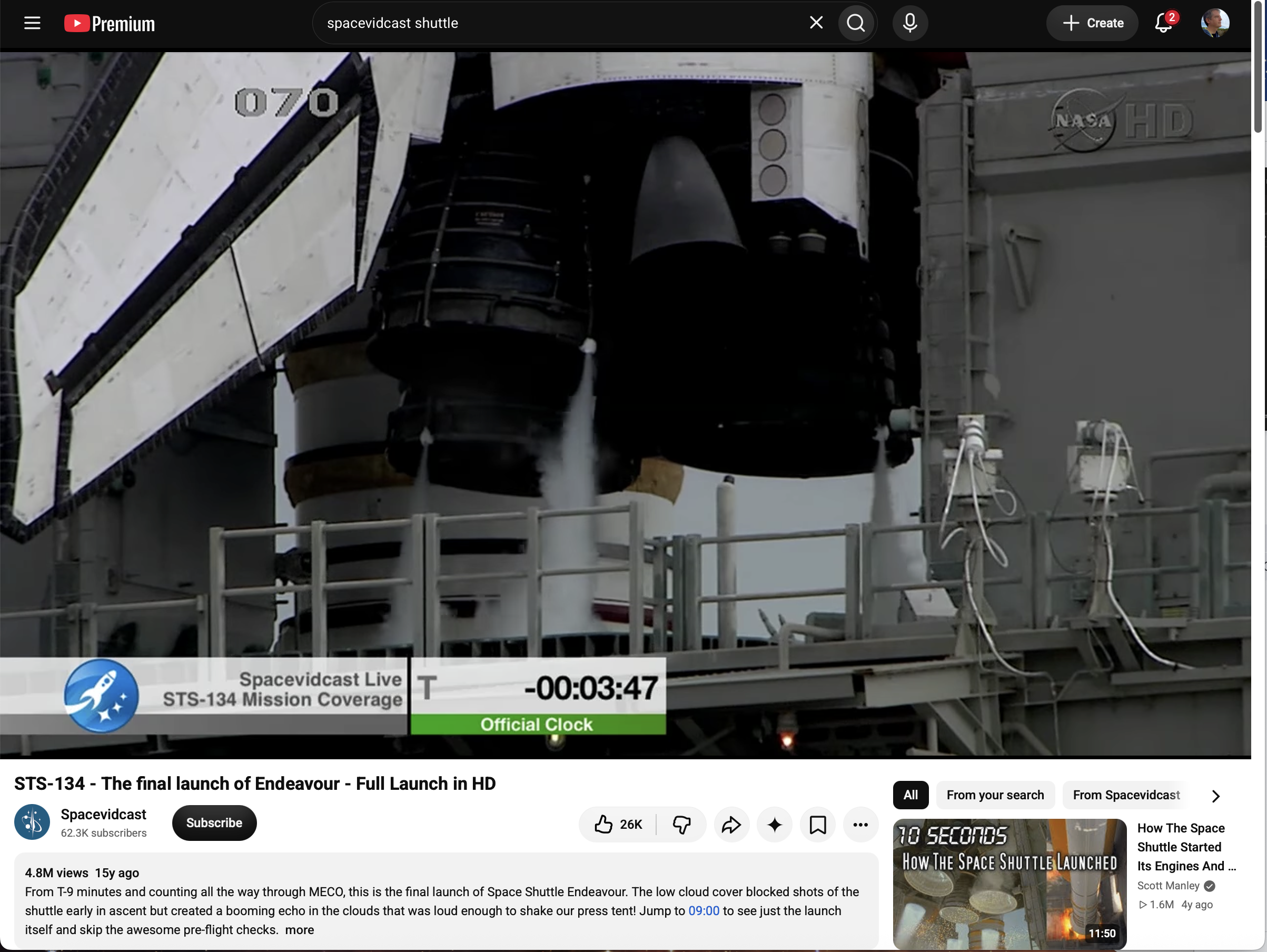
    In your third screenshot the video is maximally enlarged (it's constrained by the window width already), but there is still stuff above and below it – going by what you write (less visual clutter) I'm assuming you would prefer the stuff above and below the video to be replaced with black bars and the video just be centered vertically?

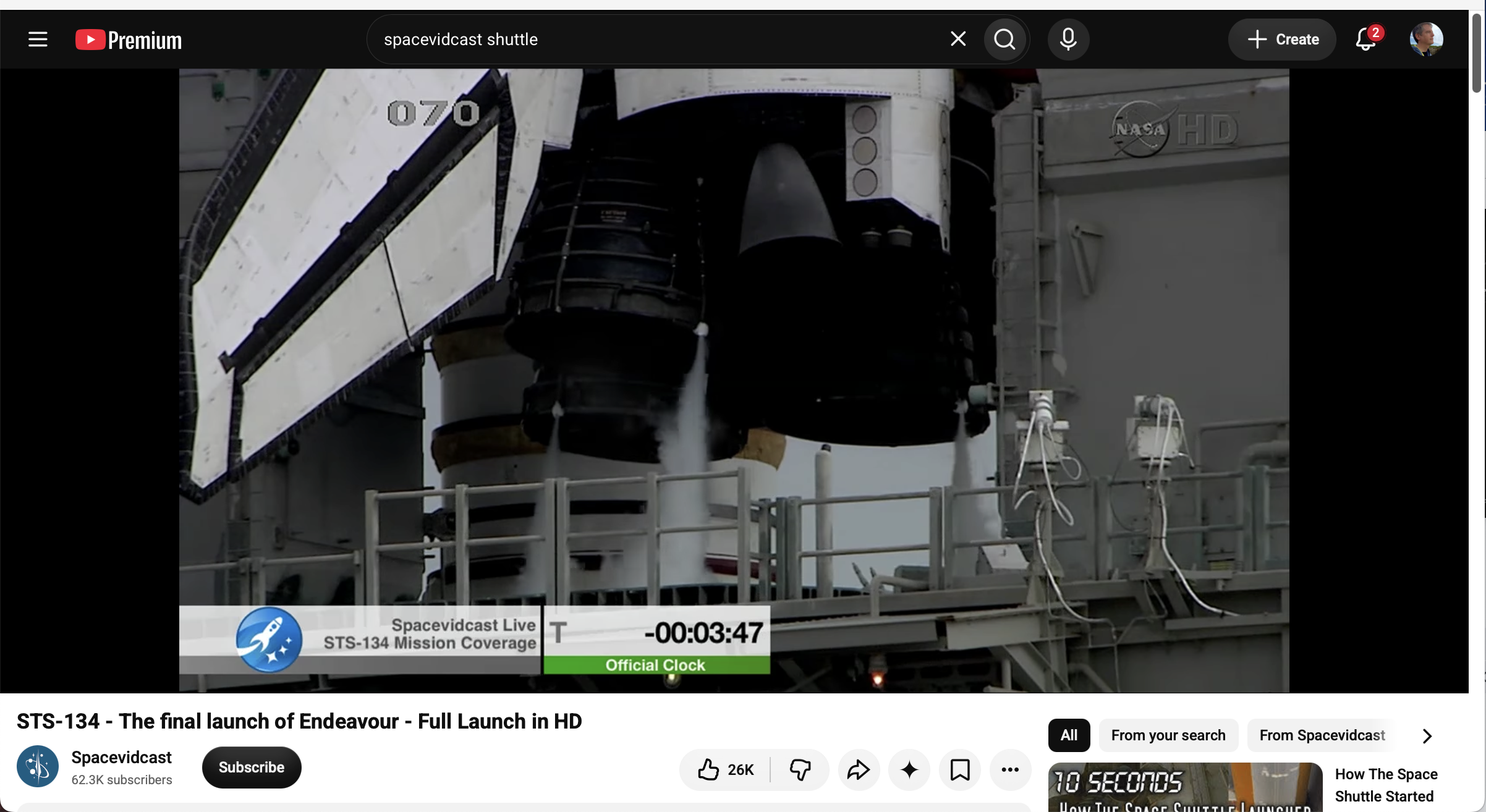
    Likewise in the fourth screenshot, if theater mode would also get rid of the stuff above and below the video, the video could be shown much larger and without any visual clutter, which I'm assuming would also be what you prefer?

    Let me know if I got that correctly. :)

    💬 1🔄 0⭐ 0
  • Oct 22, 2026, 3:35 PM

    @freebliss Yes, well spotted! If I can get that without losing the ability to scroll up or down to the usual elements, then that’s an improvement

    💬 1🔄 0⭐ 0
  • Oct 22, 2026, 3:40 PM

    @chris_radcliff Gotcha, one last question then: Is the ability to instantly scroll down/up vital, or would it be ok if it required one click to go out of theater mode before the rest of the interface becomes accessible again? Thanks a lot!

    💬 1🔄 0⭐ 0
  • Oct 22, 2026, 3:46 PM

    @freebliss Thanks for asking! Yes, I essentially want the page to still function as a page, so my mental model sees the elements above and below the viewing are to be instantly accessible and partially unhideable when I choose to. I realize this makes implementation tricky

    I often do check comment updates and metadata. I might even underprovision width so that a little bit below is peeking out, depending on the stream

    💬 1🔄 0⭐ 0
  • Oct 22, 2026, 3:50 PM

    @chris_radcliff Perfectly put, I see what you mean now! Thank you for taking the time to feed my curiosity on this, much appreciated! :)

    💬 0🔄 0⭐ 0
  • Oct 22, 2026, 2:28 PM

    @freebliss I use theater mode on youtube, so I can describe what I expect if that helps.

    Viewing area should be as wide as the browser window, with a black background.
    Video should be centered and as wide as possible without cropping. Put another way, it should fill the height of the viewing area and retain its aspect ratio.
    If I size the window down vertically, it’s OK for black bars to fill the sides of the viewing area. That’s better than clutter.

    I’ll share why in a second. 1/2

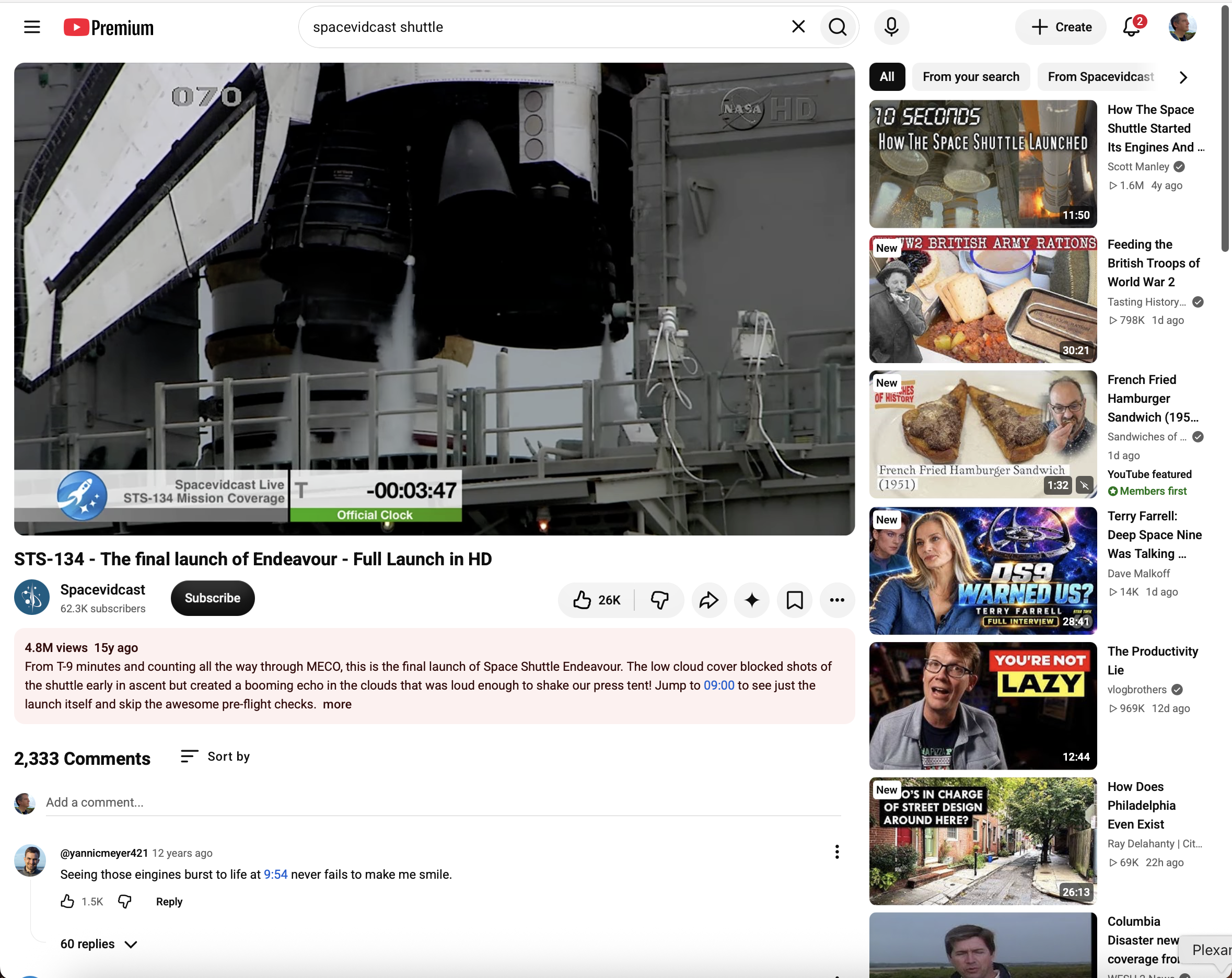
    A youtube browser window in standard mode. The video (of a Space Shuttle launch) is in about a third of the available space.
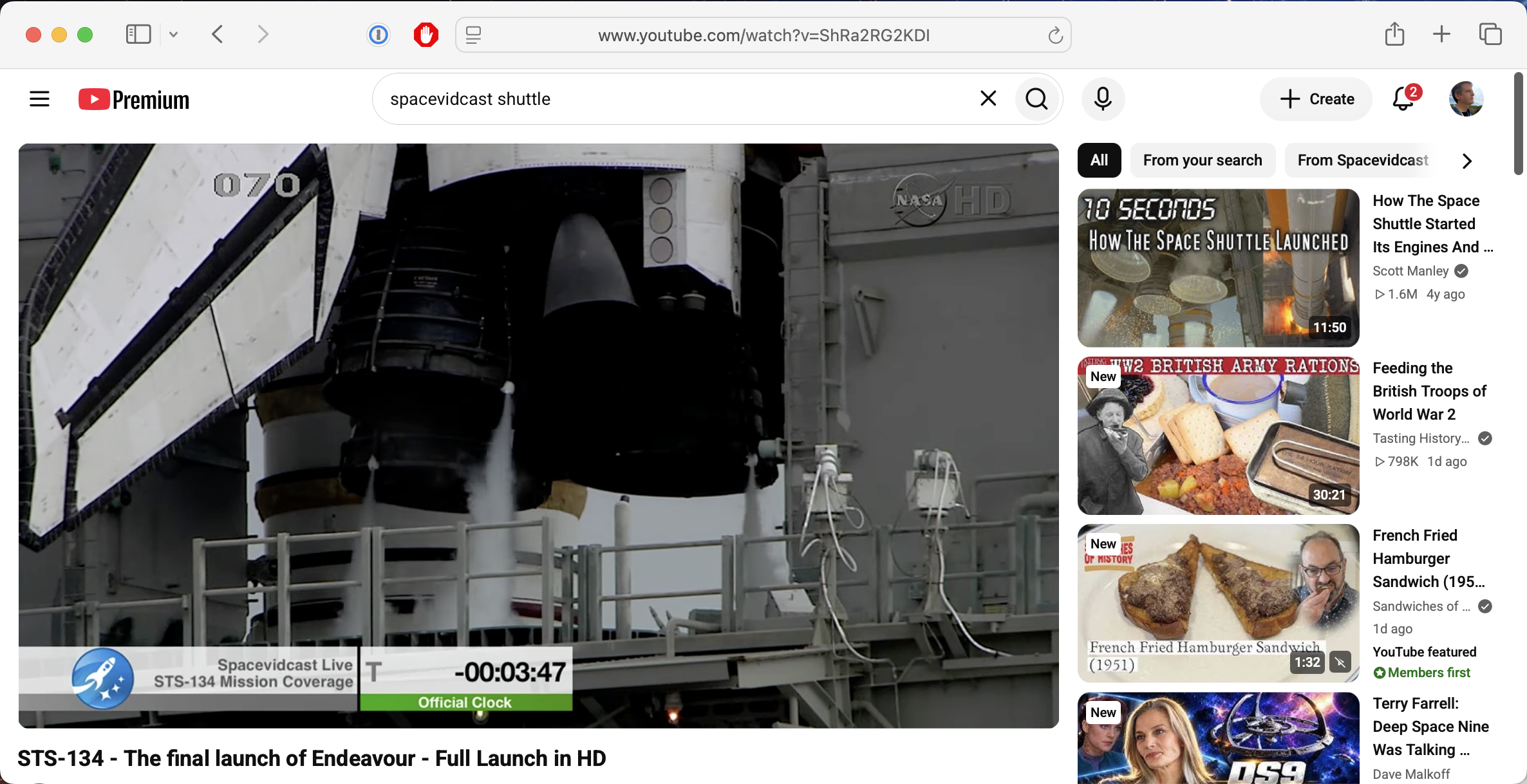
    A youtube browser window in standard mode, narrowed vertically. The video (of a Space Shuttle launch) is in about two-thirds of the available space, and the rest is taken up by ads for other videos.
    A youtube browser window in theater mode. The video (of a Space Shuttle launch) is in about 4/5 of the available space and covers the full width of the window.
    A youtube browser window in theater mode, narrowed vertically. The video (of a Space Shuttle launch) is in about four-fifths of the available space. Black bars are on either side of the video.
    💬 1🔄 0⭐ 0
  • 💬 0🔄 0⭐ 0
  • Oct 22, 2026, 3:48 PM

    @himysyed Cool thanks for the insight! Similarly to what I asked Chris, would you prefer if in theatre mode, in addition to the video being as large as possible, the rest of the interface elements were hidden, so that you could focus on and only see the video itself (and potentially black bars above/below or left/right if needed)?

    💬 1🔄 0⭐ 0
  • Oct 22, 2026, 4:02 PM

    @freebliss@post.lurk.org Yes.

    Because the reason I intentionally "choose" Theatre Mode is because I do not "trust" full screen mode to be showing me "everything".

    Whenever I see black bars, be they below or beside the video surface area, I know nothing is being cropped, like it 'might be' when simply going full screen.

    A secondary muscle memory behaviour of mine is to toggle Theatre Mode to get rid of the distracting right side vertical youtube recommendation / advertising-promoted thumbnails of videos.

    They distract me and bisect my attention.

    My muscle memory is to then toggle "Theatre Mode" and full screen mode to compare how much or what is being cropped and If I care on that specific video.

    Example : a talking head video, full screen is fine.

    Example : Landscape or nature video, Theatre Mode.

    I can not know if my behaviour is typical of anyone else, I've never had cause to explain/discuss this before, until this thread.

    💬 0🔄 0⭐ 0
  • Oct 22, 2026, 4:21 PM

    @himysyed Great insights thank you! :) I wasn't aware/haven't seen YouTube crop videos in fullscreen, if you ever run into that again feel free to share a link, I'd be curious to have a look!

    💬 0🔄 0⭐ 0
  • Oct 22, 2026, 5:50 PM

    @freebliss Everyone else has basically covered what I think, but I'll add that for me "Theatre Mode" on YouTube desktop is mostly about pushing the right-hand sidebar filled with algorithmic suggestions under the video. Sometimes with livestreams that's a chat replay instead.

    I wish Theatre Mode was a user default. Recently YT even hide the UI toggle (A/B testing? 🤷‍♂️), only allowing a key command to change viewing mode; They really want to promote that right-hand sidebar content!

    💬 1🔄 0⭐ 0
  • Oct 22, 2026, 7:16 PM

    @evilpeacock Perfect. Fortunately there's no algorithmic suggestion anything in Hyper 8, and the playlist/chapter/transcript side panel is optional/toggleable as well, so that's a problem I don't even need to solve anymore. ^^ Thank you for the feedback!

    💬 0🔄 0⭐ 0