Login
You're viewing the discuss.systems public feed.
  • Oct 15, 2026, 8:10 PM

    Hey so uhhh

    Would you happen to have a thing called the "NVidia App" installed on your computer?

    If so, you might want to open it up, go to Settings, and uncheck "Allow AI Agents to Control NVidia App". This checkbox will be on by default if you have not specifically turned it off.
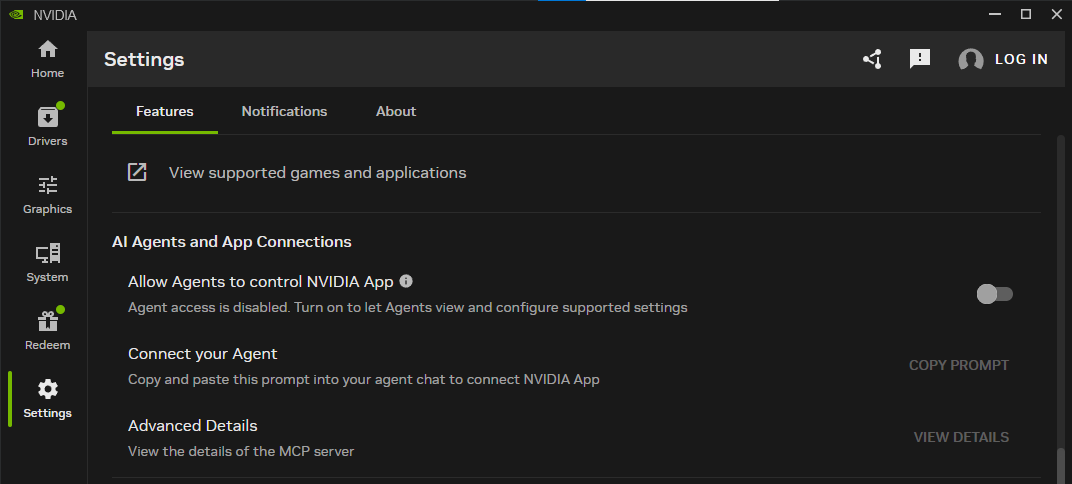

    "AI Agents and App Connections

Allow Agents to control NVidia App"
    💬 13🔄 20⭐ 0

Replies

  • 💬 0🔄 0⭐ 1
  • 💬 0🔄 0⭐ 0
  • Oct 15, 2026, 8:23 PM

    @mcc For a while I have refused to install the Nvidia app. It was causing more problem than it was worth. I see that was a good idea and remains a good idea.

    💬 0🔄 0⭐ 0
  • Oct 15, 2026, 8:40 PM

    @mcc ...sneaky bastards. Also while on that page, also switch off "Automatically optimize newly added games and apps", otherwise it will keep messing up your game settings on each start.

    💬 1🔄 0⭐ 0
  • 💬 1🔄 0⭐ 0
  • Oct 15, 2026, 9:17 PM

    @mcc At least on my machine, it almost never actually guesses the settings correctly. You’d think they would have a database of similar PCs, but alas my kitbashed PC eludes them…

    💬 1🔄 0⭐ 0
  • Oct 16, 2026, 6:12 AM

    @swiftcoder @mcc yeah same here, I play on 1080p and almost never want any of NVIDIA's "enhancements" enabled. I first noticed that in Oblivion Remastered, you tweak the graphics settings, and on the next start of the game they are reset on what NVIDIA think's is best (e.g. a blurry mess). Unchecking that checkbox in the NVIDIA app fixed that (at first I thought it's a bug in the game).

    💬 0🔄 0⭐ 0
  • Oct 15, 2026, 8:41 PM

    @mcc For the first time in thirty years I'm thrilled that NVidia never properly built an application for Linux that wasn't completely broken for updates.

    Not seeing anything in there that I'm not used to seeing...and it's easy to avoid updating because it's such a pain in the ass to update.

    💬 0🔄 0⭐ 0
  • Oct 15, 2026, 8:53 PM

    @mcc The reason I don't use Windows. Too many - especially gamer - companies see Windows use as carte blanche for opting you in by default into any shit like AI, marketing, telemetry, you name it. After all, MS does the same. No need to be holier than the pope...or MS

    💬 0🔄 0⭐ 0
  • Oct 15, 2026, 9:28 PM

    @mcc Hm... Is it talking about an Nvidia specific AI thing or all AI agents? Because the ability to banish *any* AI agents from poking around in your app seems like the kind of incantation I would like to learn.

    💬 0🔄 0⭐ 0
  • Oct 15, 2026, 9:36 PM

    @mcc I am so grateful I abandoned the Nvidia ship after using them for like 20 years and went to AMD for my last computer build.

    💬 0🔄 0⭐ 2
  • 💬 0🔄 0⭐ 0
  • 💬 2🔄 0⭐ 0
  • 💬 0🔄 0⭐ 0
  • Oct 15, 2026, 10:01 PM

    @rcombs I would never assume that a socket being open on my desktop computer is a no-op. Especially if the team who owns the code on the other side of the socket is something other than a per se networking team (for example, the AI agents team)

    💬 1🔄 0⭐ 0
  • Oct 15, 2026, 10:04 PM

    @rcombs I would also not assume I have control over whether there is an AI agent on my computer. I have Visual Studio Code installed, therefore I have to work on the assumption the machine is potentially compromised

    💬 1🔄 1⭐ 0
  • Oct 15, 2026, 10:12 PM

    @mcc the harness code presumably exists but it’s not gonna just start running a session at random without being prompted (and even if it somehow ran with blank user-turn input, that’d just result in generic “What do you want to do?”-style text output; no reason you’d get a tool call out of that)

    💬 1🔄 0⭐ 0
  • Oct 15, 2026, 10:16 PM

    @rcombs but another process or actor on my computer (or, possibly, my home network) could connect *to* it, and that would start a session. this is the scenario i am attempting to avoid

    💬 1🔄 0⭐ 0
  • Oct 15, 2026, 10:16 PM

    @rcombs one thing i am not quite clear about from NVidia's in-app messaging is whether, in order to connect to the mcp server, some sort of token is required (a token which would presumably be generated upon clicking "connect your agent"), or if there are no access controls and the "prompt" it gives just describes what port to connect to. however even if a token is required, I still wonder what happens if you connect to the port and send the character '{' repeated 4,294,967,297 times

    💬 3🔄 0⭐ 0
  • Oct 15, 2026, 10:19 PM

    @mcc @rcombs This sounds like something interesting to test ourselves... Hmmm...

    💬 0🔄 0⭐ 0
  • Oct 15, 2026, 10:21 PM

    @rcombs Wait, sorry. my last two posts are discussing the MCP server NVidia wants to run on my machine; now that i reread, i think you're acknowledging the ai agent code in vs code exists (and maybe it does, although i intentionally uninstalled it) but VS Code wouldn't start running the AI agent unless I told it to. If so, I would not assume this so confidently. I believe that Microsoft programs are like ghosts and just kind of do things arbitrarily

    💬 0🔄 0⭐ 0
  • Oct 15, 2026, 11:32 PM

    @mcc @rcombs The visibility and consent are the missing pieces. Things get hacked, this is how they get hacked. Nobody knew this was there! It's been there since the AI boom of 2020s!

    💬 1🔄 0⭐ 0
  • Oct 15, 2026, 11:34 PM

    @reconbot @rcombs now note if you read the "what's new" the NVidia app shows on launch you *would* know it is there but reading the "what's new" is not something i would tend to do, because to me the point of the nvidia app is to get in, bump my driver version, get out as quick as possible. maybe if i hadn't been forewarned my brain would have still automatically spotted "MCP" as the popup flashed by, but i wouldn't wanna rely on that

    💬 0🔄 0⭐ 1
  • Oct 15, 2026, 10:01 PM

    @mcc To be honest I don't think this is as worrying as it first looks.
    Admittedly in their words, but they've added MCP support into the app so it might be controlled by applications / AI such as Openclaw.

    Popup in the Nvidia app, which reads:
NVIDIA App MCP Server
Description
Allow Agents to control NVIDIA App
Typical usage scenarios
- See your installed games, launch a game, and check which game is
running.
- Apply NVIDIA's optimal settings to your games.
- Record gameplay, capture screenshots, and turn Instant Replay, Highlights
and the stats overlay on or off.
- Adjust in-game visuals with RTX Dynamic Vibrance.
- Check your driver version, recommended updates and release highlights.
- Manage laptop performance with Whisper Mode and Battery Boost.
    💬 1🔄 0⭐ 0
  • 💬 1🔄 0⭐ 0
  • Oct 15, 2026, 10:05 PM

    @mcc My first interpretation of your toot, was an implication that Nvidia can use AI to remotely control the app. The point I'm trying to express from that, is it seems to be only AI apps that would be locally installed (which I assume you wouldn't anyway).
    Apologies if I've misunderstood.

    💬 1🔄 0⭐ 0
  • Oct 15, 2026, 10:07 PM

    @lilbigmouth Literally my words are that there is a setting on the computer, whose name I paraphrased but only slightly; and that people might want to turn it off. Personally I want to turn off anything which is related to "AI" or "AI" branding in any way.

    💬 1🔄 0⭐ 0
  • 💬 0🔄 0⭐ 0
  • Oct 15, 2026, 10:03 PM

    @mcc Additionally, if you have the text size bumped up, say to 125%, that On/Off button might be *off the screen to the right*!!!

    💬 1🔄 0⭐ 0
  • 💬 1🔄 0⭐ 0
  • Oct 15, 2026, 10:14 PM

    @mcc I hopped back and forth between my app and your screenshot, saw that yours had a switch and mine didn't. Eventually, I noticed the narrow horizontal scrollbar at the bottom on mine, and found the switch way over to the right.

    💬 1🔄 2⭐ 0
  • 💬 1🔄 0⭐ 0
  • Oct 15, 2026, 10:19 PM

    @mcc Might be text size, might be screen zoom. I have a lot of things tweaked so I don't have to wear my glasses.

    Yeah! I went in there, saw that option, saw that it was turned on, and then clicked all over the place and it wouldn't let me turn it off! I looked at your screenshot again, saw the switch, griped (out loud!) that mine didn't have that, and then finally noticed the horizontal scrollbar, maybe five px wide, and found it. (Mind you, I've got all AI garbage turned off in my machine anyway, but I don't even like *the very idea* of it in there.)

    💬 0🔄 0⭐ 0
  • Oct 15, 2026, 10:24 PM

    @mcc Oh, hey, so I hadn't launched it in a while and it updated to this version right in front of me with the relevant release notes:

    A screen shot of the NVIDIA App Release Highlights for version 11.0.9 with the AI Agent Support for Model Context Protocol (MCP) Server section highlighted with a red rectangle surrounding it.  The text reads: NVIDIA App includes a local MCP server (Model Context Protocol) that lets a compatible AI agent control the NVIDIA App using natural-language requests. This means your AI assistant like Hermes, OpenClaw or Perplexity can see your installed games and apply optimal settings, or enable Shadowplay to record gameplay, all through simple conversation.
Access this feature under Settings > Features > AI Agents and App Connections"
    💬 0🔄 0⭐ 0
  • 💬 0🔄 0⭐ 0
  • 💬 0🔄 0⭐ 0