Login
You're viewing the adforward.org public feed.
  • Dec 3, 2025, 5:43 PM

    Free Software that I rely on. One per day.

    Day 4:

    Papagayo NG

    This one fills a very important niche in my pipeline. It is a tool to make it much easier to line up lip movements to speech.

    This is not an AI tool and does not do the alignment for you, but it makes it much it easier to do.

    We used this extensively in "Lunatics!", particularly for the long dialogues in the Press Conference.

    Morevna Project maintains this program, which is a fork of the original "Papagayo" with some enhancements. Hence the "NG":

    morevnaproject.org/papagayo-ng

    I've attached the 2015 "2-Min Tutorial" in which I briefly explained how to use the program.

    #FreeSoftwareAdvent #Papagayo #PapagayoNG #Lipsync #Animation
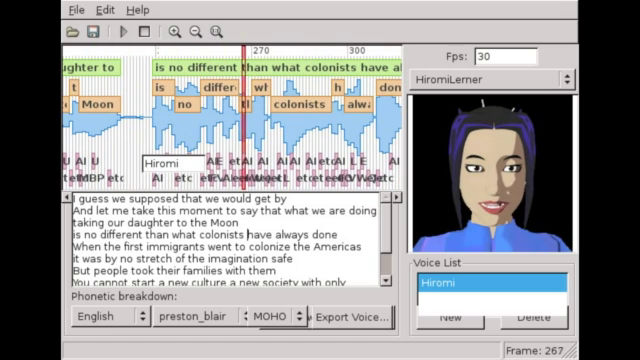
    Image attached toot
    💬 2🔄 1⭐ 0

Replies

  • 💬 1🔄 0⭐ 0
  • Dec 3, 2025, 6:41 PM

    "...on our production website..."

    I guess that's another thing I need to find and upload.

    I've also got a language patch for Japanese for Papagayo... SOMEWHERE. :neko_tired:

    Ah well. I think Morevna has a copy of the Blender extension, too.

    💬 0🔄 0⭐ 0
  • Dec 4, 2025, 8:04 PM

    Free Software that I rely on. One per day.

    Day 5:

    Wordpress

    Here's a program I regularly use at least once a month when I write up my project summaries. And I've been using it for a little over ten years now.

    It is both a blogging platform and a content management system, which makes it a very good hub for my site.

    At current count, I have published 386 articles and 3537 images on this site. I think I'm getting my investment back on this one.

    I currently get the program via YunoHost:

    apps.yunohost.org/app/wordpres

    That page includes links to the upstream sites if you'd rather install it some other way. There are MANY options.

    #FreeSoftwareAdvent #Wordpress #Blogging #Writing #Illustration

    Public-facing Wordpress site for Lunatics Project. I'm logged in, so there is a navigation bar at the top for the editing interfaces.

I believe this theme is called "GridNext", though I've done some customizing.
    Ye Olde Classic Editor, which I still use, gives me a simple WYSIWYG (sort of) interface for editing articles. I'm writing a "Guide to the Fediverse" here.
    The list of posts, both published and draft. Wow. 386. That's more articles than I ever wrote for Free Software Magazine by quite a bit now. I wonder when I crossed that line..?
    Text at the bottom says this is 80 of 3537 media items.

Almost 10X more images than articles. 

Of course, they're not all original. But there are behind-the-scenes shots and renders from Lunatics, a couple of photos of me, logos, and other things I needed to illustrate articles.
    💬 1🔄 0⭐ 0
  • Dec 6, 2025, 3:56 AM

    Free Software that I rely on. One per day.

    Day 6:

    Audacity

    Another old one! I think I've been using Audacity for about 25 years, now.

    It is a "destructive audio editor", which means it is kind of the audio equivalent to a bitmap editor in graphics -- you are actually changing the values of the samples in the recording when you make changes, rather than applying filters on top of them as non-destructive editors do.

    This makes Audacity particularly good at constructing sound effects from recorded sources.

    I do most of my audio processing in Audacity, but even if I do involve a non-destructive "DAW" platform, I would probably continue to use Audacity for creating effects and recording voices.

    It is an excellent tool for recording audio directly or reviewing and selecting audio from field recordings.

    audacityteam.org/

    #FreeSoftwareAdvent #Audacity #Audio #DAW #Sound

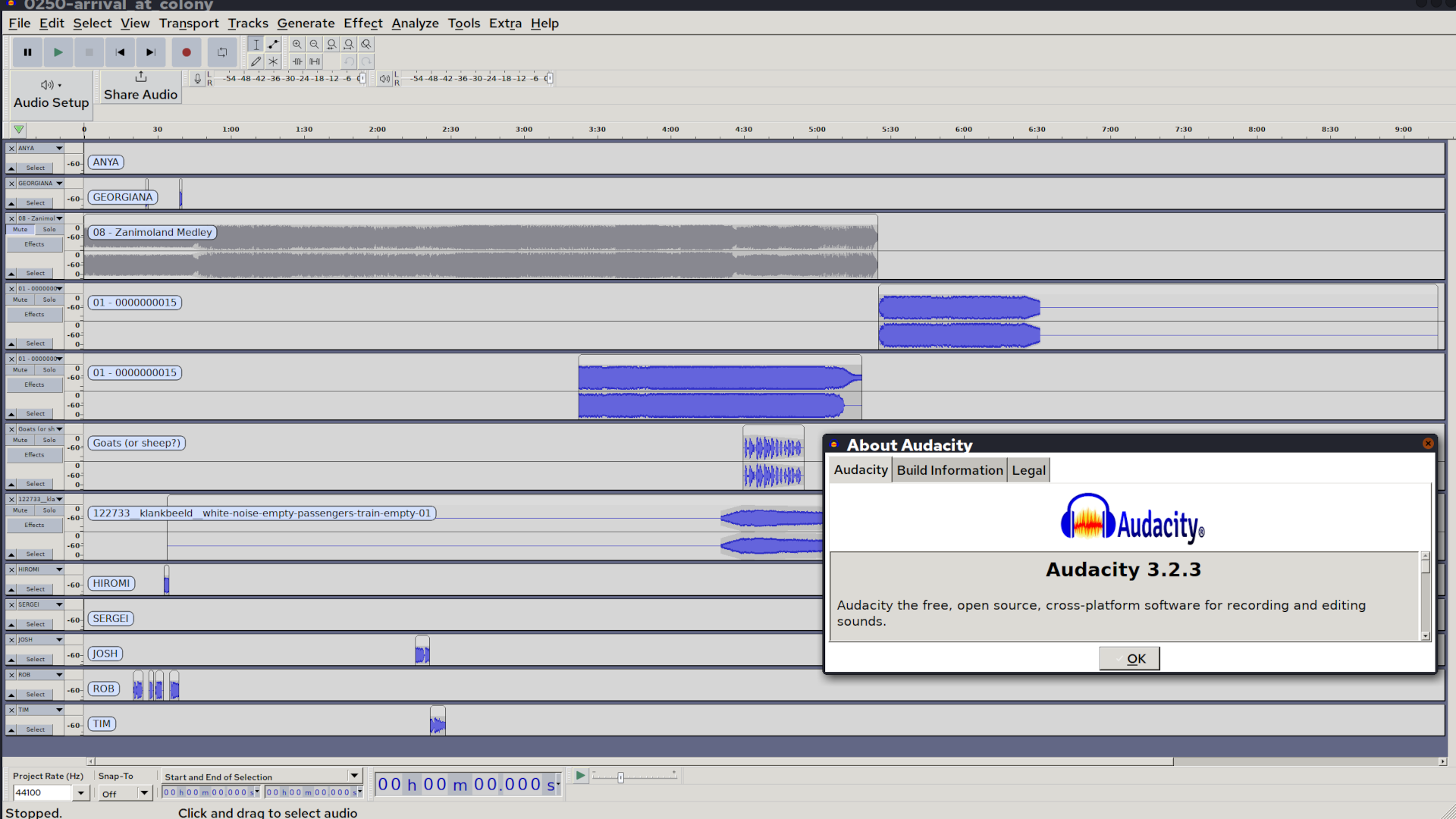
    Screen capture of Audacity with a project loaded, including music, ambience, and effects.

An "About" pop-up window shows this is version 3.2.3.
    💬 1🔄 0⭐ 0
  • Dec 6, 2025, 8:56 PM

    Free Software that I rely on. One per day.

    Day 7:

    ImageMagick

    This is actually a small suite of tools that can be used from the command line, although it also has a GUI interface. Pretty old school software; been around for ages; still very handy.

    Not as powerful as Gimp or Krita for manipulating a single image, but with ImageMagick and a bash script you can make changes en masse ("convert" and "mogrify" -- which does the job in place). You can quickly check the format and size of images from the command line ("identify") or simply pop up the image with "display".

    Finally, with "compose" you can make an image combining multiple images in many different ways, including making a grid with or without labels.

    I don't use it as much as I used to, but it is still the simplest way to check image content from the command line. And it's really the only option when you need to change a whole lot of images at once.

    Also often used on server back ends to manipulate images for display in web applications.

    #FreeSoftwareAdvent #ImageMagick #Graphics #FreeSoftware #OpenSource

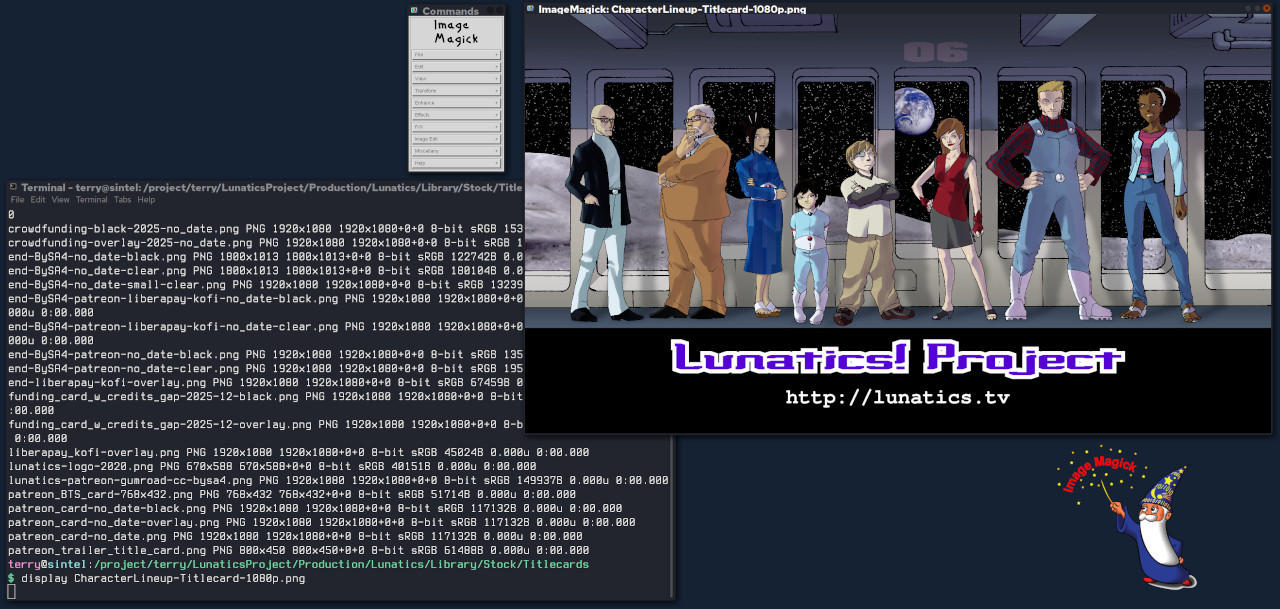
    Demo of ImageMagick tools: terminal with output from "identify" showing filenames, format, size, and other details.

Also "display" has been used to pop up a window, with a simple editor menu.

The ImageMagick logo, a wizard holding a wand with the words "Image Magick" in red.
    💬 1🔄 0⭐ 0
  • Dec 8, 2025, 1:39 AM

    Free Software that I rely on. One per day.

    Day 8:

    Blender

    This one's a gimme. Blender is the single most important free software tool in my project toolbox.

    Weirdly, I still use Blender 2.79, because I built my project on the "Blender Internal" render which they removed in 2.8 (more about that in a comment). Meanwhile Blender is on at least v4 now.

    I'm sure you've heard of it, but you may not realize Blender's full scope. It is designed to be a complete 3D animation suite in one package:

    * 3D surface modeler
    * Materials editor, shader, rendering engine
    * 3D armature & shape key animation
    * 2D annotations
    * 2D "grease pencil" animation tool
    * video clip editor with rotoscoping and tracking for VFX work
    * video sequence editor for editing clips together

    It is pretty complete, and many people have made animated films entirely in Blender, although it can also be integrated into a pipeline with other tools, as I've done on Lunatics Project.

    It's popular with indy film makers and Hollywood alike.

    blender.org

    #FreeSoftwareAdvent #Blender3D #Blender #Animation #FreeSoftware #OpenSource

    A shot from "Lunatics!" loaded in Blender. A window with a rendered image is in front. Behind we can see a bit of the 3D view, the node-based compositor (left), the properties panel (right), two outliner panels (top and upper right, and dope sheet and timeline (bottom).
    💬 2🔄 0⭐ 0
  • Dec 8, 2025, 1:49 AM

    We built Lunatics around the Blender Internal renderer, which was removed along with the game engine when they went to v2.8. Switching rendering engines would be too big an ask, so we just stuck with 2.79 (for now).

    There IS a fork of the program, called "UPBGE" that incorporates both BI and the Game Engine (also removed with 2.8).

    Later Blender includes the "Eevee" renderer, which I understand was based on the previous "viewport renderer" (that's also when "annotations" became separate from "grease pencil").

    And the "Cycles" renderer, which is meant to be more photorealistic was retained.

    But they junked "Blender Internal". I understand it had a lot of "technical debt". And the Blender Game Engine I think was considered to be out of scope and not competitive with other game engines, so they dropped that.

    There are also 3rd party renderers. I haven't tried them, myself, but I hear good things about them from time to time.

    One of particular interest to me is "BEER" the "Blender Extended Expressive Renderer" which is explicitly designed for NPR3D work, and it's successor (I think), called "Malt".

    I might give those a go before long. Maybe next year.

    It occurs to me to wonder if UPBGE or some other package of BI can be used for rendering from later versions of Blender? 🤔

    UPBGE:
    upbge.org

    BNPR - BEER & MALT:
    github.com/bnpr

    #Blender3D #NPR3D

    💬 0🔄 0⭐ 0
  • Dec 8, 2025, 10:08 PM

    Free Software that I rely on. One per day.

    Day 9:

    YunoHost

    This is technically more of a distribution than an individual software. There's a portal, and a large volunteer packaging effort to create apps for it. And a large catalog of applications already packaged.

    I definitely rely on it. So I'm counting it.

    YunoHost is how I have Wordpress (which I've already mentioned) installed -- along with other software I haven't got to yet.

    It is based on Debian Linux: a particular install with applications already configured to work on it, pretty close to "plug and play". It's like the packaging systems for Linux desktop systems -- but for the Internet.

    It makes managing a web application site SO much easier. I decided to adopt it as the basis of my "virtual studio" instead of trying to write something new.

    yunohost.org/

    apps.yunohost.org/

    #FreeSoftwareAdvent #YunoHost #Debian #FreeSoftware #OpenSource

    YunoHost through-web management interface, with access to "Users", "Groups and Permissions", "Domains", "Applications", "Updates", "Tools", "Diagnosis", and "Backup".
    YunoHost "applications" interface, showing "Pixelfed", "Misskey", "PeerTube", "Wordpress" applications installed, along with a customized static site and a couple of utility applications.
    Regular logged-in portal interface for YunoHost, showing five apps: Misskey, Peertube, Pixelfed, Wordpress, and a custom website app.
    💬 1🔄 0⭐ 0
  • Dec 10, 2025, 2:19 AM

    Free Software that I rely on. One per day.

    Day 10:

    Open Camera

    I'm stuck on my phone today, so today's free software is an Android smartphone app from the F-Droid repo: Open Camera.

    I use it to record the "real life" parts for my daily logs. A particularly useful feature is the "photo stamp" so I have the date and time on screen.

    f-droid.org/packages/net.sourc

    #FreeSoftwareAdvent #OpenCamera #FDroid #Android

    Settings for Open Camera's photo stamp.
    Photo with Open Camera, since I'm here watching "A Charlie Brown Christmas" on the 60th anniversary. Note the time stamp.
    💬 1🔄 0⭐ 0
  • Dec 10, 2025, 7:03 PM

    Free Software that I rely on. One per day.

    Day 11:

    Seafile

    I like Seafile, it's simple. It does one thing well, which is make it easy to share files between different machines. It reminds me of Google Drive before they junked it up.

    And if you run your own Seafile server on your LAN, this is totally secure, without your data ever having to leave your control at all.

    It's weird that that has become a luxury, but such is 21st century corporate-platform computing.

    Anyway, none of that with Seafile running on your own LAN. I run it on my household file server, with clients on my phone and my workstation.

    For several years, this has been my go-to solution for transferring photos and note files from my phone to my workstation, where I edit my logs.

    manual.seafile.com/latest/
    seafile.com

    #FreeSoftwareAdvent #Seafile #FileSharing

    Turns out you can customize the login screen on the server. Mine the engine room from the Cerritos.

I like to use features like this, because it's an immediate reassurance that I am indeed logging into MY Seafile server.
    A simple, intuitive, no-frills folder interface, not unlike a local file system browser.
    💬 1🔄 0⭐ 0
  • Dec 12, 2025, 1:48 AM

    Free Software that I rely on. One per day.

    Day 12:

    Gwenview

    For this list, I've been trying to focus not so much on the most exciting applications as the ones I use so often I forget they exist -- and Gwenview definitely fits in that category. I literally use it every day.

    It's an image/multimedia browsing utility. Ostensibly for KDE, although I routinely use it in XFCE.

    In any case, it's very low-maintenance and the fastest way for me to check out a tree of images -- whether they're PR collections or a series of frames in a PNG stream. Helps a lot when I'm looking for an image and can't quite remember what I called the file.

    I've tried some other image browsing apps, but this is the one I keep coming back to.

    apps.kde.org/gwenview/

    #FreeSoftwareAdvent #Gwenview #Images #Graphics #FreeSoftware #OpenSource

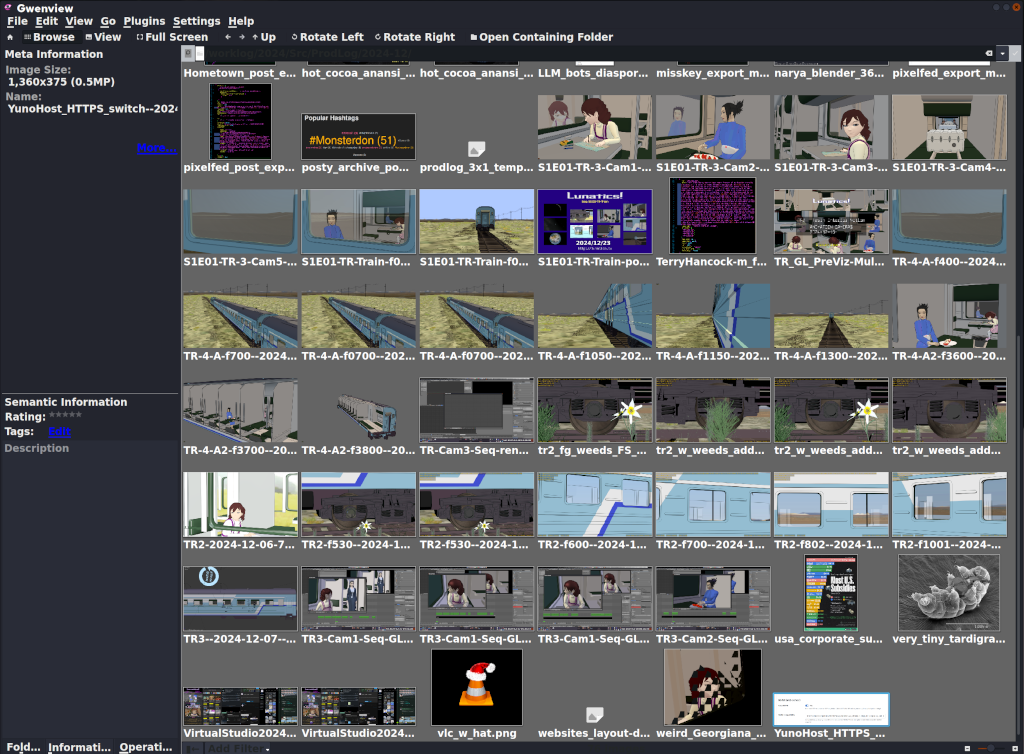
    Screen capture of Gwenview, with a folder full of images opened up (mostly test renders from Lunatics, and a few screen captures).

The images are displayed in a grid. There's a sidebar with details for the currently selected image.
    💬 1🔄 0⭐ 0
  • Dec 12, 2025, 9:21 PM

    Free Software that I rely on. One per day.

    Day 13:

    VideoLAN Client, a.k.a. VLC

    Some distro maintainers apparently hate it. It is very customizable, which results in multiple and frequent UI changes.

    But damn is it useful! I MUST have it.

    I have found very few video formats that VLC won't play, at least if you install all the codecs (some of which are non-free, which is why you have to install them later -- but that's not VLC's fault).

    It is my usual music player, and video player. I use it to check my newly-edited videos.

    Somewhere in there is a way to edit metadata in files -- I know I've used it, though not in a long time.

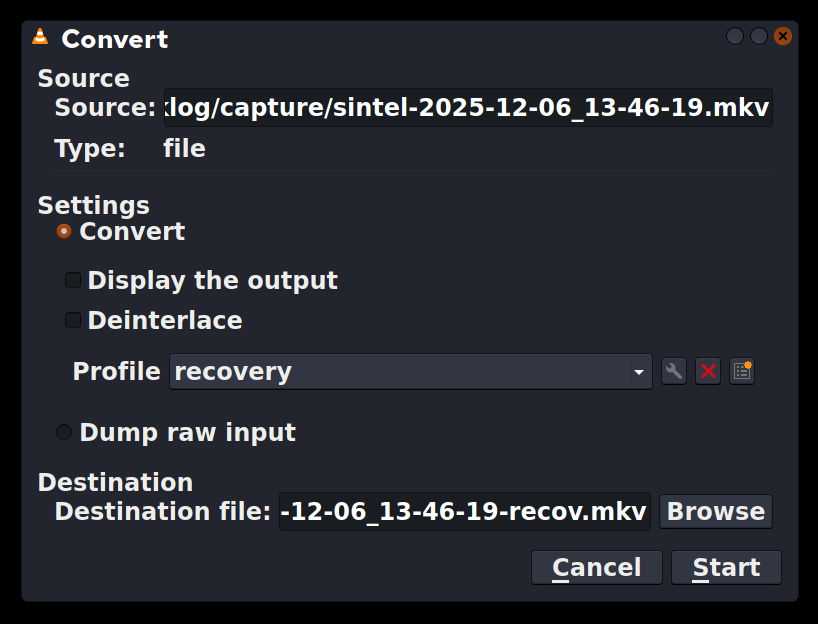
    And if I go to "Media -> Convert/Save", it can convert video formats, which can be a life-saver.

    If my computer should shut down suddenly, my screenlogging script will produce a corrupted video. VLC can read it and convert into a corrected format that other programs can read. Handy!

    videolan.org/

    #FreeSoftwareAdvent #VLC #VideoLan #MusicPlayer #VideoPlayer #Multimedia

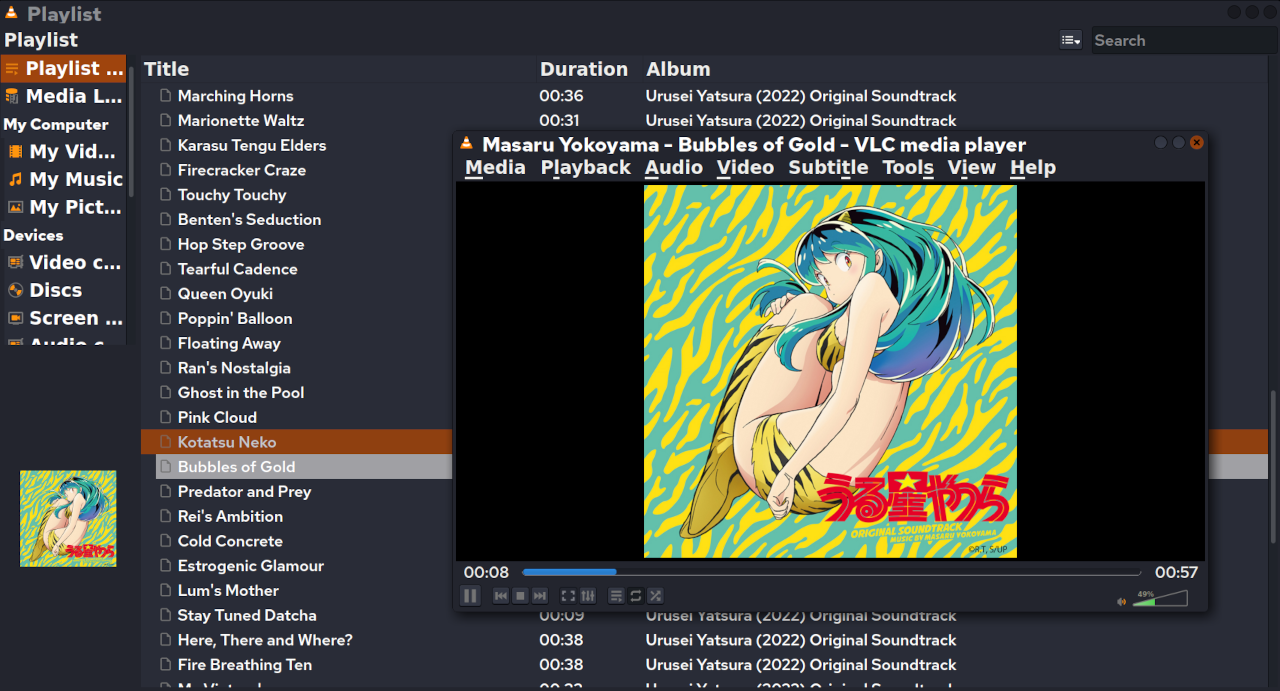
    VLC, playing an album directory (with the Urusei Yatsura 2022 soundtrack open).

I think some versions of the UI have "File" instead of "Media". But this version has "Media", "Playback", "Audio", "Video", "Subtitle", "Tools", "View", "Help".
    Convert/Save dialog from VLC.

At top is the source file. Then there are settings. I have defined a "recovery" profile, because the most common use is to fix video files corrupted by a crash or accidental shutdown without turning off the screen logger.

At bottom is the destination file. Conveniently, it defaults to the same name as the source, and I just add "-recov" to that.
    💬 0🔄 0⭐ 0