Login
You're viewing the adforward.org public feed.
  • Dec 8, 2025, 10:08 PM

    Free Software that I rely on. One per day.

    Day 9:

    YunoHost

    This is technically more of a distribution than an individual software. There's a portal, and a large volunteer packaging effort to create apps for it. And a large catalog of applications already packaged.

    I definitely rely on it. So I'm counting it.

    YunoHost is how I have Wordpress (which I've already mentioned) installed -- along with other software I haven't got to yet.

    It is based on Debian Linux: a particular install with applications already configured to work on it, pretty close to "plug and play". It's like the packaging systems for Linux desktop systems -- but for the Internet.

    It makes managing a web application site SO much easier. I decided to adopt it as the basis of my "virtual studio" instead of trying to write something new.

    yunohost.org/

    apps.yunohost.org/

    #FreeSoftwareAdvent #YunoHost #Debian #FreeSoftware #OpenSource

    YunoHost through-web management interface, with access to "Users", "Groups and Permissions", "Domains", "Applications", "Updates", "Tools", "Diagnosis", and "Backup".
    YunoHost "applications" interface, showing "Pixelfed", "Misskey", "PeerTube", "Wordpress" applications installed, along with a customized static site and a couple of utility applications.
    Regular logged-in portal interface for YunoHost, showing five apps: Misskey, Peertube, Pixelfed, Wordpress, and a custom website app.
    💬 1🔄 0⭐ 0

Replies

  • Dec 10, 2025, 2:19 AM

    Free Software that I rely on. One per day.

    Day 10:

    Open Camera

    I'm stuck on my phone today, so today's free software is an Android smartphone app from the F-Droid repo: Open Camera.

    I use it to record the "real life" parts for my daily logs. A particularly useful feature is the "photo stamp" so I have the date and time on screen.

    f-droid.org/packages/net.sourc

    #FreeSoftwareAdvent #OpenCamera #FDroid #Android

    Settings for Open Camera's photo stamp.
    Photo with Open Camera, since I'm here watching "A Charlie Brown Christmas" on the 60th anniversary. Note the time stamp.
    💬 1🔄 0⭐ 0
  • Dec 10, 2025, 7:03 PM

    Free Software that I rely on. One per day.

    Day 11:

    Seafile

    I like Seafile, it's simple. It does one thing well, which is make it easy to share files between different machines. It reminds me of Google Drive before they junked it up.

    And if you run your own Seafile server on your LAN, this is totally secure, without your data ever having to leave your control at all.

    It's weird that that has become a luxury, but such is 21st century corporate-platform computing.

    Anyway, none of that with Seafile running on your own LAN. I run it on my household file server, with clients on my phone and my workstation.

    For several years, this has been my go-to solution for transferring photos and note files from my phone to my workstation, where I edit my logs.

    manual.seafile.com/latest/
    seafile.com

    #FreeSoftwareAdvent #Seafile #FileSharing

    Turns out you can customize the login screen on the server. Mine the engine room from the Cerritos.

I like to use features like this, because it's an immediate reassurance that I am indeed logging into MY Seafile server.
    A simple, intuitive, no-frills folder interface, not unlike a local file system browser.
    💬 1🔄 0⭐ 0
  • Dec 12, 2025, 1:48 AM

    Free Software that I rely on. One per day.

    Day 12:

    Gwenview

    For this list, I've been trying to focus not so much on the most exciting applications as the ones I use so often I forget they exist -- and Gwenview definitely fits in that category. I literally use it every day.

    It's an image/multimedia browsing utility. Ostensibly for KDE, although I routinely use it in XFCE.

    In any case, it's very low-maintenance and the fastest way for me to check out a tree of images -- whether they're PR collections or a series of frames in a PNG stream. Helps a lot when I'm looking for an image and can't quite remember what I called the file.

    I've tried some other image browsing apps, but this is the one I keep coming back to.

    apps.kde.org/gwenview/

    #FreeSoftwareAdvent #Gwenview #Images #Graphics #FreeSoftware #OpenSource

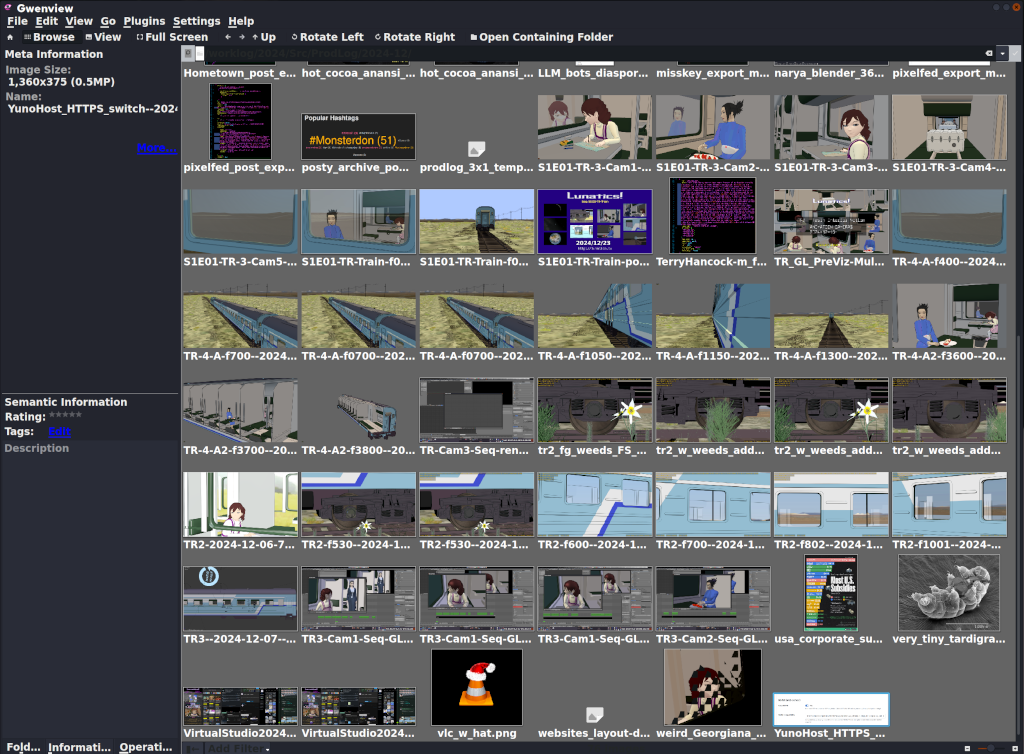
    Screen capture of Gwenview, with a folder full of images opened up (mostly test renders from Lunatics, and a few screen captures).

The images are displayed in a grid. There's a sidebar with details for the currently selected image.
    💬 1🔄 0⭐ 0
  • Dec 12, 2025, 9:21 PM

    Free Software that I rely on. One per day.

    Day 13:

    VideoLAN Client, a.k.a. VLC

    Some distro maintainers apparently hate it. It is very customizable, which results in multiple and frequent UI changes.

    But damn is it useful! I MUST have it.

    I have found very few video formats that VLC won't play, at least if you install all the codecs (some of which are non-free, which is why you have to install them later -- but that's not VLC's fault).

    It is my usual music player, and video player. I use it to check my newly-edited videos.

    Somewhere in there is a way to edit metadata in files -- I know I've used it, though not in a long time.

    And if I go to "Media -> Convert/Save", it can convert video formats, which can be a life-saver.

    If my computer should shut down suddenly, my screenlogging script will produce a corrupted video. VLC can read it and convert into a corrected format that other programs can read. Handy!

    videolan.org/

    #FreeSoftwareAdvent #VLC #VideoLan #MusicPlayer #VideoPlayer #Multimedia

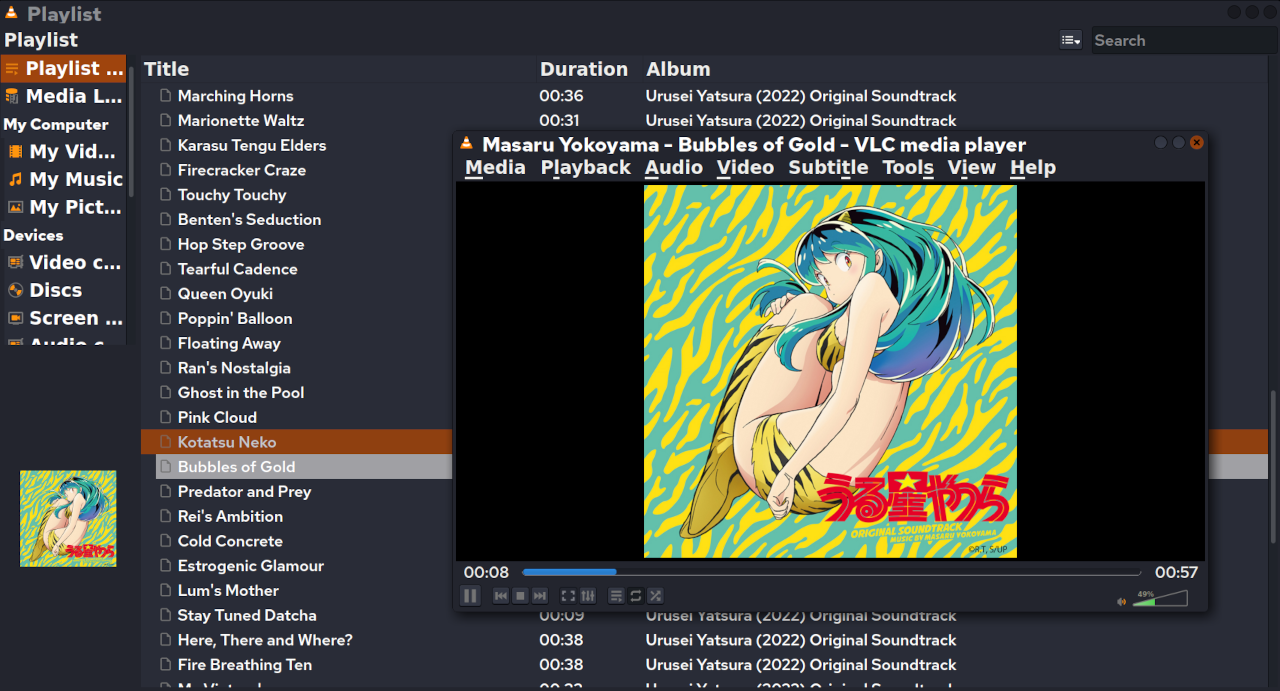
    VLC, playing an album directory (with the Urusei Yatsura 2022 soundtrack open).

I think some versions of the UI have "File" instead of "Media". But this version has "Media", "Playback", "Audio", "Video", "Subtitle", "Tools", "View", "Help".
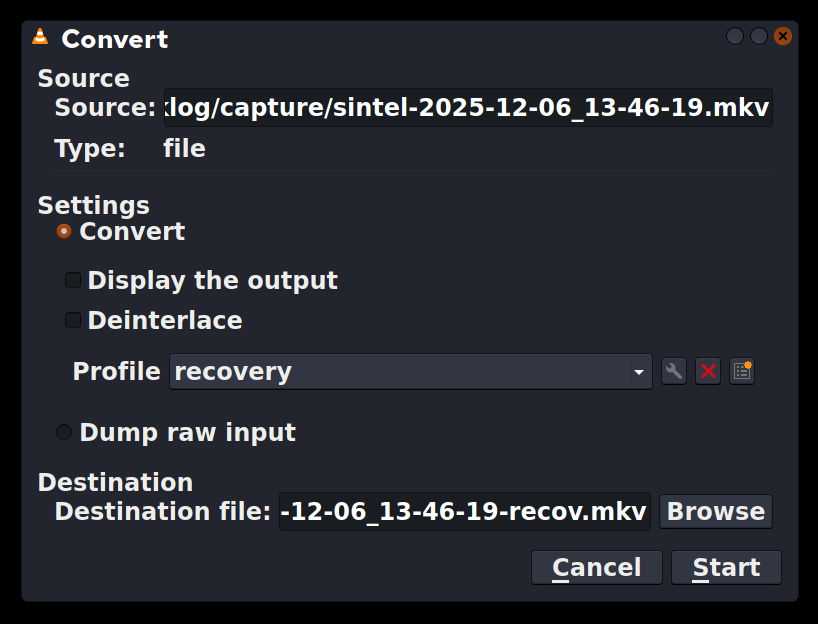
    Convert/Save dialog from VLC.

At top is the source file. Then there are settings. I have defined a "recovery" profile, because the most common use is to fix video files corrupted by a crash or accidental shutdown without turning off the screen logger.

At bottom is the destination file. Conveniently, it defaults to the same name as the source, and I just add "-recov" to that.
    💬 0🔄 0⭐ 0