 12/11/2025
So the only option is to wait three minutes until the previous login times out before attempting to reconnect again.
What a great user experience especially if there's multiple switches that need deploying!
12/11/2025So the only option is to wait three minutes until the previous login times out before attempting to reconnect again.
What a great user experience especially if there's multiple switches that need deploying!
12/11/2025Hmm, maybe a reboot helps?
Nope, it's the switch design that requires a separate "Save configuration" button press after making a change to write the config to NVRAM.
Which is impossible to do after hitting Apply on the DHCP setting as it immediately loses its previous IP address, so after a power-cycle, you're back to square one.
12/11/2025Got a Zyxel managed switch from work and I'm trying to get it to use DHCP.
When logging in to the switch at its default IP of 192.168.1.1 (which IMO is a terrible default IP for non-router network devices), you can change it over to DHCP easily.
But! Once you hit apply, the switch *immediately* moves over to DHCP.
Not a huge problem, a quick look at the DHCP table and there's the login page again.
Well, it only allows a single login at a time, like the one you just got disconnected from.
12/6/2025Whilst I was aware that Wireguard is a PtP tunnel and everything shoved in at one end (when AllowedIPs is configured accordingly) comes out the other, but still today I learned that you don't actually need any tunnel IPs on a Wireguard interface. Just having the correct routes on both ends into the respective tunnel interfaces is enough to make traffic flow bi-directionally between two remote clients across one central VPN server, not using up a single IP address for transport o.O
11/20/2025Unifi software is such a cobbled together mess of half working but flashy "Look what we can do!" features to the point it's more than just a little annoying -w-
11/19/2025Ah dang, being so used to having the OS on nvme0n1 nowadays instead of sda, my brain autopiloted a dd call to overwrite the first 1.5GB of a system disk and it only clicked on what happened after spending a minute trying to figure out why it wrote way too fast for the slow little thumbdrive I wanted to image and seeing the GPT mismatch error in fdisk :floofWoozy:
But I'll never not be amazed at how long a running Linux install keeps working after its root disk has been overwritten with garbage!
11/19/2025Oh well, "CAT_" also works :3
11/19/2025Noooo, 7637 (SNEP) is already taken as an extension, for some reason I keep missing all the important dates related to prep for the Congress this year ;-;
At least I was early enough to use my voucher :neocat_laugh_sweat:
11/16/2025Damn, 28 US dollar for mediocre, spotty internet on a long flight? Yeahh, nahhh, I'm good, American Airlines.
Incidentally and totally unrelated, but today I learned that Shadow TLS is a pretty neat project and works like a charm in... certain restricted situations :3
 11/14/2025
The CurrentPendingSector count of one of my two main home server SSDs just increased from a constant 1 to a fresh 2, this is probably fiiineeee :neocat_nervous:
10/10/2025Outch
 10/10/2025
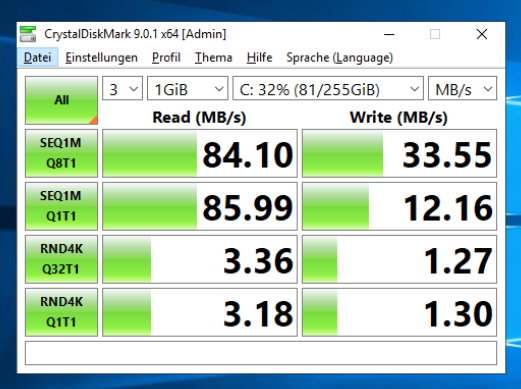
It took Server 2019 about two minutes *just to get to the boot screen spinner* and another five or so to get to the login screen. I wonder what difference a CrystalDisk benchmark will show on IDE vs VirtIO block or VirtIO SCSI
10/10/2025Folks at work have complained about a terribly slow book keeping software that takes minutes to connect to the server and sometimes to even just open simple menus and documents, putting it off as "the software is just written horribly inefficient", because the Proxmox host it runs in is fairly speedy otherwise.
Today I was tasked with installing an update to the software, lo and behold, what do I notice? The VM's system disk is attached via a virtual IDE channel. IDE! No wonder it's slow! <w<
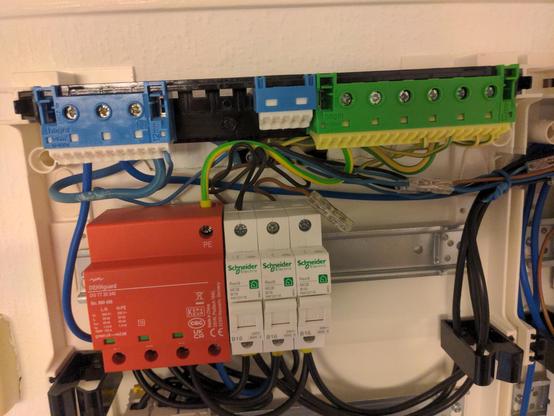
9/18/2025Like... why?
 9/18/2025
Got a new breaker panel installed, three phases coming in, three circuits going out in addition to a three-phase oven hookup. The bedroom/living room circuit is on phase 1. The office/kitchen circuit is on phase 2. The bathroom and hallway circuit is on phase 1, again. The three phase oven hookup is on phase 1 and phase 1 (two conductors of the three stuffed into a single 16A breaker), whilst the third phase chills in mid air, connected to nothing.
Something doesn't seem right here :floofWoozy:
9/15/2025Microsoft popping up a notification in the web version of Outlook in the middle of typing an e-mail which steals the focus to tell me that "Copilot is now over here!', which then activated the global shortcut handler and activates random UI elements as I'm typing out the word I was currently on...
Peak UX, Microsoft, peak UX. :neocat_woozy:
8/25/2025Hmmm, I wonder, I wonder, why my Wireguard tunnel suddenly stopped working (on UDP/51820) after I redirected all packets coming in via UDP between 10000 and 65535 to my VoIP server at the firewall. A true mystery I totally haven't spent 15 minutes figuring out... :floofWoozy:
8/20/2025Well, what a surprise - An original Pentium (P54C) at 100MHz manages about 5Mbps average upload throughput and about 3.5Mbps average download throughput doing both Wireguard tunneling and NAT on said Wireguard tunnel under Linux 6.14.9. Without Wireguard but still doing NAT, it's about 15Mbps down and 22Mbps up, which all in all is a lot quicker than I would've ever expected from that chip! :neocat_surprised:
8/12/2025When your server schedules the maintenance for you that you've been putting off for months because... time and money :floofWoozy:
(/ ran full and now begins the game of shuffling less important files onto random hard drives to free up enough space to get stuff to work again)
7/23/2025Crap, during some IPv6 mishaps in my home network, I somehow disabled the sysctl paramter 'accept_ra' for my primary interface under Debian Sid and I have no clue how, nothing in /etc/sysctl.d and /etc/sysctl.conf doesn't exist because systemd, my shell history has already rotated way past whenever I messed with that parameter and it's neither a kernel command line parameter, nor does grep on the entire filesystem give anything useful back. Oh no :neocat_googly_shocked: