
Login
You're viewing the social.telemetrydeck.com public feed.
  • May 5, 2026, 11:27 PM

    I need tech help.

    A couple years ago, I created an HTML-based website for a friend. All he needed, really, was a single index page with a few links, and a logo. No problem, made a working page and a logo, zipped it up, and sent it to him.

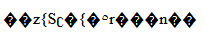
    Last year, he starts having a problem viewing his site. For some strange reason, all he sees is this string. No other text or image on the screen.

    1/3
    #TechSupportRequest #HTML #Code

    image of a strange display of 17 odd symbols in black on a white background. Nothing here makes sense.
    💬 1🔄 1⭐ 1

Replies

  • May 5, 2026, 11:30 PM

    So, I was able to CAREFULLY rework the code, fixing what I thought might be the problem. Zipped all the corrected files to him after testing in several browsers and my phone and iPad, that it did, indeed, work as intended.

    He re-installed everything, but once again, the HTML file converted to a PHP file, and he saw the same junk code on his page.

    After *deleting* all the files on his site, and reinstalling the new files, his site worked as designed.

    2/3

    💬 1🔄 1⭐ 1
  • May 5, 2026, 11:33 PM

    Alas, the problem is happening again. Something, somewhere, somehow, is changing his index.html file to index.php. He is not running any CMS and this is on a sever he built and owns.

    He wrote: For reason I do not understand, the index.html file you wrote for me keeps changing to index.php and when it does I get a short line of gibberish on a plain white screen. Any ideas what's happening?

    Then: My server is nginx, and as far as I know there's no content management system in use.

    Advice?3/3

    💬 1🔄 1⭐ 1
  • May 5, 2026, 11:56 PM

    @lisamakesstuff Random thoughts:
    - I suspect the package management system of his Linux distribution. What’s he running? Perhaps a package in it is overwriting the index files.
    - Perhaps the generated index.php file has a comment in it saying whence it was generated. Should just be a plain text file, have him cat it.

    💬 1🔄 0⭐ 0
  • 💬 0🔄 0⭐ 1
  • May 6, 2026, 12:07 AM

    @lisamakesstuff More thoughts:
    - Check the creation timestamp of the rogue file. If it’s the middle of last night then I’d be looking for cron jobs creating it. If it’s always the same date long in the past then it’s been extracted from a package.
    - On Debianish systems you can ask the package manager who owns the file with `dpkg -S /full/path/to/file`. Even an empty response is informative.

    💬 0🔄 0⭐ 0