
Login
You're viewing the mstdn.social public feed.
  • Jun 25, 2026, 12:42 AM

    Thinkpad from the trash is POST-ing!!!! Its such a cute aspect ratio

    The CPU is VERY pissy and it refused to post on a stock bios, so its running a coreboot fork i lightly modified to skip some early hardware tests to let it boot while I do more probing :> ( I feel like this becoming routine for me at this point, coreboot just lets me fix anything )

    I have another broken x60 I'm frankensteining parts from, so hopefully I can make one fully functional one in the end.
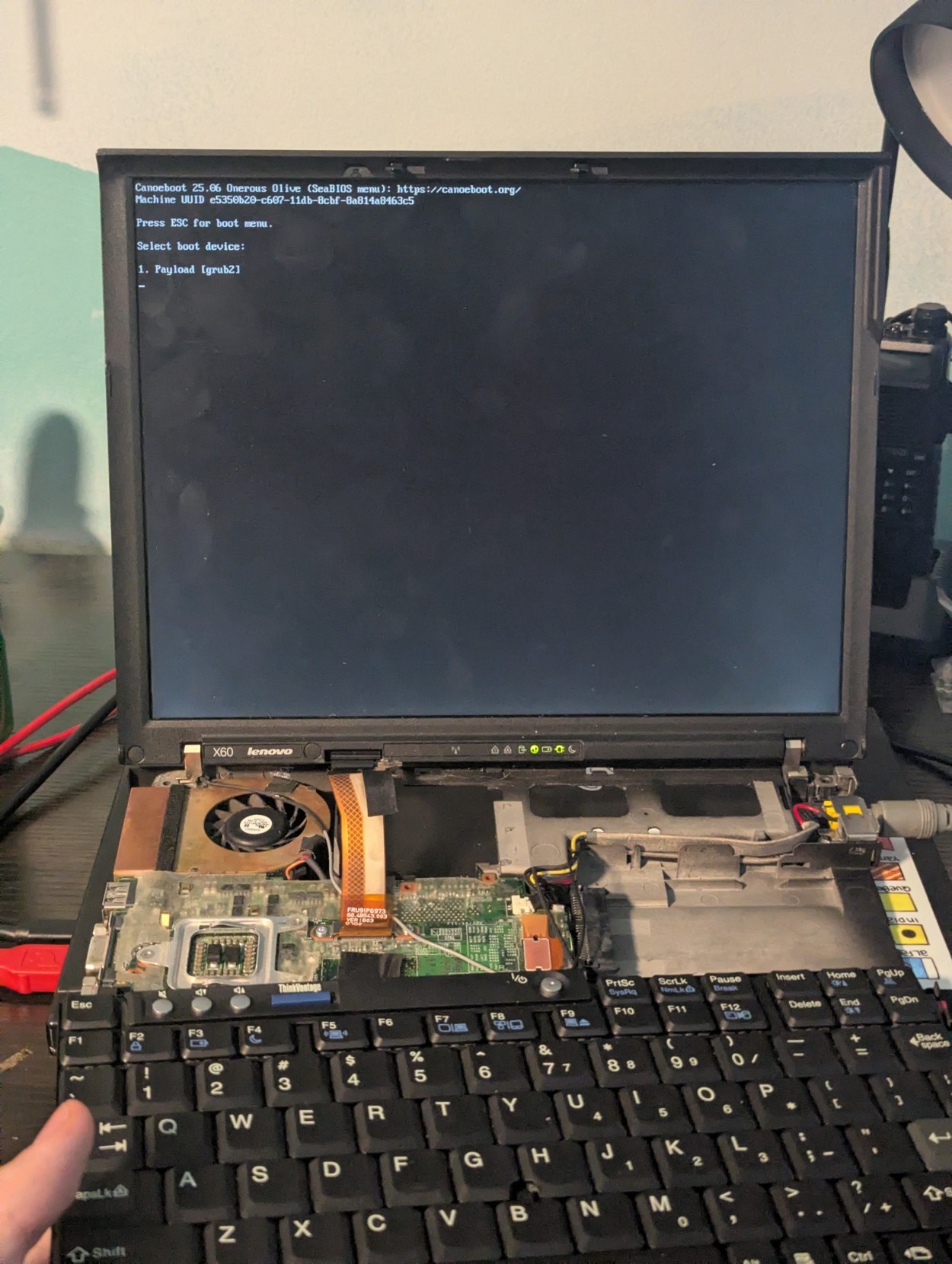
    A x60 with its internals spread apart. Tools litter its sidelines. On the dim screen is the boot prompt
    💬 1🔄 5⭐ 0

Replies

  • Jun 25, 2026, 1:07 AM

    @angelwood *whoa*

    so the CPU is partly broken, but partly functional, and it'll post with coreboot because coreboot doesn't care about the breakage or some such?

    💬 1🔄 0⭐ 0
  • Jun 25, 2026, 1:11 AM

    @pixx the cpu *appears* to be fine, and alot of the power-on tests are failing, but after post - it seems to be just fine???

    its quite strange....

    💬 1🔄 0⭐ 0
  • 💬 1🔄 0⭐ 0
  • Jun 25, 2026, 1:15 AM

    @pixx

    on the stock bios, lights turned on for a second and then immediate power off.

    then i was running a vanilla coreboot build, same issue.

    then i ran a blob-less coreboot fork with a serial console attached and it got a bit further, then gave some cryptic cpu cache error

    so then i disabled all ram and cache tests, recompiled it and it booted just fine! and im cant see any issues at all after booting, memtest86 passed just fine and the openbsd installer's shell is working

    💬 1🔄 0⭐ 0
  • Jun 25, 2026, 1:17 AM

    @angelwood

    ....uhhhhh hm. I'd be... very, very hesitant to trust that. It's possible one of the CPU caches has worn down?

    I wonder if that coreboot build might be just, turning it off?

    Is performance in line with expected for that CPU in an x60?

    💬 1🔄 0⭐ 0
  • Jun 25, 2026, 1:18 AM

    @angelwood (you can always tell me to shut up; I'm just being curious, not trying to tell you what to do :)

    💬 1🔄 0⭐ 0
  • Jun 25, 2026, 1:22 AM

    @pixx oh no its fine dont shut up :)

    im not going to use the computer for anything serious anyways, its just for experimentation :)

    i didnt turn off any of the cpu caches in the build i did, just the poweron tests of them, so it might be a false positive on the test side??

    ill be running a stresstest overnight and see if it's still alive in the morning, then work from there

    💬 1🔄 0⭐ 0
  • Jun 25, 2026, 1:24 AM

    @angelwood I wonder. IIRC the caches on ARM CPUs have to be turned on explicitly, and are off at boot; I'd be unsurprised if the same is true for x86.

    Soooo it's possible that that initialization fails, the BIOS detects it and freaks out?

    and your current build, since it's not testing them, doesn't care? i.e. the tests might notice the cache not working, but if you're not testing it, you just silently accept the performance hit?

    💬 1🔄 0⭐ 0
  • Jun 25, 2026, 1:33 AM

    @pixx i dont know anything about ARM, but i do i know that during boot on x86 it treats a small portion of the cache as ram in the "Ram-As-Cache", then the bios is loaded into cache to start bringing up the real ram chips...

    So a portion of cache must be working for it to be able to unpack the bios into it, but not enough for the tests to pass??

    💬 0🔄 0⭐ 0