Login
You're viewing the mstdn.social public feed.
  • Apr 13, 2026, 6:06 PM

    Managed deployment of Cisco Secure Client on macOS is easy 😊

    – What are you talking about?!?

    Many of us have for years tried to deploy the “predeploy” pkg prom the downloaded dmg. Either using InstallerChoices to select which components to install, or splitting (repackaging) the meta-package into individual installers to make sure only the needed ones are installed.

    But this procedure is NO MORE!

    Image attached toot
    💬 2🔄 2⭐ 0

Replies

  • Apr 13, 2026, 6:10 PM

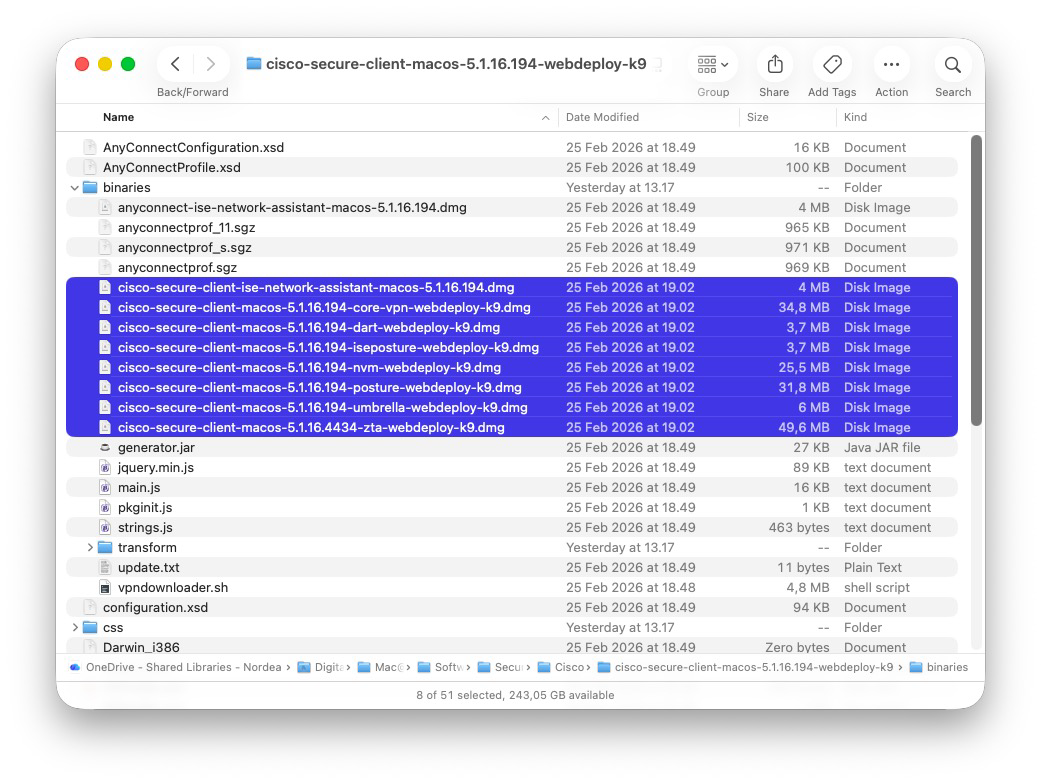
    The correct package to deploy from is “webdeploy”! It’s downloaded as a pkg, which could look like a macOS installer pkg, but it is actually a zip-archive. Yes, even Cisco knows that if you need to cheat your download through web filters, you should rename your zip-archives to .pkg 😃

    Rename the webdeploy pkg so it ends in “.zip”, then expand it, and go to the “binaries” folder. In here are the individual installer separated into dmg-files, so just grab the installers you need.

    Image attached toot
    💬 1🔄 0⭐ 0
  • Apr 13, 2026, 6:11 PM

    Cisco is still in the works of making some documentation to support this, so maybe we get more details later. But this IS the recommended procedure from Cisco to install Cisco Secure Client on macOS.

    I will recommend to hide the uninstaller apps afterwords, by running a script that gives them the hidden flag, so users do not easily see these.

    💬 1🔄 0⭐ 0
  • 💬 0🔄 0⭐ 0
  • 💬 0🔄 0⭐ 0