Login
You're viewing the functional.cafe public feed.
  • Nov 14, 2026, 8:48 PM

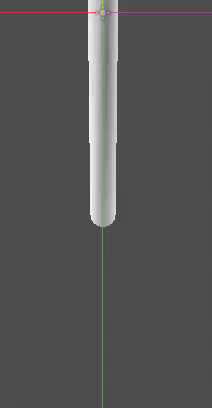
    ETA: I made one with the AnimationPLayer and two Line2Ds. Attached!

    How would you, in Godot, 2D, make a goo drop effect?

    Imagine a side view as goo slowly dangles and then breaks-free and falls as a drop.

    Shader? Particles? Some kind of line2d magic?
    #GodotEngine

    Short video showing an animation of a blob of goo falling from a .. another? Ewwwwww!
    💬 3🔄 0⭐ 1

Replies

  • Nov 14, 2026, 9:08 PM

    @dbat Probably shaders, in a deferred style. My mind immediately comes to distance fields, since they are an easy way of generating droopy visuals:

    1. Draw goo objects to a buffer as a mask;
    2. Run jump-flood on it to make the mask into a distance field;
    3. Render that distance field to the screen with a goop shader, using the distance field to even generate normals/lighting.
    💬 1🔄 0⭐ 2
  • 💬 1🔄 0⭐ 0
  • Nov 14, 2026, 11:17 PM

    @dbat A bit more concretely in Godot terms in sentence case, and things you're supposed to look up in quotes:

    1. Set up a separate Viewport where your goo objects get drawn to, with a black background, with just a plain white unlit shader;
    2. Create a CompositorEffect (post process shader) that implements "jump-flood", outputting the distance, and attach to the Environment of that viewport;
    3. Create a shader that reads the ViewportTexture above, and outputs the goo material:
      • At the most basic, you'll check if the distance against some positive threshold, emitting a solid color if it's smaller, and transparent if greater;
      • You can also use the "central difference method" to find the direction of the surface, to use for lighting
        • Since you're talking 2D, you can use the "fwidth" function over the color you sampled from the distance texture.
    4. Add a plane that covers the screen that uses the material from the previous step, and put it in the correct layer/sort order you want for the goo to appear in.
    💬 2🔄 0⭐ 2
  • 💬 0🔄 0⭐ 0
  • 💬 0🔄 0⭐ 1
  • Nov 14, 2026, 9:21 PM

    @dbat Shaders fs. Not sure about Godot specifically, but I'm sure you could do some signed distance fields (SDF) (which are just a distance equation where you take everything below a set value as "opaque". when two SDFs overlap, their distances combine in a way that looks goopy)

    I've done this exact effect using a rectangle SDF for the surface thats just outside of view/ outside the quad UVs, and a circle SDF for the drop. in one shader

    💬 1🔄 0⭐ 0
  • 💬 1🔄 0⭐ 0
  • 💬 1🔄 0⭐ 0
  • 💬 0🔄 0⭐ 0
  • Nov 14, 2026, 10:59 PM

    @dbat a cheaper route than full SDF is a little verlet chain of 4 or 5 points drawn with a Line2D, fat at the bottom with a width curve. when the bottom segment stretches past some length you cut it and spawn a round drop sprite, squash it a bit on impact and it reads as goo pretty well

    💬 1🔄 0⭐ 0
  • 💬 0🔄 0⭐ 0