Kevs 🦄kevinrpb@mastodon.social
Sep 21, 2024, 11:57 PMThe reason behind building this app is that the official Twitch app is... uncomfortable, at best. Sure, you have access to the chat, but it will never take more than half of the space? (even if you disable video playback). Sometimes I want to chat from the couch while I'm watching on my TV!
Also, it doesn't support all emotes. You get access to the Twitch emotes, but what about FrakerFazeZ? BetterTwitchTV? If there's anything Twitch chatter loves sure is emotes!
(2/x)
Now, there are some third-party apps available for iOS. But none of the good ones are native! The best ones I know of are Chatsen and Frosty, both built with Flutter.
These are really good apps, and I even really like Frosty's design (Chatsen seems out of place in iOS, IMO). But I wondered if there could be a native app built in Swift. And so I started to work on it.
https://github.com/tommyxchow/frosty
https://github.com/chatsen/chatsen
(3/x)
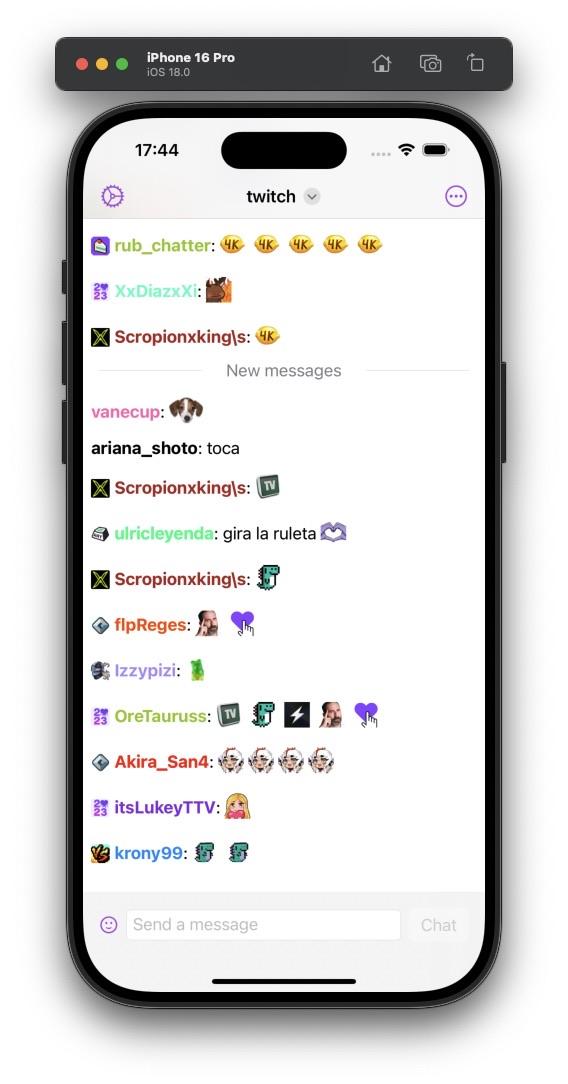
The app will let you join any number of chats simultaneously, and let you switch between them from the title menu, which is a new-ish feature in iOS that I love.
(4/x)

It has all the Twitch chat goodies, including emote support for Twitch, FFZ and BTTV.
(I'm not 100% sure on this UI yet, I know the header bit looks odd).
(5/x)
@SwiftUI

The feature I'm most proud of is animated emotes. It's nothing crazy in and out of itself. But if you have tried to get GIFs to render in SwiftUI you may know that it also not trivial.
The crazy part? Those GIFs you see are not SwiftUI Images*. They are Text. Actually, every message in chat is just a Text view!
*They kinda are Images, but keep reading to understand what I mean.
(6/x)
I am really happy with the implementation to render these emotes in text. Both badges and static emotes are just a Text(Image(uiImage:)) element. They are then concatenated to form the whole message.
In order to be able to follow this approach, I download the images and use the UIImage to initialize the SwiftUI image. One important bit here is matching the text size. I am using the current DynamicType setting to resize the images so they are always scaled to the text.
(7/x)
Now for the animated emotes... They are also defined in the view hierarchy as a Text(Image(uiImage:)). However! The magic to make them animate is to make use of the new TextRenderer protocol.
When I have to add an animated emote to the hierarchy, I add it as an Image with the first frame. I also add a custom TextAttribute to it that contains all the needed images to render the animation.
(8/x)
Then, I wrap the chat message in a TimelineView to drive the animation. The timeline context is passed to the text renderer, which then reads the attribute to get the necessary frames, and uses the timeline context to pick which frame needs to be rendered
The relevant WWDC session (https://developer.apple.com/videos/play/wwdc2024/10151/) and the snippets shared by @dlx were really helpful in getting comfortable with the renderer, which is an extremely powerful tool in SwiftUI.
(9/x)
Other than that, the app will support things that you'd probably expect from it. Some obvious ones are searching for channels (duh) or viewing the details of a specific channel (so you can see the name of that juicy emote).
(These UIs are WIP at the moment).
(10/x)


I also want to allow some form of customization, at the minimum setting a color scheme override and setting an accent color.
I have also implemented opt-in into using https://recent-messages.robotty.de/, which allows loading the recent history of a chat (if available) on joining it.
(11/x)

I have many more features in the backlog, but the app is now in an MLP state that I am happy to share.
I need to do a bit of polishing and fix a few bugs, but hopefully I will be able to send it to TestFlight in the next couple weeks.
I also want to keep updating this thread with the progress I make.
(12/x)