
Login
You're viewing the blob.love public feed.
  • Oct 17, 2026, 8:12 PM

    If you use the Libby app with your local library, it has a set of options that let you filter out various kinds of AI-generated material. They're in the app settings under Content Controls: AI Contributions.
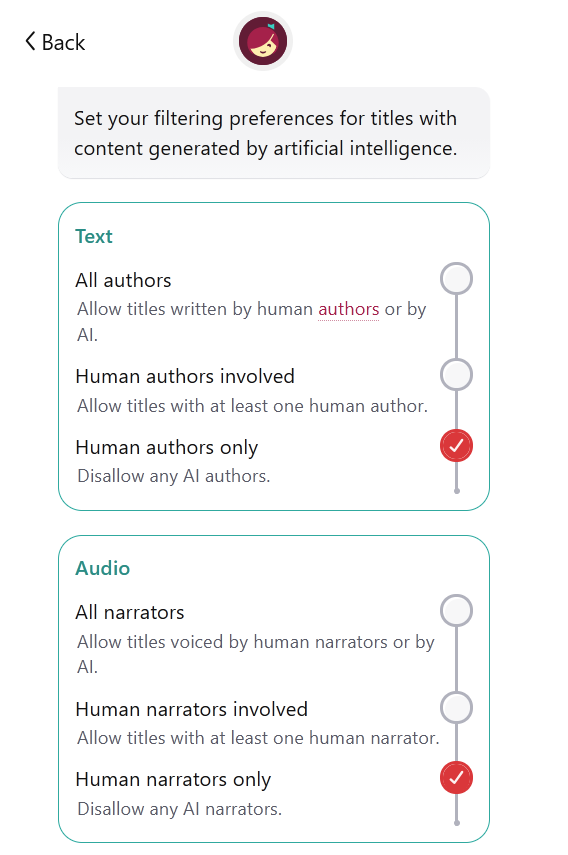
    Set your filtering preferences for titles with content generated by artificial intelligence.

TEXT

All authors: allow titles written by human authors or by AI.
Human authors involved: allow titles with at least one human author.
Human authors only: disallow any AI authors.

AUDIO

All narrators: allow titles voiced by human narrators or by AI.
Human narrators involved: allow titles with at least one human narrator.
Human narrators only: disallow any AI narrators.
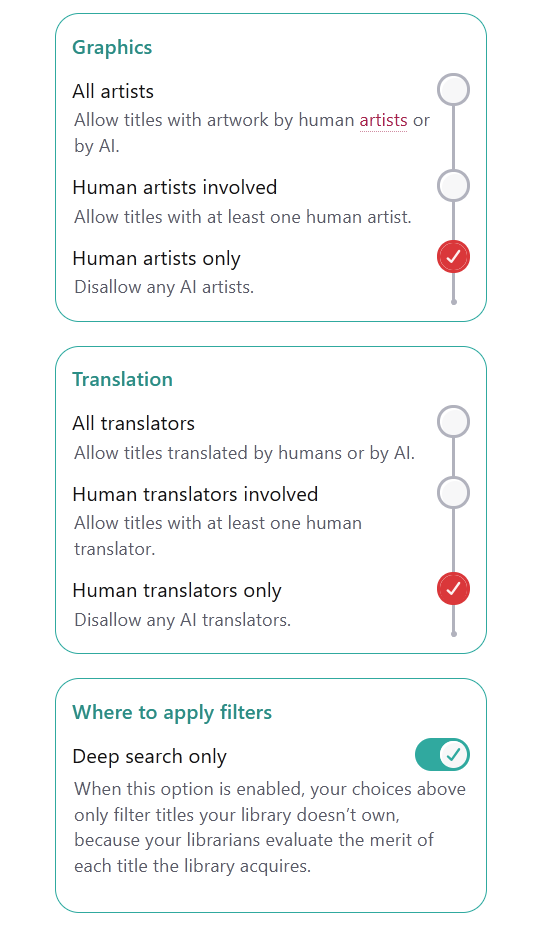
    GRAPHICS

All artists: allow titles with artwork by human artists or by AI.
Human artists involved: allow titles with at least one human artist.
Human artists only: disallow any AI artists.

TRANSLATION

All translators: allow titles translated by humans or by AI.
Human translators involved: allow titles with at least one human translator.
Human translators only: disallow any AI translations.

WHERE TO APPLY FILTERS

Deep search only: when this option is enabled, your choices above only filter titles your library doesn't own, because your librarians evaluate the merit of each title the library acquires.
    💬 5🔄 107⭐ 85

Replies

  • Oct 17, 2026, 8:33 PM

    @jalefkowit But you need to turn "deep search only" OFF, I've heard, because otherwise it won't filter books that are already in your local library.

    💬 1🔄 0⭐ 1
  • Oct 17, 2026, 8:34 PM

    @irina I'm giving my librarians the benefit of the doubt for now. If it turns out they're buying slop I will flip that switch too

    💬 0🔄 0⭐ 0
  • Oct 17, 2026, 10:25 PM

    @jalefkowit

    FYI, for anyone not seeing the AI options, scroll down to the version number on the settings page. Mine had a version number hotlink that added the AI options after I hit it.

    💬 0🔄 1⭐ 0
  • 💬 0🔄 0⭐ 2
  • 💬 0🔄 0⭐ 0
  • Oct 17, 2026, 11:37 PM

    @jalefkowit
    I love how it changes the color to red when you select human only, as if to tell you that you're making the wrong choice. That has to be intentional.

    💬 1🔄 0⭐ 1
  • Oct 18, 2026, 2:54 PM

    @jargoggles its greenish/yellowish/red in the standard go/slow/stop orientation of a stoplight dawg

    💬 1🔄 0⭐ 0
  • Oct 18, 2026, 3:21 PM

    @nora
    Right, which is why in UI terms, green means everything's good, yellow means caution, and red indicates something is wrong. Warnings are yellow, errors are red.

    If you make a dashboard where something turns red when you make a change, I guarantee that almost everyone's immediate thought will be that they did something wrong.

    💬 1🔄 0⭐ 0
  • 💬 1🔄 0⭐ 0
  • Oct 18, 2026, 4:39 PM

    @nora
    I mean, weird trollish antagonism aside, the constant dark patterns we all have to navigate as part of day-to-day life is something my therapist has brought up as an extremely common contributor to baseline anxiety and stress. So I guess, kinda sorta?

    💬 1🔄 0⭐ 0
  • Oct 18, 2026, 4:49 PM

    @jargoggles you're not really drawing reasonable conclusions from that hypervigilance. you could just be ingroup signaling and spreading your own anxiety around, i guess, then it will not really help

    💬 1🔄 0⭐ 0
  • Oct 18, 2026, 5:51 PM

    @nora
    I can't tell if you genuinely believe that nobody involved in designing the Libby app understands that colors mean things or if you're just jumping into a random conversation to make bizarrely ableist remarks about a complete stranger out of boredom. The way you're playing mad libs with therapy lingo makes it seem like the latter.

    💬 0🔄 0⭐ 0
  • Oct 18, 2026, 2:49 PM

    @jalefkowit the libby app is so fucking good at helping surface interesting things it makes me mad about the entire rest of everything. being able to hide children's titles and show only first books in a series and use random sorting is incredible

    💬 1🔄 1⭐ 6
  • 💬 0🔄 0⭐ 0