Login
You're viewing the techdon.dev public feed.

Replies

  • Sep 8, 2026, 10:39 PM

    Advanced Programming in the #UNIX Environment

    Week 01, Segment 01: Introduction

    In this video lecture, we provide an introduction, discuss the purpose of the class, the syllabus, student expectations, as well as available resources.

    Note: The videos in this series were mostly created in 2020. A few things have changed since then. Specifically, consult the course website for updates regarding the assignments.

    youtu.be/BsB9Cg6yJc4

    💬 0🔄 12⭐ 14
  • Sep 10, 2026, 3:45 PM

    Advanced Programming in the #UNIX Environment

    The objective of this class is to learn and understand the interfaces, libraries and concepts we cover as well as to actually write code. This requires struggling with code, to work your way through your problems rather than copy together AI generated snippets and pasting errors into a prompt.

    Below are my updated slides on the use of AI in this class, and this is our policy:

    stevens.netmeister.org/631/use

    Screenshot of lecture slides "Use of AI":

LLMs are inherently problematic:
Based on unapologetic exploitation of Intellectual Property
Reinforcement of biases and power structures in the training set (GIGO)
Concentration of power in the hands of a small number of US companies
Convergence on Meh
Reckless practices by AI companies, including attacks on other companies and generation of CSAM
Your use of AI helps AI companies make better autonomous killing machines
Massive environmental impact and exacerbation of global warming
    Screenshot of lecture slide "Ethics aside..."

AI can be useful when writing code, but the code is generates requires scrutiny.

Being able to identify problem with somebody else’s code requires you to be able to fully understand the code, the problem space, the constraints, the edge conditions.

LLMs generate plausible looking code, but reviewing and debugging code that intuitively looks correct requires double the effort and experience — i.e., not a task for junior developers.

In order to supervise AI, you need to fully understand the problem you’re trying to use AI to solve.
    Screenshot of lecture slied "Don't be a Meat Proxy"

Meat proxy
A person who forwards AI-generated text, code, or other output without reading, understanding, or validating it. The person acts only as a relay between the AI system and the intended recipient.


If all you do is paste problem statements into the LLM and copy/paste the response… then why do we need you?

Being a meat proxy is not a skill; it’s the choice of reducing your value and offer yourself up as tribute.
    Screenshot of lecture slide "Use of AI"

Telling AI to write (code) is not the same as learning to write (code).  You can only get better at writing (code) by actually writing (code), kind of badly at first, struggling with it, and figuring out what works.
Using AI to complete your coding assignments is like asking somebody else to go to the gym for you.  You’re here to learn, to exercise, to build muscle.

The use of AI in this class is strictly prohibited.
This includes writing emails, READMEs, or other text.

https://stevens.netmeister.org/631/use-of-ai.html
    💬 1🔄 8⭐ 16
  • Sep 11, 2026, 3:13 PM

    Advanced Programming in the #UNIX Environment

    In this class, we use #NetBSD as our reference platform. In addition to our shared shell server, here are some ways you can install NetBSD:

    - put it on e.g., your laptop: netbsd.org/docs/guide/en/chap-

    - use VirtualBox: stevens.netmeister.org/631/vir

    - use UTM: stevens.netmeister.org/631/utm/ (Video instructions: youtu.be/hCqfmuG5Acc )

    - use or create an AWS image: stevens.netmeister.org/615/net

    - create your own NetBSD #Linode: netmeister.org/blog/netbsd-on-

    💬 0🔄 5⭐ 10
  • 💬 0🔄 5⭐ 13
  • Sep 13, 2026, 7:16 PM

    Advanced Programming in the #UNIX Environment

    Week 1, Unix Basics

    We write our first trivial program, which promptly segfaults and gives us a chance to explain function forward declarations and maneuvering man pages and set our default compiler flags ("-Wall -Werror -Wextra"), then proceed to write the most trivial versions of cat(1), ls(1), and even a rudimentary shell including a signal handler.

    youtu.be/w3spRzZ8bSA

    Slides: stevens.netmeister.org/631/01-

    💬 0🔄 6⭐ 9
  • Sep 16, 2026, 8:49 PM

    Advanced Programming in the #UNIX Environment

    Week 2: File Descriptors

    To introduce the concept of file descriptors, let's start with a simple question: how many file descriptors can a unix process open? Finding the answer helps us introduce a few different limits that may apply across the system, for a given user, or just a process.

    As a fun exercise, try setting "ulimit -n 0" in your shell and see what happens. Can you explain why?

    youtu.be/h5A1OQjuCqk

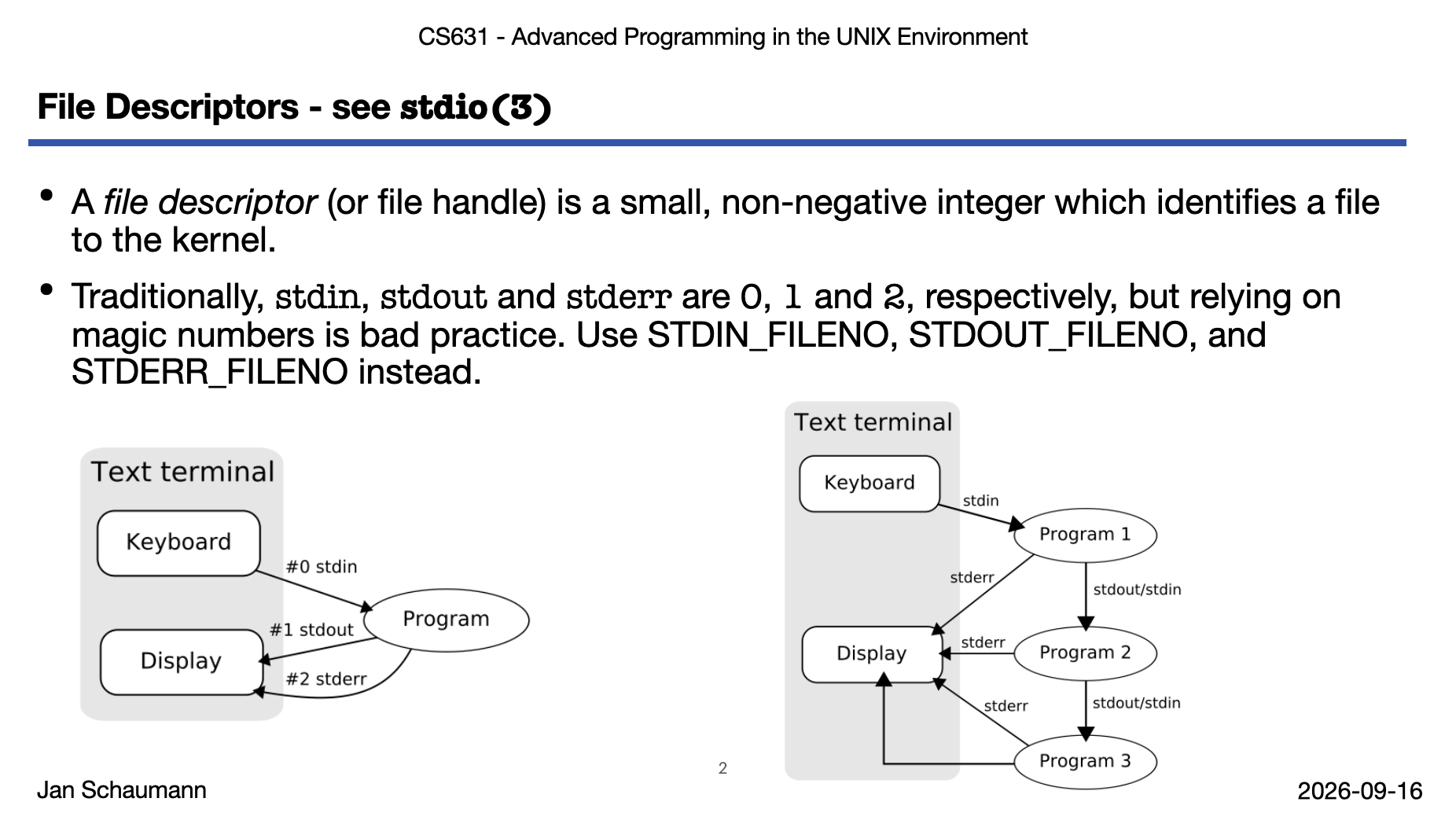
    Presentation slides showing an illustration of file descriptors connected from the terminal to a single program as well as to two programs in a pipe.

Additional bullet points:
A file descriptor (or file handle) is a small, non-negative integer which identifies a file to the kernel.

Traditionally, stdin, stdout and stderr are 0, 1 and 2, respectively, but relying on magic numbers is bad practice. Use STDIN_FILENO, STDOUT_FILENO, and STDERR_FILENO instead.
    💬 0🔄 3⭐ 7
  • Sep 18, 2026, 12:36 PM

    Advanced Programming in the #UNIX Environment

    Week 2: open(2) and close(2)

    Having introduced the concept of file descriptors, let's look at what happens when we try to create a file, "create" an existing file, open an existing file, truncate a file, and look at the various other flags we can pass to open(2). We also note the perhaps surprising number of ways in which open(2) can fail and take a look at openat(2) and TOCTOU defenses.

    youtu.be/QnL4eYpb5Iw

    💬 0🔄 5⭐ 7
  • Sep 19, 2026, 7:56 PM

    Advanced Programming in the #UNIX Environment

    Week 2: read(2)/write(2)/lseek(2)

    In this video lecture, we will go into the details of the read(2), write(2), and lseek(2). We'll also do a few weird things with file descriptors, and take a look at how we can ensure I/O efficiency when making these system calls.

    youtu.be/EUUPw8MOV_A

    💬 0🔄 4⭐ 4
  • Sep 20, 2026, 7:50 PM

    Advanced Programming in the #UNIX Environment

    Week 2: File Sharing

    In this final video lecture segment for our week 2 materials, we take a look at what it means when multiple processes access the same files and what the implications of that are on the syscalls we know. We conclude with a look at /dev/fd on different operating systems, including #NetBSD, #macOS, and #Linux.

    youtu.be/CAbUtc86ULw

    💬 0🔄 7⭐ 12
  • Sep 22, 2026, 3:09 PM

    Advanced Programming in the #UNIX Environment

    Week 3: stat(2) intro

    In this video lecture, we meet our new best friend, the 'struct stat'. We'll cover the stat(2) system calls and begin discussing each of the fields in the struct, often by example of the ls(1) and stat(1) commands. In this way, we begin learning more about how the Unix File System is implemented.

    (Note that the output of stat(1) on #NetBSD is different from that on #Linux.)

    youtu.be/veFwXrEHPsk

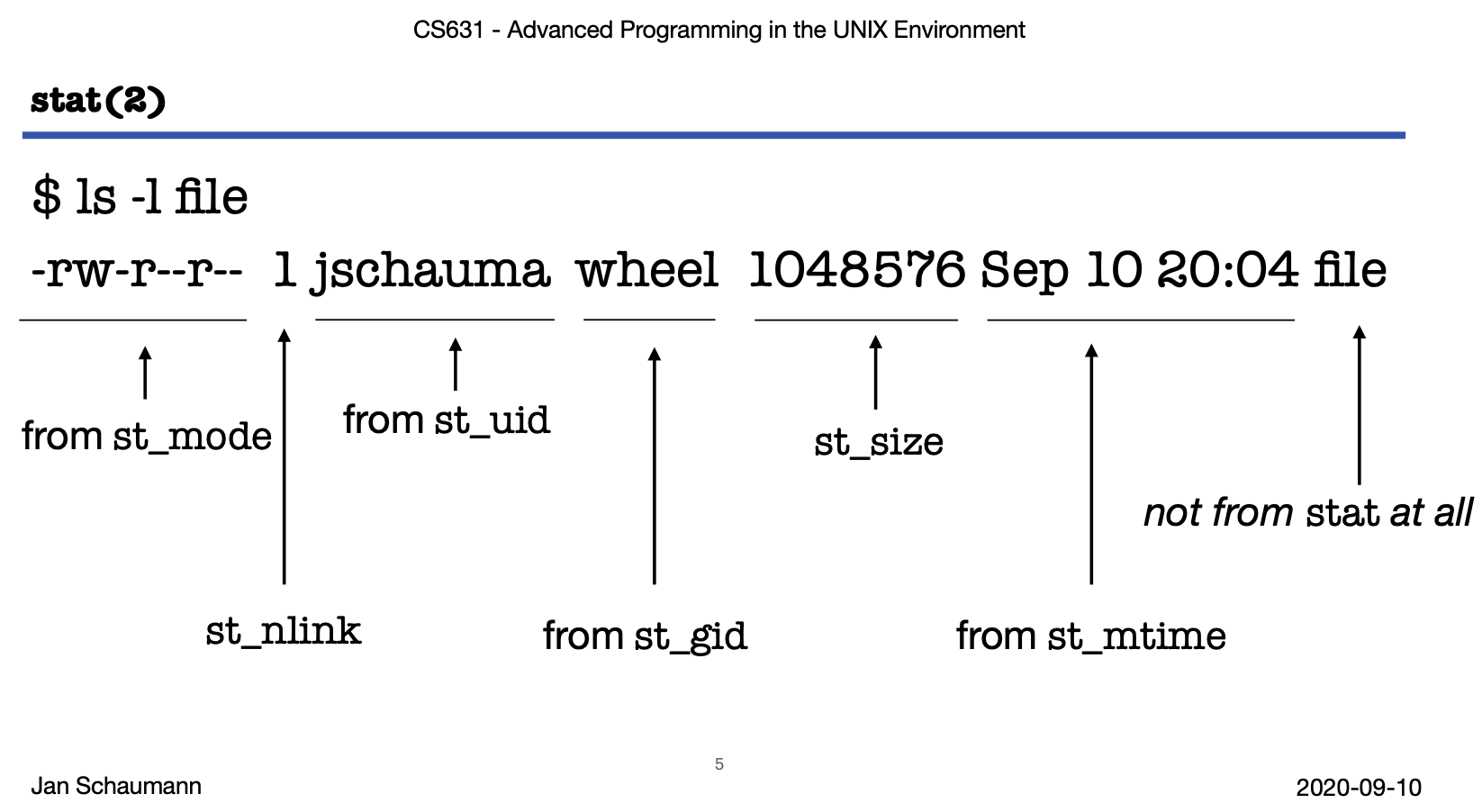
    $ ls -l file
-rw-r--r-- 1 jschauma wheel 1048576 Sep 10 20:04 file

"-rw-r-r-" from st_mode
1 st_nlink
"jschauma" from st_uid
"wheel" from st_gid
1048576 st_size
Sep 10 20:04  from st_mtime
file not from stat at all
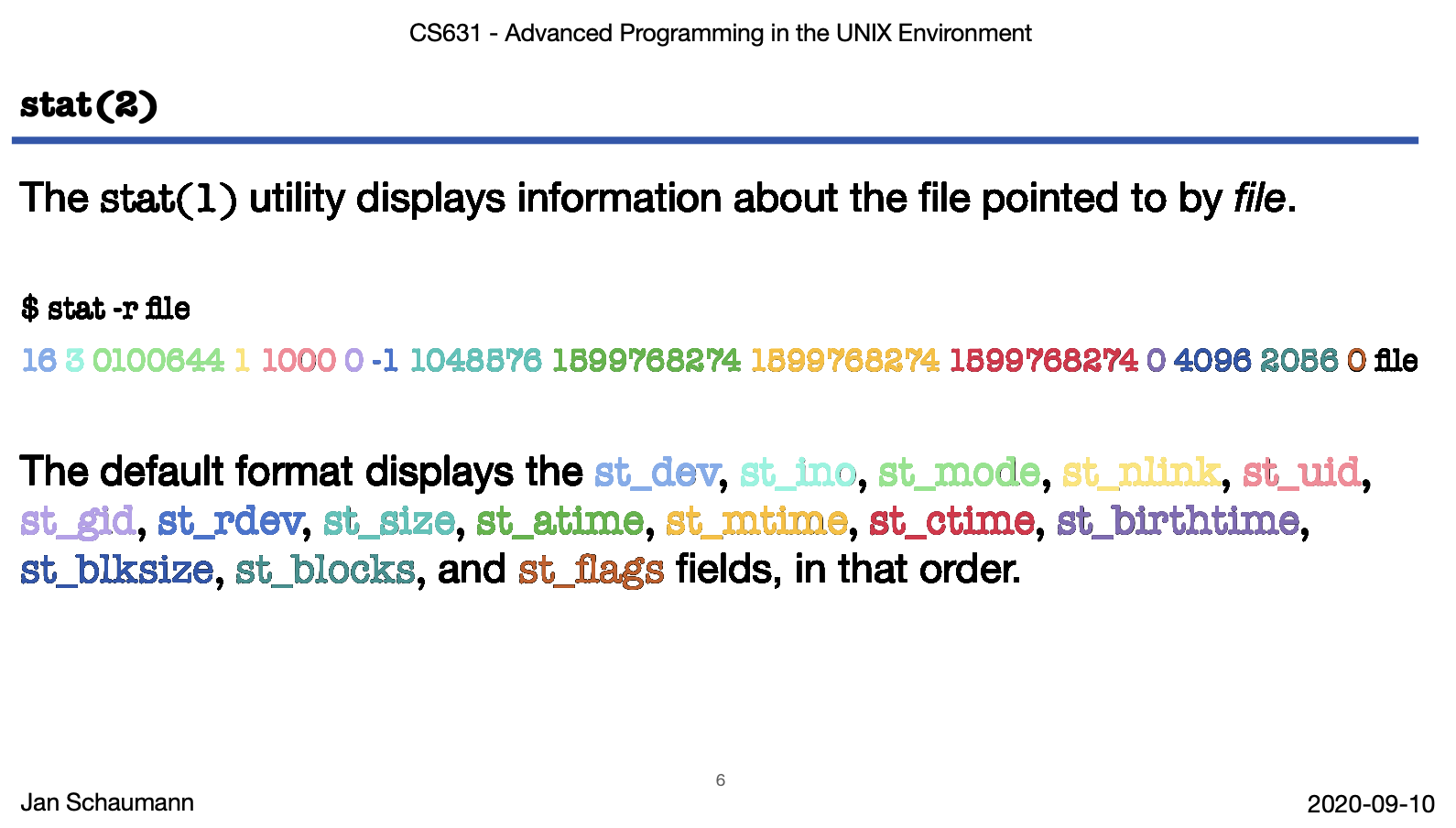
    The stat(1) utility displays information about the file pointed to by file.

$ stat -r file
16 3 0100644 1 1000 0 -1 1048576 1599768274 1599768274 1599768274 0 4096 2056 0 file

The default format displays the st_dev, st_ino, st_mode, st_nlink, st_uid,
st_gid, st_rdev, st_size, st_atime, st_mtime, st_ctime, st_birthtime,
st_blksize, st_blocks, and st_flags fields, in that order.
    💬 0🔄 1⭐ 8
  • Sep 23, 2026, 9:10 PM

    Advanced Programming in the #UNIX Environment

    Week 3: UIDs and GIDs

    In this video lecture, we'll learn a little bit more about file ownership and the user IDs of a process (real, effective, saved) by looking at the seteuid(2) and setuid(2) system calls and experimenting with setting the setuid bits and observe the file access we gain.

    youtu.be/YlcF3ncTQpo

    💬 0🔄 4⭐ 5
  • Sep 24, 2026, 6:42 PM

    Advanced Programming in the #UNIX Environment

    Week 3: struct stat st_mode

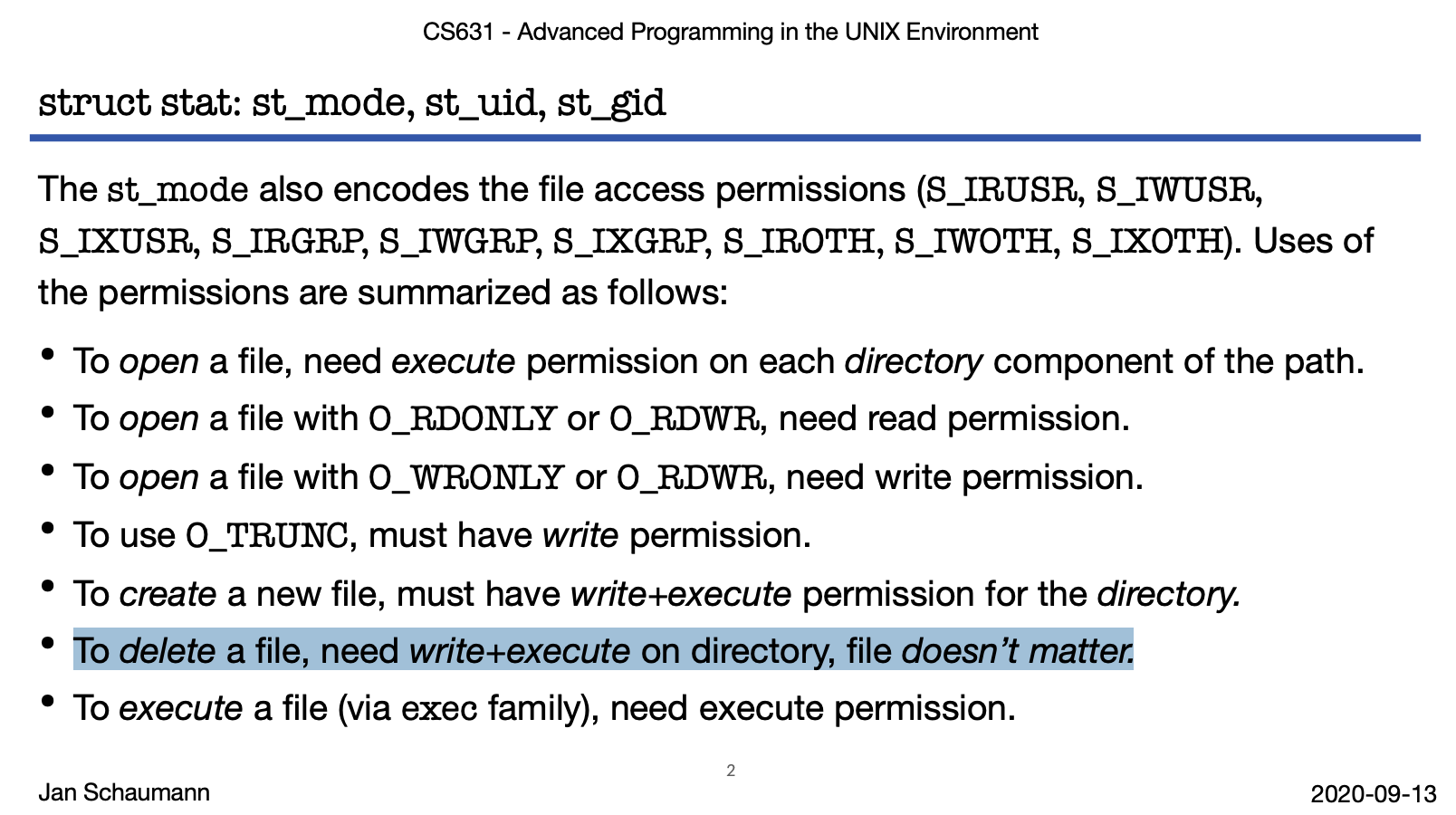
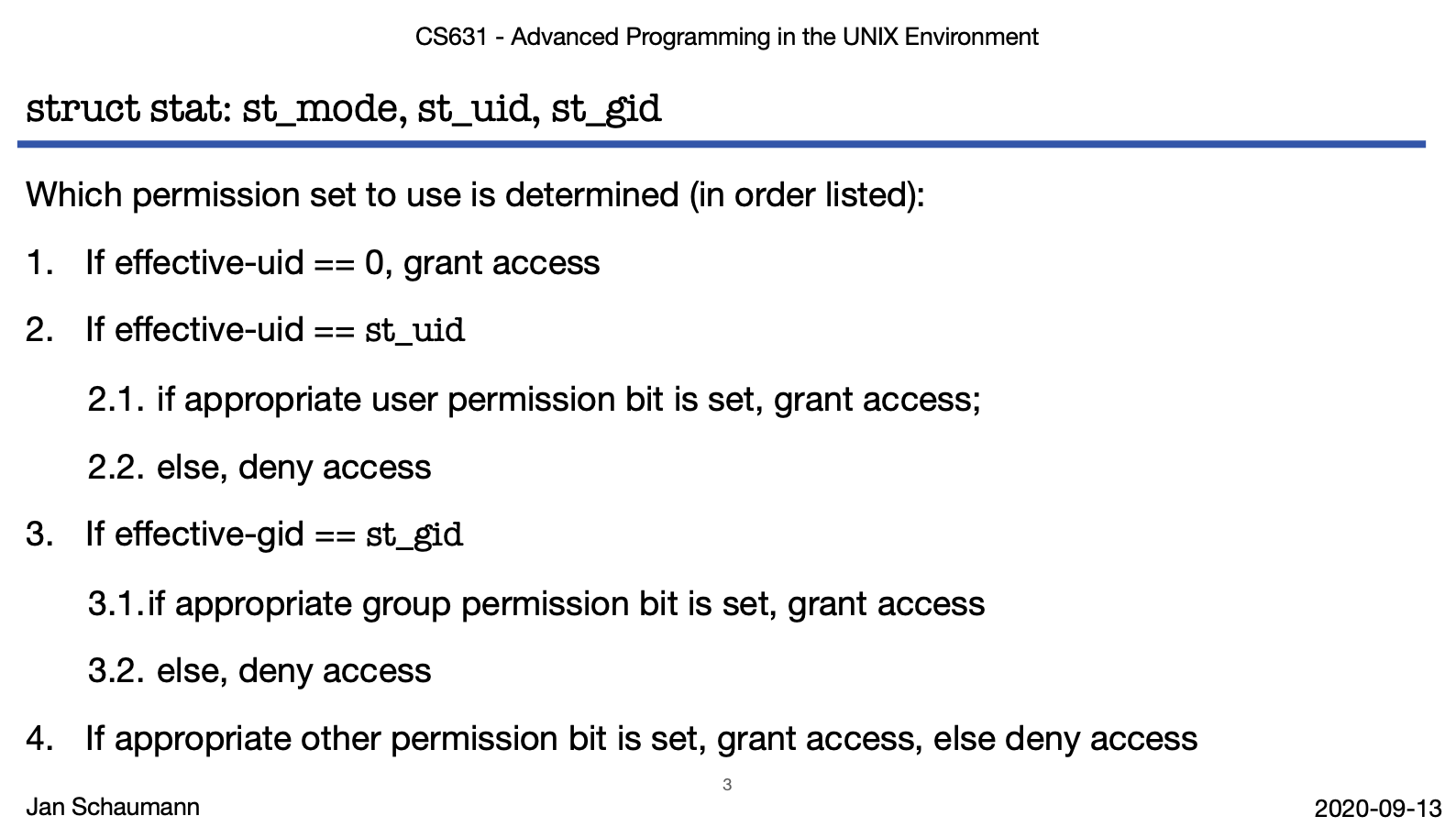
    In this video segment, we're looking at how the traditional permissions defined in the `struct stat st_mode` are applied. You want to pay particular attention to the permissions on directories and the order in which they are checked. One thing that often surprises newcomers is that to delete a file, Unix does not care about the permissions on the _file_, only on the directory it's in.

    youtu.be/vS6abFjN3ZY

    The st_mode also encodes the file access permissions (S_IRUSR, S_IWUSR,
S_IXUSR, S_IRGRP, S_IWGRP, S_IXGRP, S_IROTH, S_IWOTH, S_IXOTH). Uses of
the permissions are summarized as follows:
• To open a file, need execute permission on each directory component of the path.
• To open a file with O_RDONLY or O_RDWR, need read permission.
• To open a file with O_WRONLY or O_RDWR, need write permission.
• To use O_TRUNC, must have write permission.
• To create a new file, must have write+execute permission for the directory.
• To delete a file, need write+execute on directory, file doesn’t matter.
• To execute a file (via exec family), need execute permission.
    Which permission set to use is determined (in order listed):
1. If effective-uid == 0, grant access
2. If effective-uid == st_uid
2.1. if appropriate user permission bit is set, grant access;
2.2. else, deny access
3. If effective-gid == st_gid
3.1.if appropriate group permission bit is set, grant access
3.2. else, deny access
4. If appropriate other permission bit is set, grant access, else deny access
    💬 0🔄 4⭐ 3
  • Sep 25, 2026, 6:03 PM

    Advanced Programming in the #UNIX Environment

    Week 3: chmod(2) and chown(2)

    Having seen a lot of examples in our previous videos of creating files, changing their ownership, changing their permissions, we now focus on the system calls that are used to implement the chmod(1) and chown(8) commands.

    youtu.be/5MJmCanZDyk

    💬 0🔄 3⭐ 3
  • Sep 26, 2026, 3:33 PM

    Advanced Programming in the #UNIX Environment

    Week 3: umask(2)

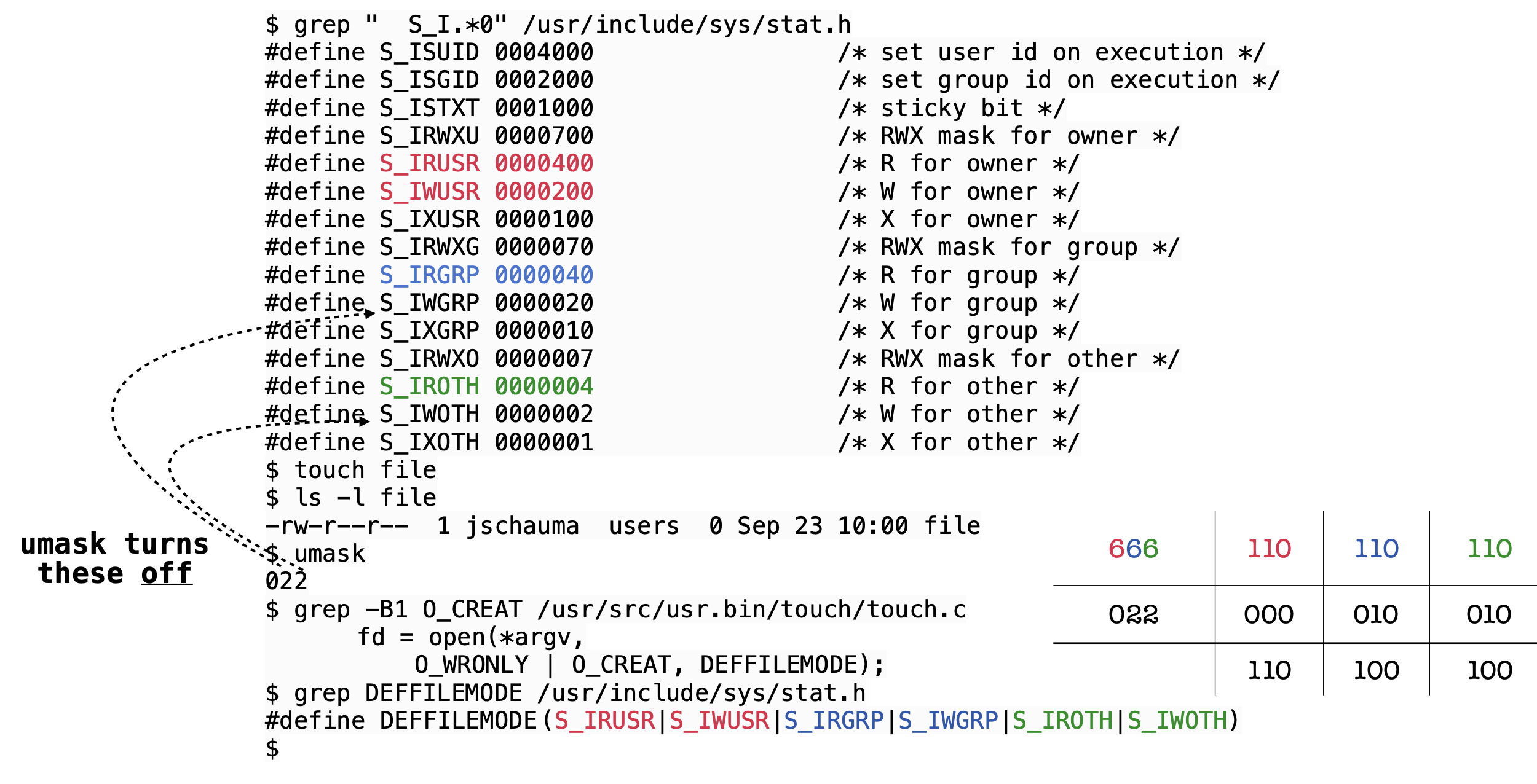
    In this video lecture, we'll take a look at what file ownership and permissions are applied when we create a new file. In the process, we'll learn about the concept of a process's "umask", and look at how the 'umask' shell built-in is implemented.

    youtu.be/bRAR2bv2HSM

    💬 0🔄 5⭐ 6
  • Sep 27, 2026, 4:21 PM

    Advanced Programming in the #UNIX Environment

    Week 3 (and 4, kind of): Union Mounts and Whiteout Files

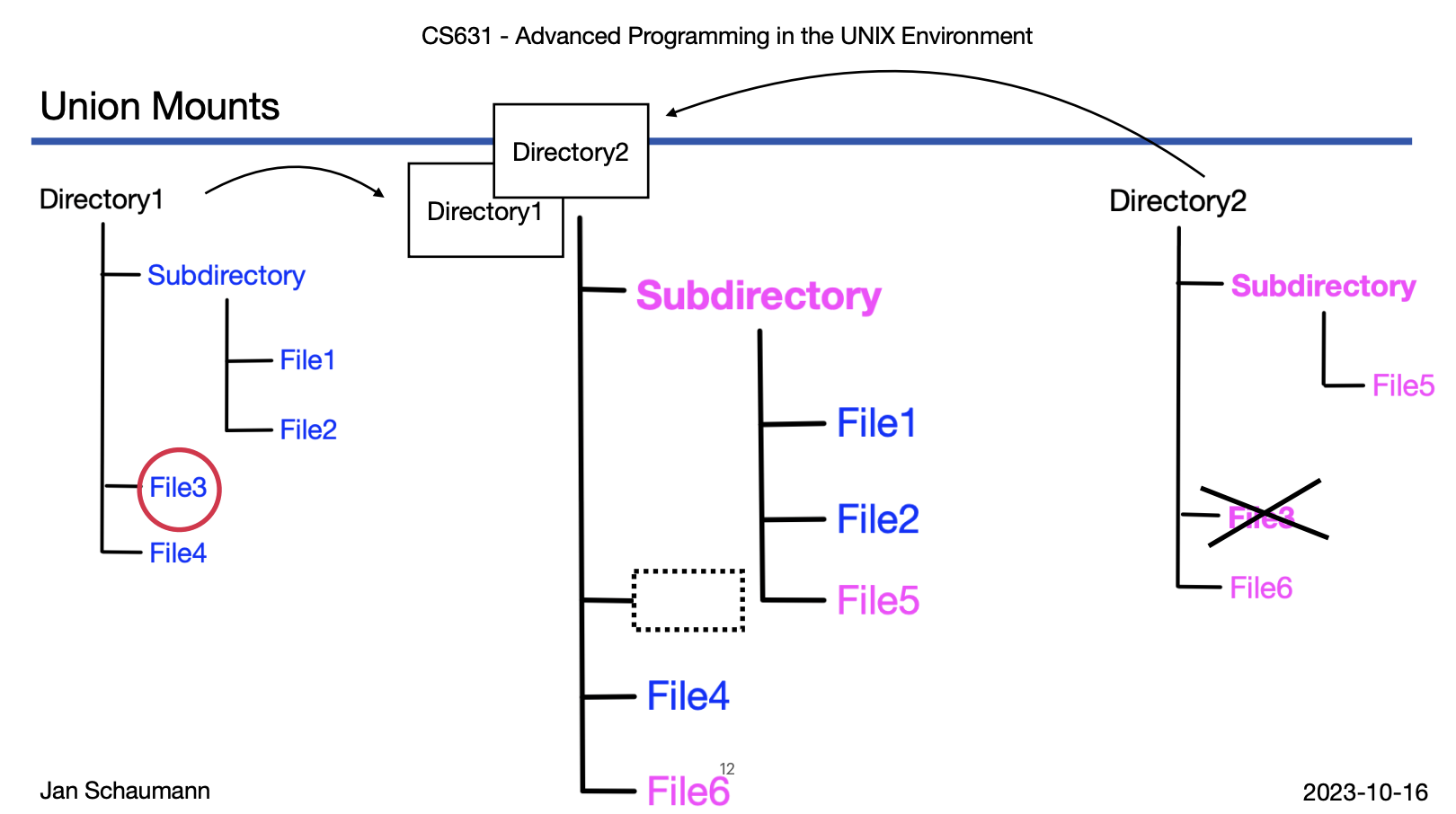
    One of the file types we've encountered are those of type S_IFWHT, so called "whiteout" files. But what the hell is that?? Let's illustrate! We describe the concept of union mounts and see what happens when a file in the upper layer is removed while the same file still exists in the lower layer: a whiteout file is created to cover up the lower file.

    youtu.be/MkFExG9jhEE

    Image attached toot
    💬 0🔄 2⭐ 7
  • 💬 0🔄 7⭐ 10
  • Sep 29, 2026, 10:10 PM

    If you create a symlink to a symlink to a symlink ... at some point your system will return ELOOP.

    A reasonable system has that value defined in sys/param.h as MAXSYMLINKS or as sysconf(_SC_SYMLOOP_MAX).

    On Linux, the value of MAXSYMLINKS in sys/param.h is 20, but the kernel actually uses 40:
    elixir.bootlin.com/linux/v7.2.

    The sysconf(3) man page on Linux documents _SC_SYMLOOP_MAX, but then fails to actually retrieve that value.

    Good job, Linux. You illustrate why I use #NetBSD to teach this class.

    💬 0🔄 10⭐ 17
  • Oct 1, 2026, 12:44 AM

    Advanced Programming in the #UNIX Environment

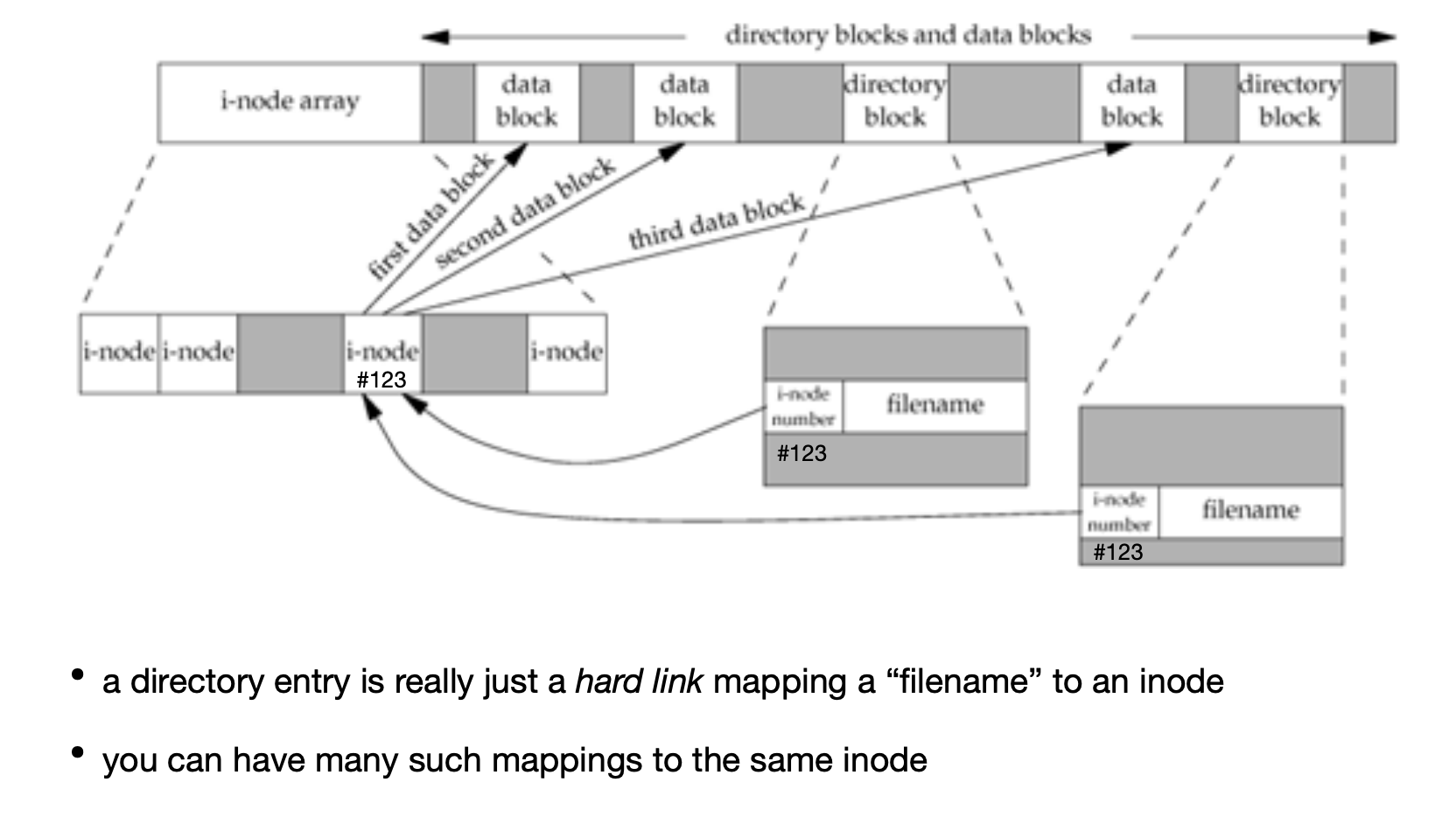
    Week 4: The Unix Filesystem

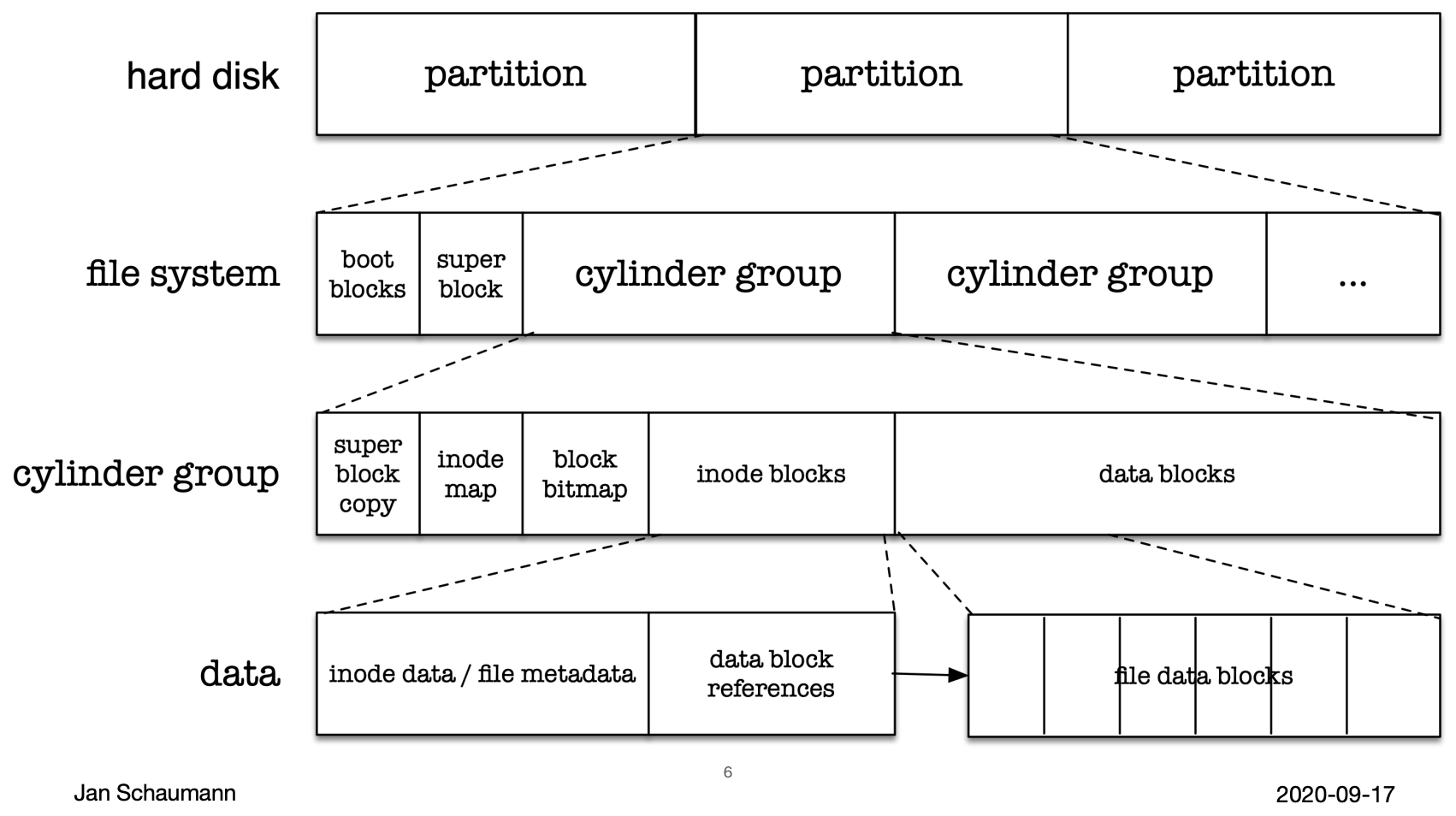
    This week, we'll take a closer look at the Unix Filesystem (UFS). In our first video segment, we visualize how the filesystem structures the disk and organizes files and directories. We illustrate how directory entries are created and moved around.

    youtu.be/kY4JAXYyByQ

    Image attached toot
    Image attached toot
    💬 0🔄 4⭐ 7
  • Oct 1, 2026, 1:50 PM

    Advanced Programming in the #UNIX Environment

    Week 4: Links

    In this video lecture, we'll take a look at the system calls used to create, remove, and rename both hard- and symbolic links. We'll compare expected output against trivial implementations of the ln(1) and mv(1) commands.

    youtu.be/0l8o2goJ1kc

    💬 0🔄 1⭐ 3
  • Oct 2, 2026, 5:45 PM

    Advanced Programming in the #UNIX Environment

    Week 4: Directories

    In this video, we take a look at how directories are created and removed, as well as how to move around the filesystem hierarchy. We also learn how directory permissions are applied, why the 'cd' command must be a shell builtin in order to work, what happens when you remove a directory you're currently in, and we revisit our simple ls(1) clone from week 1, using opendir(2) and readdir(2) to list files.

    youtu.be/xZ7dNXZ58G8

    💬 0🔄 2⭐ 4