Login
You're viewing the discuss.systems public feed.
  • Mar 4, 2026, 11:19 AM

    Thing I'd like: you know the way that in games now, it's normal to have a "tutorial mission" where you do the basics "now click here to place a house". "turn the speed to 2x by pressing this button", "drag over this area to select all the people there"?

    That, but for general non-game software. Esp things like Blender that have lots of controls. Watching heaps of third-party youtube videos and trying to switch back and forth and work out what they're doing is not user-friendly.

    💬 1🔄 0⭐ 1

Replies

  • Mar 4, 2026, 11:25 AM

    like for blender, having something that guides you through, IDK, making a stick figure, with automatic advance when you've completed the last step properly.

    Even for something like a spreadsheet or word processor, I think a lot of people would benefit from having something talk you through the dozen most important features (and nothing precludes having advanced tutorials).

    The built-in element is key. RTFM is fine for obscure functionality, but let's be honest, doesn't yield a quick start.

    💬 1🔄 0⭐ 1
  • Mar 4, 2026, 11:28 AM

    I find that written "Getting Started" tutorials with "recipes" are great with code libraries or CLI, reasonable for some interactive text-based stuff, and somewhere between hopeless and alienating for GUIs.

    💬 0🔄 0⭐ 0
  • Mar 4, 2026, 12:36 PM

    @pseudomonas TinkerCAD does this. I wonder if that's because it's either designed to be educational, or is entirely web-based, or because it doesn't have much too it beyond the basics?

    💬 0🔄 0⭐ 1
  • Mar 5, 2026, 11:23 AM

    @sparrowsion yeah, I'm trying to use FreeCAD and I started with "create a part" which looked so friendly and I can't even find a button or a menu item for "add a [cube or sphere or cylinder or even anything]" or how to switch to a mode that will let me add any shapes at all.

    I say this as an expert user of Inkscape, it's not like I can't handle shape manipulation, but *all* 3d packages seem to be beyond me.

    TinkerCAD doesn't seem to do much apart from upsell to the paid product.

    💬 0🔄 0⭐ 0
  • Mar 5, 2026, 11:43 AM

    @sparrowsion Ah. One of the modes (Architecture) has a "in-game tutorial" which is just a non-interactive readme, saying "this is meant to be viewed not in the browser from within the program using these commands". Using those commands opens a browser window.

    Also "This documentation is not finished". Also also, no tutorials for any of the other modes.
    This I guess must be alpha or beta software.
    [checks] nope just another project thinks documentation is optional. *sigh*

    💬 0🔄 0⭐ 0
  • Mar 5, 2026, 11:59 AM

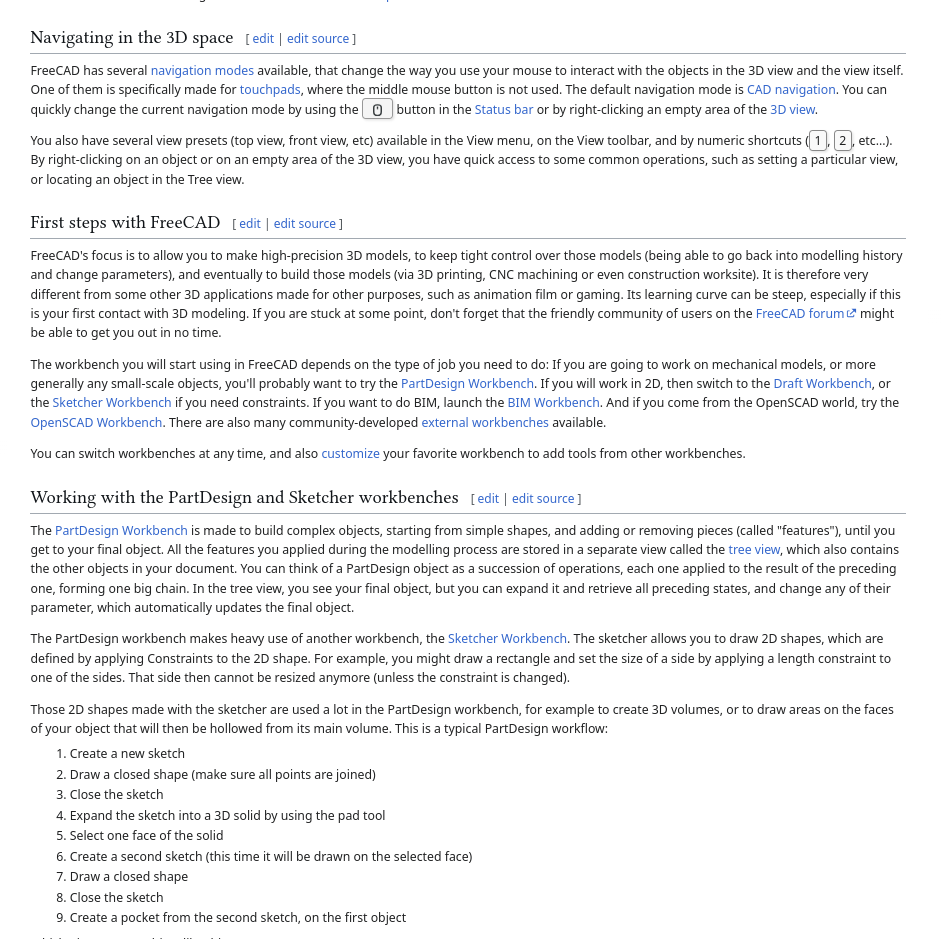
    FreeCAD. Not a single thing on their "Getting Started" page, wiki.freecad.org/Getting_start in the steps to make a part, says WHICH BUTTONS OR MENU ITEMS to use:

    1. Create a new sketch
    2. Draw a closed shape (make sure all points are joined)
    3. Close the sketch
    4, Expand the sketch into a 3D solid by using the pad tool
    […etc…

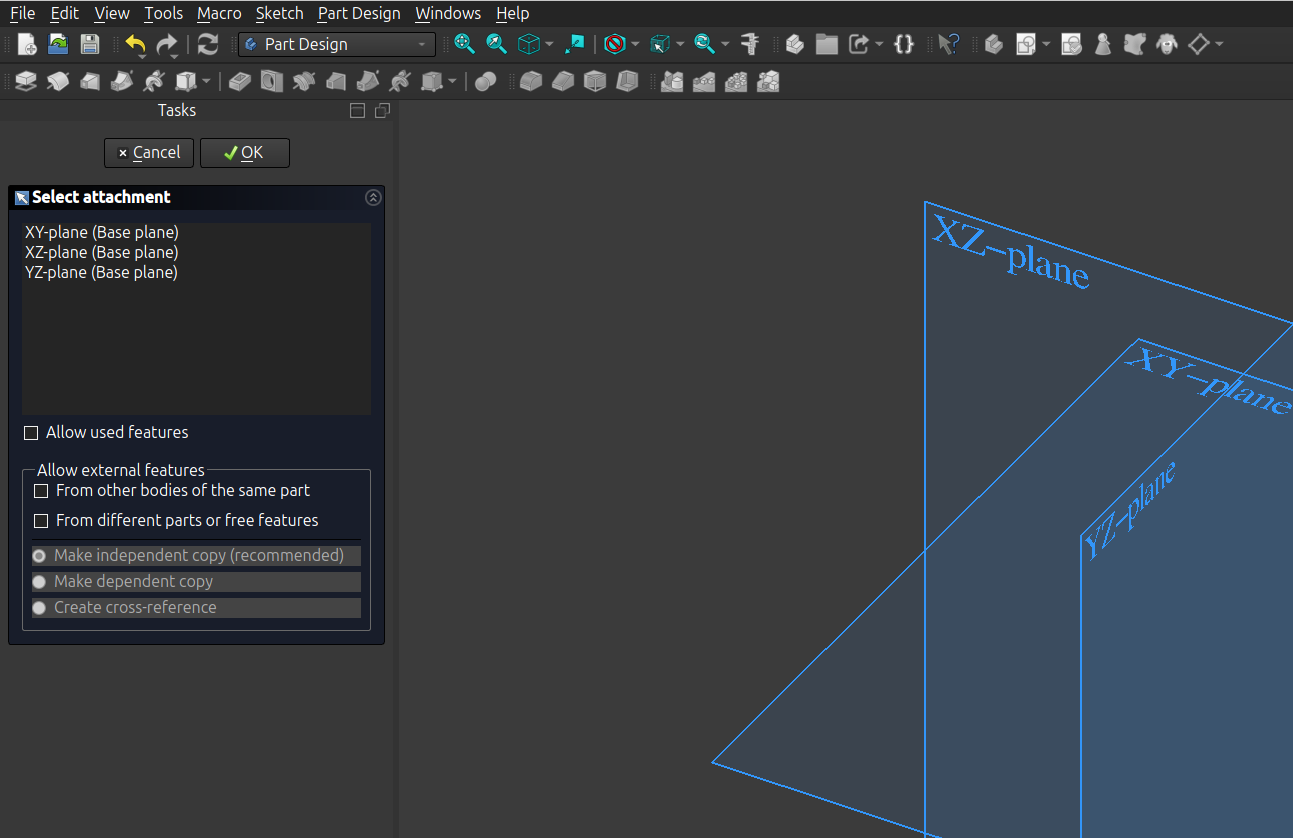
    How do I draw a shape? Clicking doesn't work, dragging neither, none of the toolbar buttons seems relevant.
    WTF is "pad tool"?

    [uninstalls; looks for something less shit]

    A screenshot of FreeCad. god only knows what any of the bits do.
    Their "Getting Started" page. 
Wall of text referring to functions that they don't indicate how to invoke. Not even clear which links will tell me how to do it.
Written for v0.19. Current release: 1.0
    💬 0🔄 1⭐ 1
  • Mar 6, 2026, 9:23 AM

    @pseudomonas I'll try and escalate this back and push for change. In my opinion you are correct that getting started should have some basic orientation to make a part or a part design object. /Jo

    💬 2🔄 0⭐ 0
  • 💬 0🔄 0⭐ 0
  • Mar 6, 2026, 10:02 AM

    @freecad Thanks! Sorry to have used harsh language; but you see the frustration.

    suggestions:
    * TinkerCAD's tutorial is really friendly even if the software itself is just a sales pitch for the $$$ product.
    * A couple of recipes for simple things would go a long way eg "make 2 cuboids of known dimensions", "join them"; or "draw and extrude a shape".
    * Avoid using FreeCAD specific names and concepts before you've defined them
    * docs say things like "As of v0.16…" and IDK if they still apply

    💬 0🔄 0⭐ 0