I get the feeling the Raspberry Pi CM5 *really* doesn't like this heat… WiFi is very unstable (and Argon didn't think to break out Ethernet…because who uses that?).
A Brunswick Street bird's knickers stay up longer!
I get the feeling the Raspberry Pi CM5 *really* doesn't like this heat… WiFi is very unstable (and Argon didn't think to break out Ethernet…because who uses that?).
A Brunswick Street bird's knickers stay up longer!
Dear #NetworkManager
My WiFi network PSK doesn't magically change just because I plug in a USB WiFi adaptor instead of using the built-in adaptor.
If you're polling and wondering why it's not pulling updates, you might want to switch to dl-cdn.alpinelinux.org as your mirror temporarily.
mirror.aarnet.edu.au in particular, is still serving the old PHP version packages.
https://gitlab.alpinelinux.org/alpine/aports/-/work_items/18512 is the #PHP tracker for #AlpineLinux
Shut down all my PHP-enabled web servers for now… I'll deal with patching them in the morning, nothing I run is critical enough to need it to stay up overnight.
Silly electronics question for people… I'm building a circuit that needs to drive a LED dot matrix panel, which means I need a beefy 5V DC-DC power supply to step down from 12V.
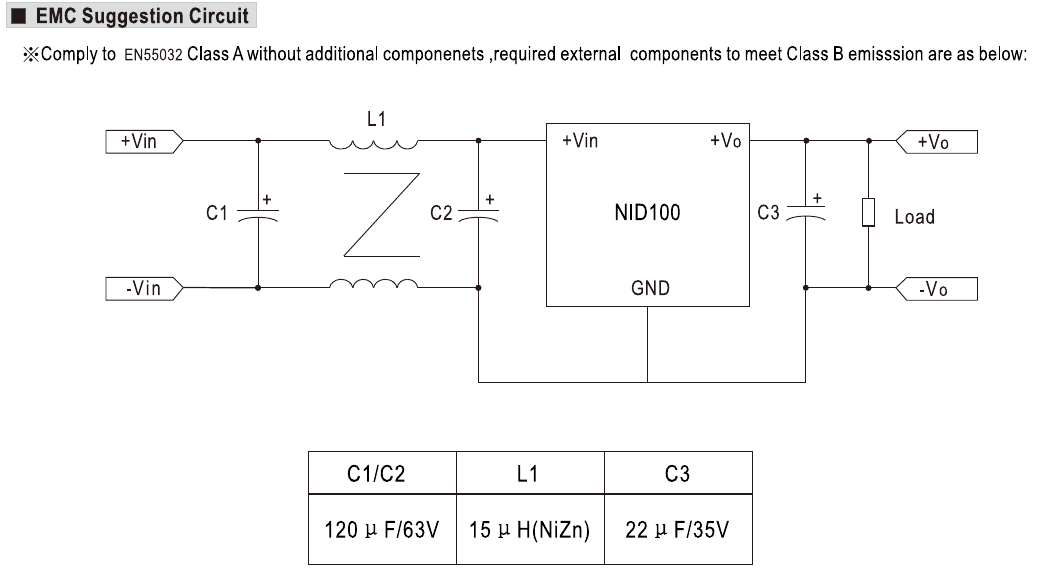
I found a suitable candidate: the Meanwell NID100-5. 5V 11A output. I'll be using it next to radio equipment, so class-B filtering is _very_ desirable. The NID100 can be used without filtering for class-A (industrial) applications, but for class-B you need filters.
Below is the recommended circuit. I'm a little stumped with the inductor. This is not a symbol I'm familiar with. It is taken from the datasheet: https://configurable.meanwell.com/webapp/product/search.aspx?prod=NID100
- https://www.reddit.com/r/ElectricalEngineering/comments/a853u2/what_does_this_inductor_symbol_mean/ suggests it's a "differential mode inductor"
- https://www.eevblog.com/forum/projects/meanwell-nid100-dcdc-module-inductor-selection/ calls it a common-mode choke
The literature I can find says a differential mode inductor has two terminals, this appears to be a four-terminal device with two coils, mutually coupled somehow.
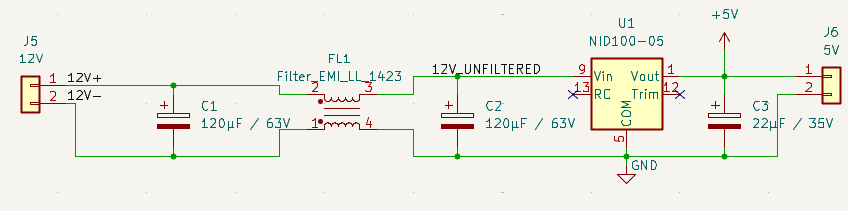
Right now I have a Kicad schematic with a Wurth Electric 7448421016 subbed in there: https://www.we-online.com/components/products/datasheet/7448421016.pdf
Is this the right type of filter here? Should maybe the connections on FL1 be swapped around to invert the phase? (e.g. swap pins 2 & 3, or 1 & 4)
Today, I received the redundancy letter. End of November, I'll be free.
13 full-time years… doubt I'll have that sort of innings again. (Plus a couple as a contractor, so 15 in total.)
Not in a rush for a new position, and to be honest in this job market, I'm not certain one will come up… but some time in 2027, I'll be starting to look around again.
```
Your request for Annual Leave for the period 31/8/2026 - 15/9/2026 has been
approved.
```
…ahh and we use up the annual leave too. Good, good. I guess I'll be packing up the desk tonight as I don't fancy lugging it home on the train tomorrow.
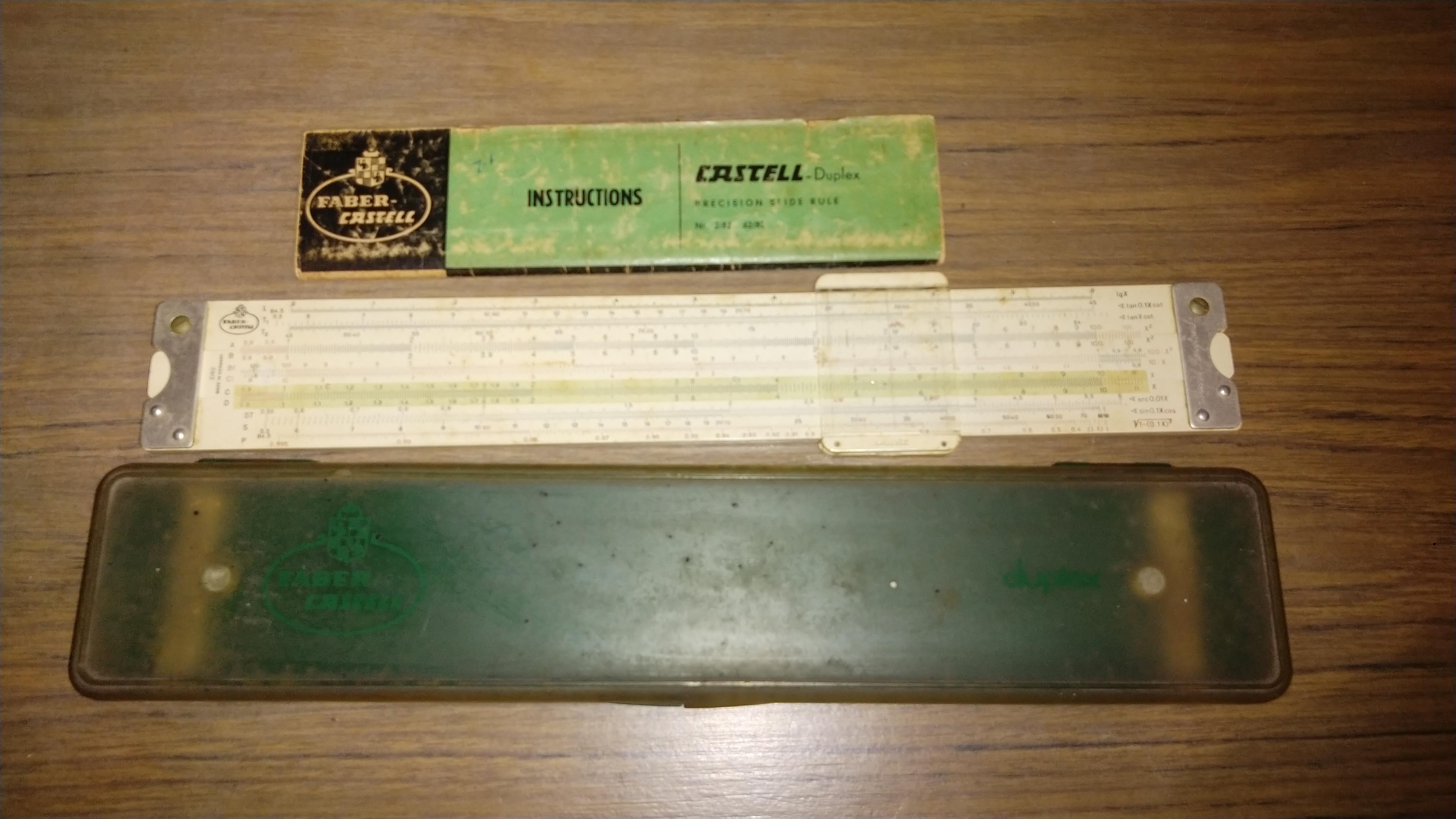
Anyone remember these? #OldTech #SlideRule
```
Your request for Long Service Leave for the period 16/9/2026 - 26/11/2026 has
been approved.
```
Thank-you!!! One last stint before I'm out the door and hitting up the #FediHire tag.
Whilst researching this, I had a look at some of the libraries out there to see how they do it on different operating systems.
Microsoft Windows and Apple MacOS X provide system APIs for doing this.
On Linux, some libraries go poking around in `/dev/serial/*`, others go nosing through `/sys/class/tty/*`. Some just look for specific names in `/dev` and hope for the best. `pyserial` also checks `/proc/tty/drivers` on Linux, but everywhere else in POSIX land it uses `glob`.
Most do not consider BSD at all. You're on your own to learn what serial ports your computer has. It's a mess.
#NetBSD has a `/kern` virtual filesystem which is similar to `/sys` in Linux… so there *is* scope there to maybe put some sort of virtual text file that dumps a mapping of devices and what device nodes they're at. My mind also thinks about OpenFirmware's DeviceTree.
BSD in general, has the same problem Linux had years ago: it assumed the hardware never changed. In the 80s and 90s, that was mostly true, your devices were hard-wired into "busses". You mostly ignored that there was a ISA bus, you just "knew" you had a device at address 0x300 and "talked" to it. It was there at power on, and there at shutdown.
SCSI was a little more complicated, you spoke to your disk drive *through* this HBA card.
Then came along Firewire, USB and Bluetooth. Devices could come and go as they pleased. Moreover, USB is a tree structure and Bluetooth is a mesh radio network. A flat structure doesn't quite describe the situation. I'm seeing a lot of wisdom behind the idea of Open Firmware's DeviceTree… and it seems to me, the kernel of a modern OS needs to track a live changing representation of this. A big part of keeping track will be providing a mechanism for the userspace to learn of changes in this tree, and to find where things are.
While I don't expect them to wholesale copy Linux, I think there is merit in the kernel calling a userspace application to "set up" devices when they are detected, and "tear down" those devices when they are removed.
This is `udev` in Linux and it is very handy even if it can be a pain in the bum to debug.
I've also seen the virtual `/dev` filesystem route used. Linux used to have `devfs`, and SyllableOS also used such a system. Not saying that's the best approach, but it is another way of exposing this information to the system.
Not sure which is the "right" approach, but I don't think a static "nothing ever changes" approach is viable here.
Playing around with #NetBSD again… so I have a Intel NUC running it. One of the thing I frequently have to deal with, being an embedded software developer *and* an amateur radio operator, is #SerialPorts.
More often than not, USB serial ports. Now, I'm used to the Linux way of doing things, where everything is accessed through a /dev/tty* device.
We used to do it the BSD way with a device like /dev/cua0 (16550 UART on ISA 0x3f8 IRQ 4; COM1 for you DOS people) being your serial port ignoring carrier detect, and /dev/ttyS0 was the same serial port but required CD to be up. This got deprecated years ago, so /dev/cua0 disappeared, and we were left with /dev/ttyS0.
I grabbed a test rig I made for work, this is Zephyr RTOS on a Raspberry Pi Pico. It enumerates two CDC-ACM serial ports, one with the Zephyr shell, and the other is a USB serial port. You use the shell port to tell it how to route the RXD/TXD lines on the other serial port, with the board supporting RS-485, RS-422 and TTL serial. On Linux, it shows up as `/dev/ttyACM${n}` and `/dev/ttyACM$(( ${n} + 1 )`. `udev` also creates these symbolic links:
```
stuartl@rikishi ~ $ ls -l /dev/serial/by-id
total 0
lrwxrwxrwx 1 root root 13 Jul 26 10:58 usb-WideSky.Cloud_Pty_Ltd_WideSky_Hub_Test_Rig_E663AC91D3665F30-if00 -> ../../ttyACM0
lrwxrwxrwx 1 root root 13 Jul 26 10:58 usb-WideSky.Cloud_Pty_Ltd_WideSky_Hub_Test_Rig_E663AC91D3665F30-if02 -> ../../ttyACM1
stuartl@rikishi ~ $ ls -l /dev/serial/by-path/
total 0
lrwxrwxrwx 1 root root 13 Jul 26 10:58 pci-0000:00:14.0-usb-0:2:1.0 -> ../../ttyACM0
lrwxrwxrwx 1 root root 13 Jul 26 10:58 pci-0000:00:14.0-usb-0:2:1.2 -> ../../ttyACM1
lrwxrwxrwx 1 root root 13 Jul 26 10:58 pci-0000:00:14.0-usbv2-0:2:1.0 -> ../../ttyACM0
lrwxrwxrwx 1 root root 13 Jul 26 10:58 pci-0000:00:14.0-usbv2-0:2:1.2 -> ../../ttyACM1
```
This is handy because if I have two of these, it doesn't matter which gets detected first, I know which device is which. The links ending in `-if02` or `.2` will be the data port, and the `-if00` / `.0` ones will be the shell control port.
In NetBSD, I plug this same MCU in and I get 4 devices:
- `/dev/dtyU0`
- `/dev/dtyU1`
- `/dev/ttyU0`
- `/dev/ttyU1`
The files actually always exist, but they get mapped to this physical device when the driver detects it and enumerates it on USB.
If I plug in another dongle, I get another pair, a `/dev/dtyU2` and a `/dev/ttyU2`. The choice of `/dev/dtyU[012]` is dependent on which order the devices is detected… which on USB is indeterminate as they can be hotplugged.
The only clue I get is the `usbdevs -v`; it shows a device number and serial number information.
```
vk4msl-nbsd# usbdevs -v
Controller /dev/usb0:
addr 0: super speed, self powered, config 1, xHCI root hub(0x0000), NetBSD(0x0000), rev 1.00(0x0100)
port 1 disabled
port 2 disabled
port 3 disabled
port 4 disabled
Controller /dev/usb1:
addr 0: high speed, self powered, config 1, xHCI root hub(0x0000), NetBSD(0x0000), rev 1.00(0x0100)
port 1 powered
port 2 addr 17: full speed, power 100 mA, config 1, USB-Serial Controller D(0x2303), Prolific Technology Inc.(0x067b), rev 4.00(0x0400)
port 3 addr 1: low speed, power 100 mA, config 1, CASUE USB KB(0x6a21), vendor 2a7a(0x2a7a), rev 0.01(0x0001)
port 4 addr 18: full speed, self powered, config 1, WideSky Hub Test Rig(0x5678), WideSky.Cloud Pty Ltd(0x1234), rev 4.03(0x0403), serial E663AC91D3665F30
port 5 powered
port 6 powered
port 7 addr 3: full speed, self powered, config 1, product 0a2a(0x0a2a), Intel(0x8087), rev 0.01(0x0001)
port 8 powered
port 9 powered
port 10 powered
port 11 powered
…
```
lacking is the knowledge that there are *two* devices allocated to device 18 (the test rig).
Given a `/dev/ttyU${n}` or `/dev/dtyU${n}` device node, how do I find out about the device attached to it? Seems assuming a device node is fraught with danger.

Tell me you don't know how IPv6 addresses work without saying you don't know how IPv6 addresses work.
Silly question for those who muck around with the cheaper amateur transceivers. What sets out there are capable of packet radio (both classical 1200baud Bell203 and 9600baud G3RUH), dual-band and can do ≥20W?
I've looked around, and so far the winner seems to be the Yaesu FTM-150R; AU$500 through a local supplier. A little overkill, but workable.
I was thinking something like a Chinese clone of the FT-7900R if such a thing existed. Dual-band, but single watch, decent power, and mini-DIN 6 data jack.
eBay list lots of Anytones and other Chinese brands, but none of them I've looked at to date, seem to have a data port for doing packet radio, and I really don't want to go through the microphone circuit for that even though 1200-baud packet is quite forgiving. (9600 baud is not!)
I'm guessing something could be cooked up using the GNURadio framework, but was hoping there might be an off-the-shelf "daemon" service that someone's done.
(I could do it myself I guess like I hacked up `slowrx` to make `slowrxd`. But why DIY if someone's done it for you?)
Silly SDR question for people.
At the moment @vk4msl_sstv is down because I had to grab the radio I use for it to run a number of WICEN events… e.g. it was the base packet station radio at Kilkivan.
Using a full-blooded 100W rig like a FT-897D is a bit overkill too.
I have a headless Raspberry Pi 4 that I use for that SSTV bot. Headless meaning not only does it not have a monitor, it also doesn't run X or Wayland. That rules out anything GUI-based like GQRX, and no, I'm not going to run VNC/RDP/NX/Spice/<insert GUI remote desktop protocol here>.
Is there a SDR receiver that can drive a RTL-SDR dongle and decode SSB audio for piping to another application (either via Pipewire or TCP sockets) and be controlled via a CLI? I have an upverter to shift HF into VHF, I just need something to decode the I/Q data and control the VCO in the RTL-SDR.
Back in November 2013, I bought myself a new laptop to celebrate that I was in full-time employment for the first time in my life.
The laptop was a Panasonic Toughbook CF-53 Mk2. I still have it, typing on it now in fact. Its had a few upgrades, but the keyboard is still the original.
A couple of the scissor switch mechanisms are starting to fail now, with a few keys becoming unresponsive or the key caps popping up. Most annoyingly, right-shift and enter. So it's new keyboard time.
I've ordered one of these, it's a backlit chiclet keyboard. Mine's not backlit, and not a chiclet, but it says its for CF-53 so hopefully will fit. $50 isn't a lot to spend anyway, so worth a gamble.
https://www.ebay.com.au/itm/276625672231
Replacement doesn't look hard from the iFixit article I found, so we'll see.
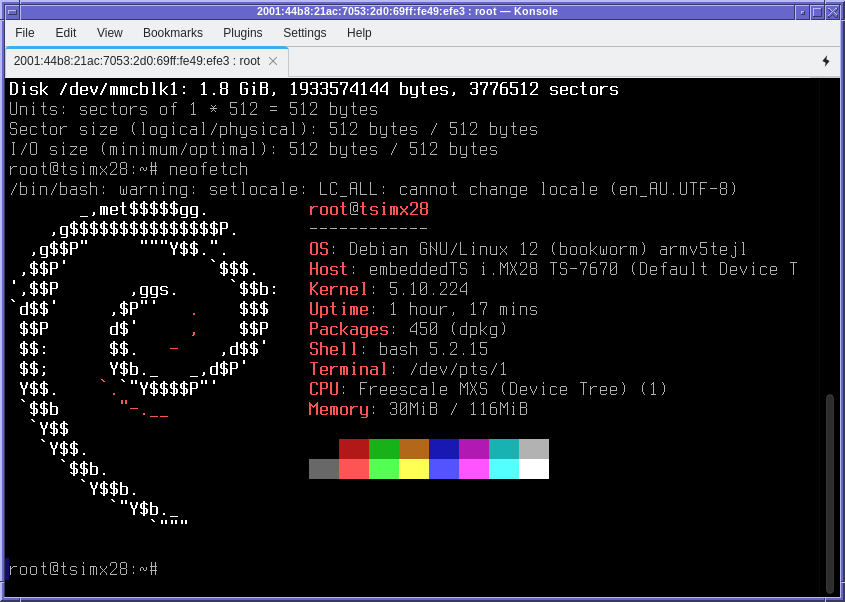
A little industrial PC rescued from the e-waste… I saw this rebadged Technologic Systems TS-7670 in the e-waste bin at work.
https://www.embeddedts.com/products/TS-7670
These machines are built around a Freescale i.MX286 which is an ARMv5 CPU. Not amazing these days, in fact I think #Debian have abandoned the `armel` platform… I do have one in the rack running #Gentoo though, and did once attempt to coax #AlpineLinux onto one. (Had to bootstrap it from Gentoo, got it booting, then `apk` promptly uninstalled the entire OS.)
I badly need to update the OS on the one I have, so having a second to test a kernel port on will be helpful. Why was this one in the e-waste?
I plugged it in, and noticed it seemed to be dead as a doornail. Plugged into the console port, and it was spitting out a hexadecimal error code: 0x8020a012. Life, but not as we know it.
Powered off, pulled the microSD out, it didn't even enumerate.
Grabbed a spare 8GB one, flashed it with an OS… I note /dev/ttyAMA0 doesn't seem to receive my keystrokes, but I now have it booting Debian 12. So it's alive, just a dead SD card. So I have a guineapig for a new OS. I'll have to dust-off my U-Boot port and kernel tree that I made for these things.