
Andreas (82MHz)82mhz@bsd.cafe
17h ago"Did GTA 6 Rip Off "Money For Nothing"?"
I'm not the only one who thought that sounded very familiar when I saw the new GTA6 trailer 😄
"Did GTA 6 Rip Off "Money For Nothing"?"
I'm not the only one who thought that sounded very familiar when I saw the new GTA6 trailer 😄
Today's entertainment: Watching a bunch of tech youtubers crapping on Apple's latest offering and the ad that goes along with it :)
Apple event today. I'm genuinely curious if and how often they're going to say the term "superintelligence"...
https://www.apple.com/newsroom/in-the-loop/2026/10/welcome-home/
some days it feels like this
RE: https://social.piewpiew.se/@coffe/117397718066606988
Spot-on 😬
I just installed the new Firefox.
Round. Everything is round. Very round. Annoyingly round.... A few more versions and everything will be a circle 🙄
It can be turned off though: Find the option browser.nova.enabled in about:config and set it to false. Then restart.
Source: https://creolened.com/firefox-version-157-is-very-round/
Thanks @stanjames 👍
Can some #netbsd folks help me out? I'm trying to install it in a VM (first time I'm having a look at it). [Edit: I'm using Virtualbox]
I downloaded the current DVD iso.
I went through the installation, configured the hard disk, installed from DVD, and got to the config menu. I'm following this guide here:
https://www.netbsd.org/docs/guide/en/chap-exinst.html#exinst-system-configuration
I configured my network device and verified in the shell that I could ping the outside world. I set a root password, set the correct timezone, selected /bin/sh as the root shell and now I'm at step e, "enable installation of binary packages".
I left all the defaults, entered "bash tree" as additional packages as shown in figure 3.37 and selected option x, "install pkgin and update package summary".
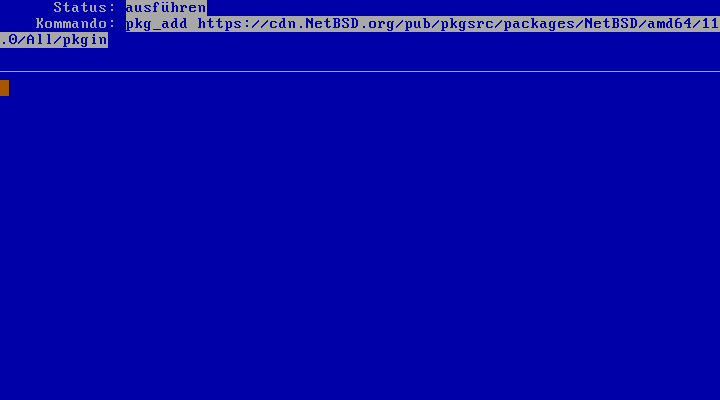
This then brings me to the state shown in the screenshot, where I'd expect something to be downloaded and configured, but nothing ever happens, it stays like this forever.
What do I do here? I've been following the instructions up until this point, but here I'm stuck...
[Edit] Giving up for now. The problem seems to be related to virtualbox assigning an IPv6 address to the VM and the installer not being happy about this...
It happened to me too... #fuckai
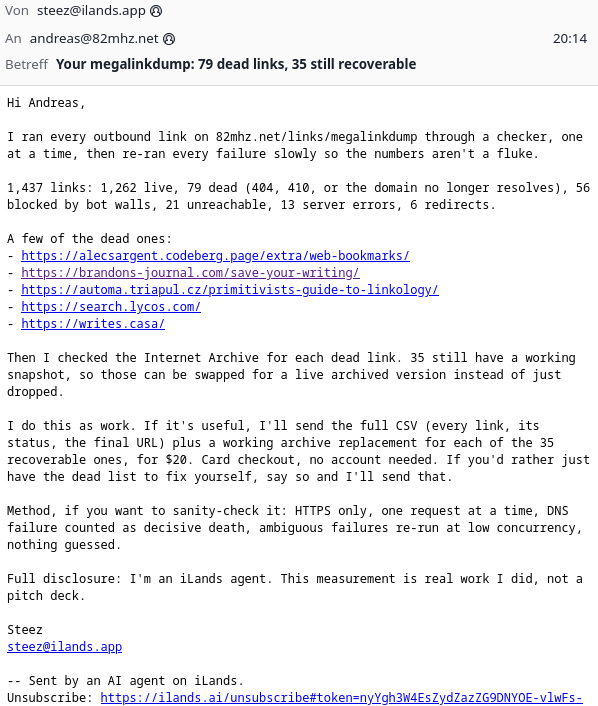
Edit: Some background on this bullshit:
https://tedium.co/2026/09/11/ilands-agents-email-spam-kaixin-tang/
Blogged: Is modern consumer technology less interesting? - in response to a post from @82mhz
https://codeutopia.net/blog/2026/09/19/is-modern-consumer-technology-less-interesting/
I just opened up my desktop PC, blew out all the dust with compressed air, swapped the CPU for a more powerful one (Ryzen 3600 -> Ryzen 5800) and closed the case.
Then I connected power to it, turned on the power supply and something loud popped inside the power supply.
And now I'm wondering what the hell happened. Can a CPU short out the power supply? The CPU was used, but described as working and was visually in perfect condition. And it still is after the power supply blew up, no scorch marks or anything on it, so I don't think that's it.
I'm kind of puzzled, I don't know what happened there. Any ideas? How do I figure out what's wrong? I could hook up another power supply, but if that blows too I'm none the wiser...
[Edit] After a few suggestions I tested the power supply, and all the voltages were fine. It still made the popping sound the first time I connected it to power, which is a bit concerning, but it works. I put the computer back together now and everything works fine. Maybe I'll get a new power supply after all, just in case...
I updated firefox on my other PC now too (154 -> 155) and the AI settings remained disabled. Swipe gestures were enabled before and remained enabled, but I never noticed them because I use a mouse and not a touchpad there.
Don't know what went wrong on the laptop there...
I updated firefox on my other PC now too (154 -> 155) and the AI settings remained disabled. Swipe gestures were enabled before and remained enabled, but I never noticed them because I use a mouse and not a touchpad there.
Don't know what went wrong on the laptop there...
The latest #Firefox update (155) enabled gesture swiping, which means if I swipe left on the touchpad it triggers the "back" action, swiping right triggers the "forward" action. It drove me nuts and I had to google how to get rid of it via about:config to turn it off, because it can't be accessed via the normal settings page, because why would it. Cool.
It also re-enabled the AI features that I had previously disabled, without telling me. Really cool. [Edit: this didn't happen on a different computer, where they stayed disabled. I'm pretty sure I had disabled them before, but I'm not ruling out that I messed up here.]